

Introduction
In this session we will describe the basic CRUD operations using MVC and Entity Framework.
The main advantage of these parts is we don't need to write any code.
About MVC: ASP.NET MVC Overview
We need to use the following procedure to create our first MVC application.
Procedure
Step 1
Frist step we need to create a new MVC application.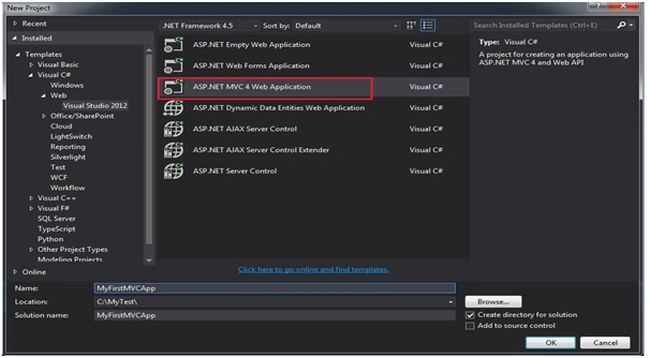
Step 2
Select the option Internet Application and select the view engine as Razor.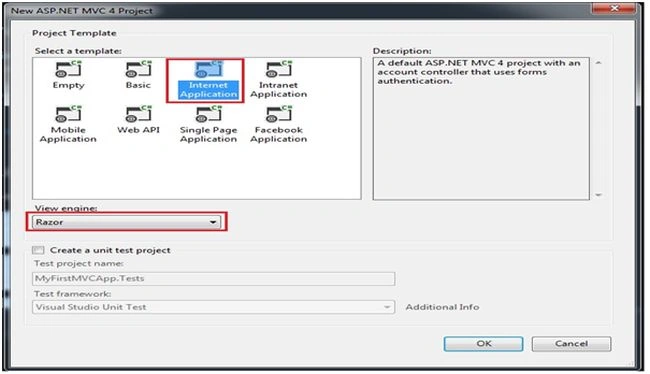
Step 3
Now our solution is created.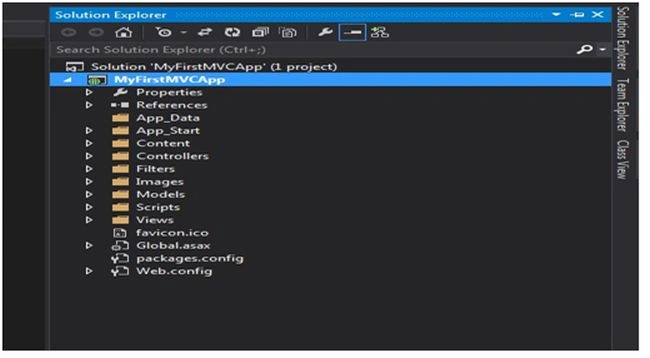
Step 4
A close look at our solution. We are now just concentrating on the three folders Controllers, Models and Views.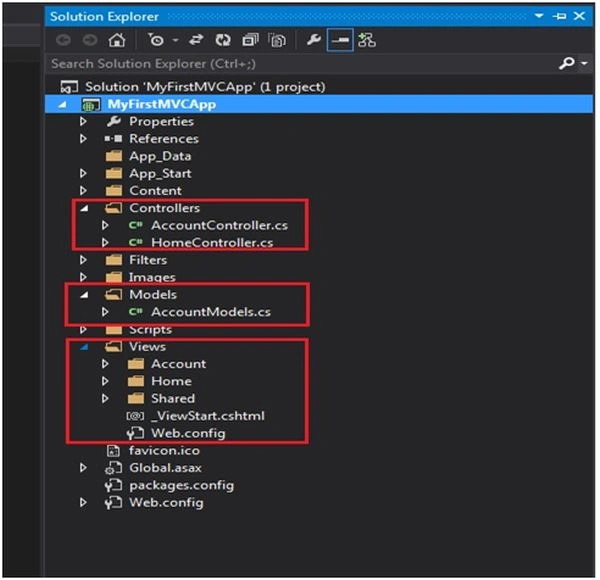
Step 5
Right-click on the Models => Add=> New Item.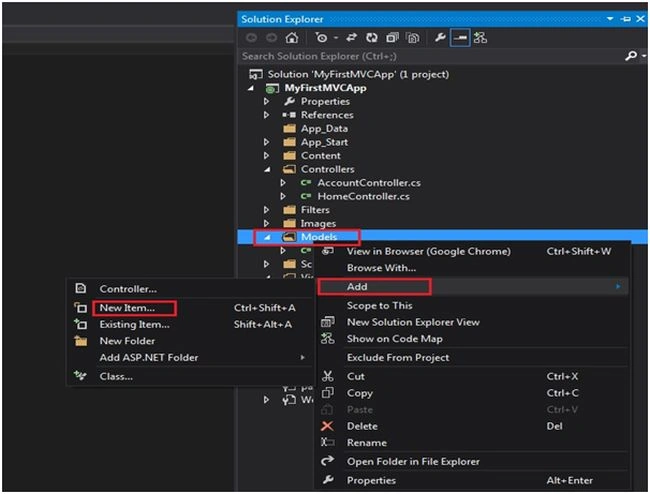
Step 6
Select the Data option and click on the Entity Data Model.
Step 7
If you want to install the latest version of the Entity Framework then you can install it through Manage NuGet Packages.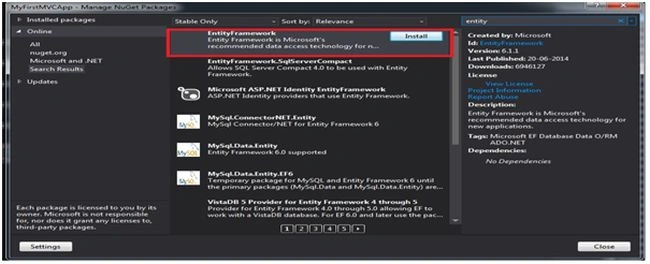
Step 8
Click on the option Generate from database.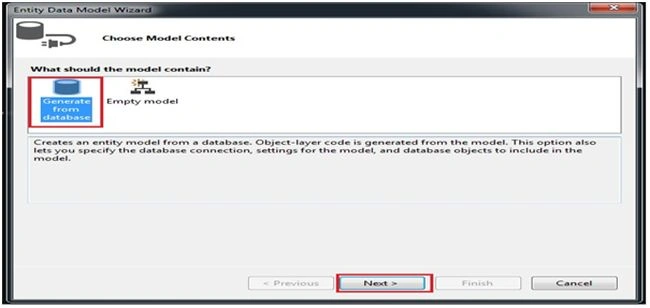
Step 9
Here we need to create a new database connection.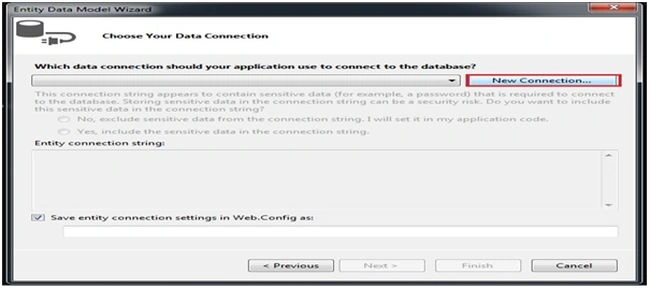
Step 10
In this window we need to provide the inputs like our server name and select the database name from the dropdown box .Then we have the option to test our server connection.
Step 11
The next step is to select the tables from the selected database.
Step 12
Now the .edmx is created and in our model folder the model classes are created.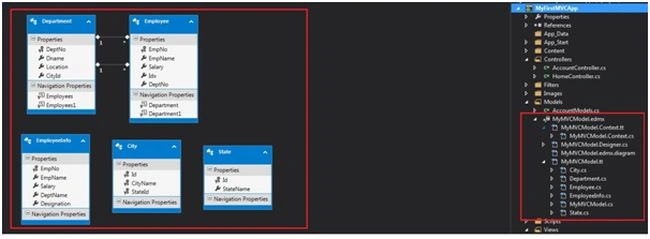
Step 13
Now we need to create a new controller. Right-click on the Controller then seelct Add => Controller.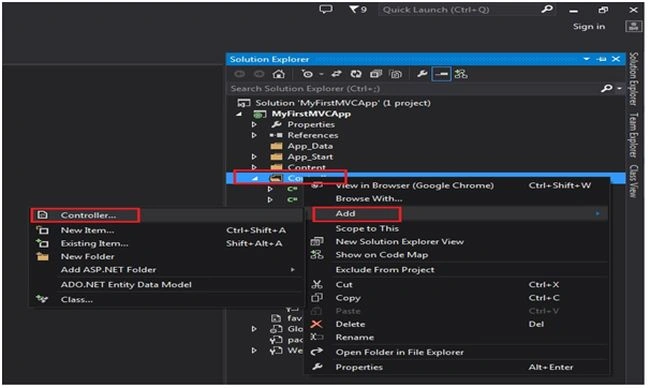
Step 14
We need to edit the Controller name and select the Scaffolding options as MVC controller with read/write actions and views, using the Entity Framework.
Step 15
Likewise select the Model class name and Data context class name.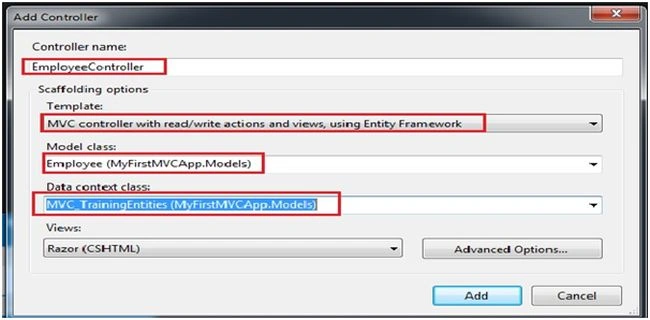
Step 16
Now our Employee controller is created with some auto-generated code.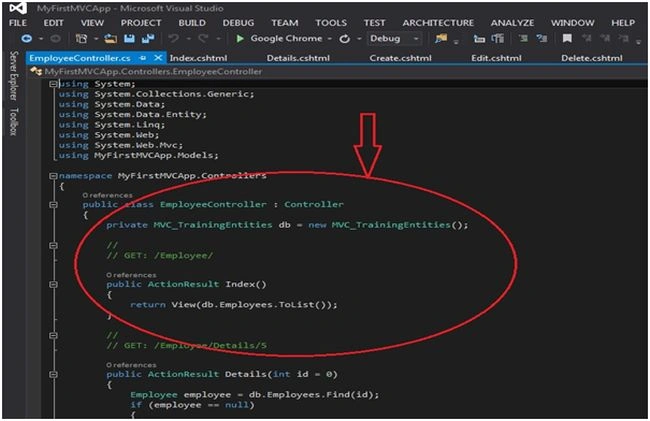
Code
- using System;
- using System.Collections.Generic;
- using System.Data;
- using System.Data.Entity;
- using System.Linq;
- using System.Web;
- using System.Web.Mvc;
- using MyFirstMVCApp.Models;
- namespace MyFirstMVCApp.Controllers
- {
- public class EmployeeController : Controller
- {
- private MVC_TrainingEntities db = new MVC_TrainingEntities();
- //
- // GET: /Employee/
- public ActionResult Index()
- {
- return View(db.Employees.ToList());
- }
- //
- // GET: /Employee/Details/5
- public ActionResult Details(int id = 0)
- {
- Employee employee = db.Employees.Find(id);
- if (employee == null)
- {
- return HttpNotFound();
- }
- return View(employee);
- }
- //
- // GET: /Employee/Create
- public ActionResult Create()
- {
- return View();
- }
- //
- // POST: /Employee/Create
- [HttpPost]
- [ValidateAntiForgeryToken]
- public ActionResult Create(Employee employee)
- {
- if (ModelState.IsValid)
- {
- db.Employees.Add(employee);
- db.SaveChanges();
- return RedirectToAction("Index");
- }
- return View(employee);
- }
- //
- // GET: /Employee/Edit/5
- public ActionResult Edit(int id = 0)
- {
- Employee employee = db.Employees.Find(id);
- if (employee == null)
- {
- return HttpNotFound();
- }
- return View(employee);
- }
- //
- // POST: /Employee/Edit/5
- [HttpPost]
- [ValidateAntiForgeryToken]
- public ActionResult Edit(Employee employee)
- {
- if (ModelState.IsValid)
- {
- db.Entry(employee).State = EntityState.Modified;
- db.SaveChanges();
- return RedirectToAction("Index");
- }
- return View(employee);
- }
- //
- // GET: /Employee/Delete/5
- public ActionResult Delete(int id = 0)
- {
- Employee employee = db.Employees.Find(id);
- if (employee == null)
- {
- return HttpNotFound();
- }
- return View(employee);
- }
- //
- // POST: /Employee/Delete/5
- [HttpPost, ActionName("Delete")]
- [ValidateAntiForgeryToken]
- public ActionResult DeleteConfirmed(int id)
- {
- Employee employee = db.Employees.Find(id);
- db.Employees.Remove(employee);
- db.SaveChanges();
- return RedirectToAction("Index");
- }
- protected override void Dispose(bool disposing)
- {
- db.Dispose();
- base.Dispose(disposing);
- }
- }
- }
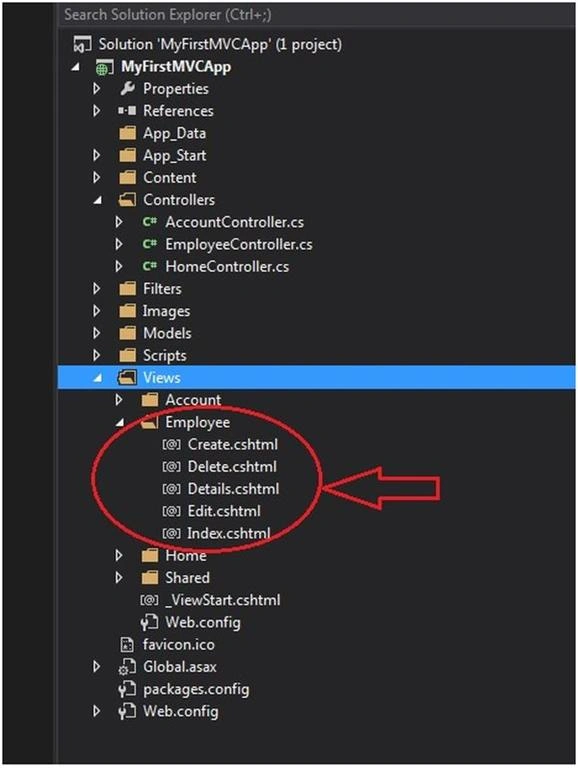
Please have a look at our Index.cshtml.
- @model IEnumerable<MyFirstMVCApp.Models.Employee>
- @{
- ViewBag.Title = "Index";
- }
- <h2>Index</h2>
- <p>
- @Html.ActionLink("Create New", "Create")
- </p>
- <table>
- <tr>
- <th>
- @Html.DisplayNameFor(model => model.EmpNo)
- </th>
- <th>
- @Html.DisplayNameFor(model => model.EmpName)
- </th>
- <th>
- @Html.DisplayNameFor(model => model.Salary)
- </th>
- <th>
- @Html.DisplayNameFor(model => model.Idx)
- </th>
- <th>
- @Html.DisplayNameFor(model => model.DeptNo)
- </th>
- <th></th>
- </tr>
- @foreach (var item in Model) {
- <tr>
- <td>
- @Html.DisplayFor(modelItem => item.EmpNo)
- </td>
- <td>
- @Html.DisplayFor(modelItem => item.EmpName)
- </td>
- <td>
- @Html.DisplayFor(modelItem => item.Salary)
- </td>
- <td>
- @Html.DisplayFor(modelItem => item.Idx)
- </td>
- <td>
- @Html.DisplayFor(modelItem => item.DeptNo)
- </td>
- <td>
- @Html.ActionLink("Edit", "Edit", new { id = item.EmpNo }) |
- @Html.ActionLink("Details", "Details", new { id = item.EmpNo }) |
- @Html.ActionLink("Delete", "Delete", new { id = item.EmpNo })
- </td>
- </tr>
- }
- </table>
Open the RouteConfig file and edit the controller name and action name.
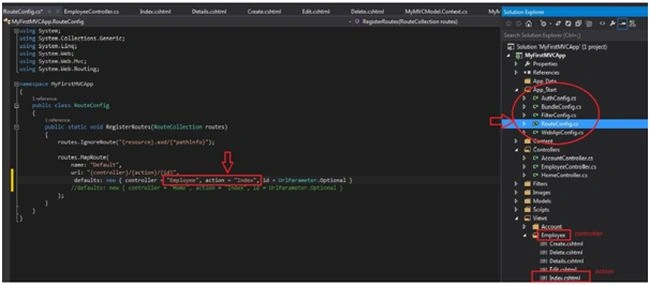
Yes! Our first MVC application is completed.

Shobana JPosted Jul 12, 2016, 3:32 AM
Good one
ajeeshkumar nPosted Oct 31, 2014, 4:42 AM
super way of KT. i like it and learn it fastly
Roymon TPPosted Oct 20, 2014, 1:10 AM
HI Shiju can you explain code first apporach using MVC ?
Shiju JosephPosted Oct 19, 2014, 6:55 AM
Thanks Vincent
Vincent SeeleyPosted Oct 18, 2014, 7:23 PM
Good article, very helpful.
Vithal WadjePosted Oct 17, 2014, 10:55 AM
good one Shiju sir,keep it up
Sreekanth MohanPosted Oct 17, 2014, 5:45 AM
Very useful article for the MVC beginners. Good job Shiju.