

Introduction
This article is trying to help the developers who want to start integrating .NET applications with Websphere MQ. Here we are going to start with the simplest Queue process of putting a message to a queue and getting the same message back.
Installation
We can get Demo version of Websphere MQ 6.0 form IBM's site for our quick start project and installed. We can start with simple installation choosing the default options.
Installing the WebSphere MQ Server/Client
We can install the Server and client in both machine, but in my case I install them in separate machines.
Creating Queue Manager, Queue and Channel
Open the Websphere MQ Explorer:
Click start->Programs->Websphere MQ
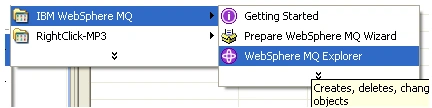
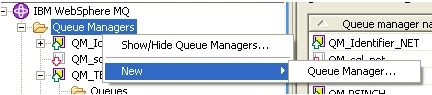
Creating Queue Manager:
Right click on the Queue manager option
New->Queue manager...
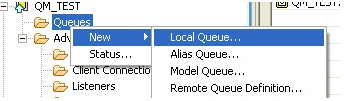
Creating Queue:
Expand the Queue manager
Right click on the Queue option
New->Local Queue...
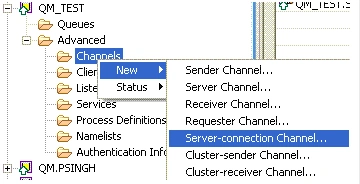
Creating Channel:
Expand the Queue manager
Right click on the Channels option
New->Server-connection Channel...
The Project
Open the Visual Studio and create a C# windows application project by clicking New Project->Visual C# Project->Windows Application. Name it MQExample.
The Client:
-
Add a Class MQTest with Connect, Write and Read methods for the MQ operation.
-
Add a form that represents the GUI.
-
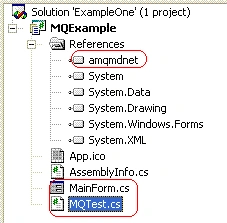
Add a reference of the amqmdnet.dll (check on the install folder of MQ)
On the MQ Server:
Create a Queue Manager : QM_TEST
: select the create Server connection option
: put 1421 on listen on port field (a free port)Create a local Queue : QM_TEST.LOCAL.ONE
Create a Channel : QM_TEST.SVRCONN
: select the Server connection channel option
The class
MQTest contains three public methods ConnectMQ, WriteMsg and ReadMsg. The ConnectMQ is call for connecting to a particular QueManager according to the parameter supply. WriteMsg is used for putting the message into a queue while ReadMsg gets the message from the queue.
using
System;using IBM.WMQ;
{
public class MQTest
{
MQQueueManager queueManager;
MQQueue queue;
MQMessage queueMessage;
MQPutMessageOptions queuePutMessageOptions;
MQGetMessageOptions queueGetMessageOptions;
static string QueueName;
static string QueueManagerName;
static string ChannelInfo;
string channelName;
string transportType;
string connectionName;
string message;
public MQTest()
{
//Initialisation
/*
QueueManagerName = "QM_TEST";
QueueName = " QM_TEST.LOCAL.ONE";
ChannelInfo = "QM._TEST.SVRCONN/TCP/psingh(1421)";
*/
}
public string ConnectMQ(string strQueueManagerName, string strQueueName,
string strChannelInfo)
{
//
QueueManagerName = strQueueManagerName;
QueueName = strQueueName;
ChannelInfo = strChannelInfo;
//
char[] separator = {'/'};
string[] ChannelParams;
ChannelParams = ChannelInfo.Split( separator );
channelName = ChannelParams[0];
transportType = ChannelParams[1];
connectionName = ChannelParams[2];
String strReturn = "";
try
{
queueManager = new MQQueueManager( QueueManagerName,
channelName, connectionName );
strReturn = "Connected Successfully";
}
catch(MQException exp)
{
strReturn = "Exception: " + exp.Message ;
}
return strReturn;
}
public string WriteMsg(string strInputMsg)
{
string strReturn = "";
try
{
queue = queueManager.AccessQueue( QueueName,
MQC.MQOO_OUTPUT + MQC.MQOO_FAIL_IF_QUIESCING );
message = strInputMsg;
queueMessage = new MQMessage();
queueMessage.WriteString( message );
queueMessage.Format = MQC.MQFMT_STRING;
queuePutMessageOptions = new MQPutMessageOptions();
queue.Put( queueMessage, queuePutMessageOptions );
strReturn = "Message sent to the queue successfully";
}
catch(MQException MQexp)
{
strReturn = "Exception: " + MQexp.Message ;
}
catch(Exception exp)
{
strReturn = "Exception: " + exp.Message ;
}
return strReturn;
}
public string ReadMsg()
{
String strReturn = "";
try
{
queue = queueManager.AccessQueue( QueueName,
MQC.MQOO_INPUT_AS_Q_DEF + MQC.MQOO_FAIL_IF_QUIESCING );
queueMessage = new MQMessage();
queueMessage.Format = MQC.MQFMT_STRING;
queueGetMessageOptions = new MQGetMessageOptions();
queue.Get( queueMessage, queueGetMessageOptions );
strReturn =
queueMessage.ReadString(queueMessage.MessageLength);
}
catch (MQException MQexp)
{
strReturn = "Exception : " + MQexp.Message ;
}
catch(Exception exp)
{
strReturn = "Exception: " + exp.Message ;
}
return strReturn;
}
}
}
The GUI
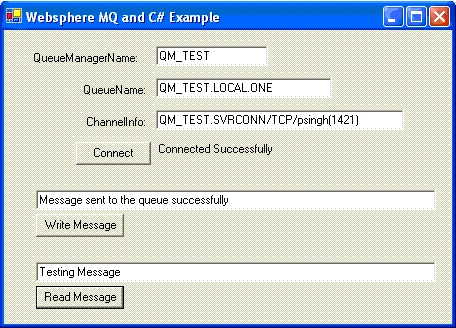
Add the following components to form as follows. (in the input box, I put the default values)
TextBox:
- txtQueueManagerName
- txtQueueName
- txtChannelInfo
- txtPUT
- txtGET
Buttons:
- btnConnect (Connect)
- btnWriteMsg (Write Message)
- btnReadMsg (Read Message)
Levels:
- label1 (QueueManagerName:)
- label2 (QueueName:)
- label3 (QueueName:)
- lblConnect (Fillup the Fields and click Connect/Connection Status)
The btnConnect_Click Method:
private
void btnConnect_Click(object sender, System.EventArgs e){
string strQueueManagerName;
string strQueueName;
string strChannelInfo;
//TODO
//PUT Valication Code Here
strQueueManagerName =txtQueueManagerName.Text;
strQueueName =txtQueueName.Text;
strChannelInfo = txtChannelInfo.Text;
lblConnect.Text = myMQ.ConnectMQ(strQueueManagerName, strQueueName, strChannelInfo);
}
The btnWriteMsg_Click Method:
private void btnWriteMsg_Click(object sender, System.EventArgs e)
{
txtPUT.Text = myMQ.WriteMsg(txtPUT.Text.ToString());
}
This method for sends the input message to the define Queue of the MQ Server.
The btnReadMsg_Click Method:
private void btnReadMsg_Click(object sender, System.EventArgs e)
{
txtGET.Text = myMQ.ReadMsg();
}
This method returns the massage/error from the Queue of the MQ Server.
Running Application
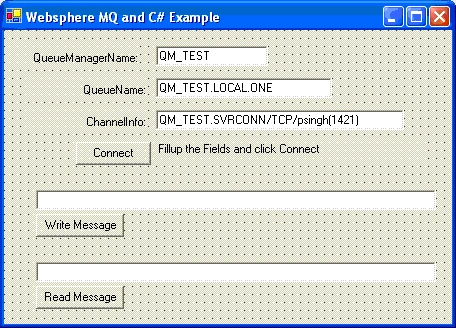
- Run the project
- Enter the Detail of Sever, Queue Manager, Queue and Channel to respective input boxes
- Click the connect button.
- Write some message and click Write Message Button
- Click Read Message Button
- You will get the same message you sent.
The view of the project:
Always respect the QUEUE and enjoy the life.
Sudipta SahaPosted Jun 8, 2018, 7:51 AM
Is it possible to connect ibm mq using windows service or windows listener?pls reply
Daniel NelsonPosted May 4, 2016, 7:18 AM
Do you know if it is possible to get all available queue names from the IBM.WMQ .NET lib dynamically as you do when using tool IBM test tool RfhUtil.exe? http://ibm-websphere-mq-client-rfhutil.software.informer.com/6.0/
Pippen ScottiePosted Sep 17, 2015, 5:53 AM
How to specify JMSType in the upload message??
Armando PortalesPosted Jul 17, 2013, 7:22 PM
Do i have to install MQ Client to connect and send messages to MQ Server? Can i use a dll to do this without the need to install MQ Client?, thabks for this article, was very useful for my project. :)
Kiran AnarasePosted Dec 1, 2011, 2:22 AM
I m not able to connect with mq client. the issue is with parameters passed. Queue manager Name : MQ_TEST Queue Name : MQ_TEST.LOCAL.ONE Channel Information : MQ_TEST.SVRCONN/TCP/D9020CQ1 (1421) when i try to run the application it gives me an exception {"CompCode: 2, Reason: 2035"}. The parameter passed D9020CQ1 is my machine name. So is it correct? So pl help me out. Thanks
Sreenath GPosted Jul 8, 2011, 3:13 AM
Hi, This is very nice article. But if I know the host name, is there any way that I can get MQ managers info and MQs too. Please help out
AndreasPosted Dec 14, 2009, 5:03 AM
Hi, where can i find the definiton for myMQ?
Hien PhamPosted Dec 24, 2008, 10:57 PM
Hi Laishram Priyokumar, I'm a beginner of MQ. Thank you so much for your guide. It's very clear and easy to understand. By reference to your article, I can now know the way to connect to Websphere MQ and Read/Write messages. Hope that you will provide us more helpful articles. Best regards, Hienptt from Vietnam
Yan TAPosted Nov 30, 2008, 8:21 AM
myMQ is not recognized by the source. where is the definition for it ?
Yan TAPosted Nov 30, 2008, 8:20 AM
myMQ is not recognized by the source. where is the definition for it ?
robojorjeditedPosted Jan 8, 2008, 4:28 AMEdited Jan 8, 2008, 4:29 AM
How can i browse my msg. when i use "amqsbr0 myQue mqMng" command on MQ Server, it will display first digit only but if i use"amqsget0 myQue mqMng" will display all data digit
Ajay YadavPosted Dec 13, 2007, 8:47 AM
i am creating a .net application which accept data from MQ server via internet.so i want to know whether i installed MQ server on my client machine or not or how do i access the dll
Senthil RajaPosted Aug 19, 2007, 12:44 PM
Hi Laishram, Am trying to create a .Net application to send a message to MQ Server. For that i have downloaded the MQ Client from ibm site and installed. As u said in the first step of this article, i couldnt see the Websphere MQ Explorer menu. Please let me know if anyother tools needs to be installed. Your support will be a great helpful for me. Thanks.