

Introduction
This article shows the use Grid.MVC for implementing grids. Grid.MVC adds functionalities for controls like sorting, filtering, paging and many more. This gives an easy way to implement HTML tables containing all the data. This Grid.MVC would require a model that would be an IEnumerable type or collection of data. Here I have used hardcoded values for populating the grid. Now a days many grid sources are available, mainly Telerik Kendo Grid has gained the market, but using this for small applications would be easy and light since we do not need any third-party tool as we can directly install Grid.MVC from the Nuget package that I will be showing below.
Let's Get Started
Before getting started, we need to understand what MVC is since everything we are dealing with are MVC components.
Step 1
Add a new project to Visual Studio. Select ASP.Net Web Application. Provide a name for it. I have used "MVCGridDemo".
After adding the project, a new pop-up is shown where we need to choose the type like MVC/Web Forms/Web API. We choose MVC here. Now the project is created with sample folders since a MVC project is created. Mainly of focus is Model, View and Controllers folders. The structure looks as in the following:

Step 2
Now, here we can see the Models, Views and Controllers folder. The next job is to add a controller. So right-click on the controllers folder and add a new controller from the following popup:
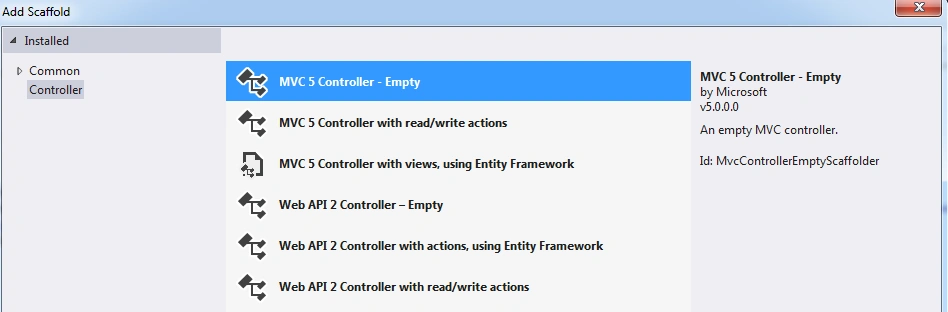
We select the empty controller and name it SuperDogController.cs since we know controllers are suffixed with the controller word.
Step 3
Then we add the main part, the Model/ViewModel. Similar to the controller, right-click on the model folder and add a class and name it. Here I have named it SuperDog.cs. The class would look as in the following:

In the preceding image as you can see, I have a Red arrow towards an option called Remove and Sort. What this does is, when we add a class the using statements are added automatically even if they are not being used. So to maintain consistency let's remove them. And we can remove them by right-clicking on the class file and click on the preceding nested route, in other words Remove and Sort, and finally our class SuperDog.cs would look like:
In the preceding image as you can see, I have a Red arrow towards an option called Remove and Sort. What this does is, when we add a class the using statements are added automatically even if they are not being used. So to maintain consistency let's remove them. And we can remove them by right-clicking on the class file and click on the preceding nested route, in other words Remove and Sort, and finally our class SuperDog.cs would look like:
- namespace MVCGridDemo.Models
- {
- public class SuperDogs
- {
- public string DogName { get; set; }
- public string BreedName { get; set; }
- public int DogAge { get; set; }
- public string DogOwner { get; set; }
- }
- }
Step 4
Now its time to add/install the Grid.MVC to our project. In the conext of MVC we would rather say add the Grid.MVC reference to the project. Thus for that we can see Reference in the project structure floating in the route of the web project. We then right-click on that, then seelct Manage Nuget package, then we directly search online for the Grid.MVC, we find the package reference with an install button beside. Click on that and wait for the successful installation of the package.
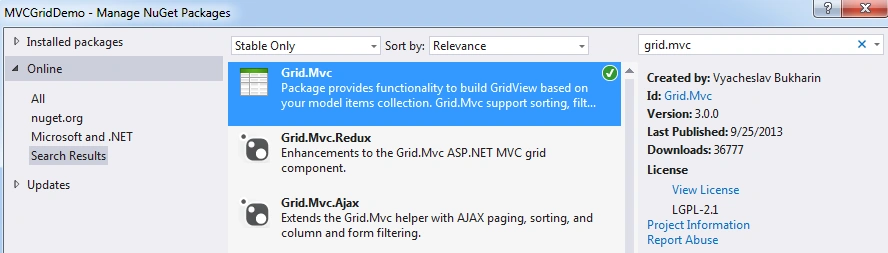
We should also search for the Bootstrap online and install that too.
Step 5
We should also search for the Bootstrap online and install that too.
Step 5
Now after adding the reference of these two, it's time to add hard coded values for the data collection to be shown in the grid or bound to the grid. The list of the model class data would be added as in the following:
- /// <summary>
- /// This returns the hard code values required for setting the grid
- /// </summary>
- /// <returns></returns>
- public List<SuperDogs> GetHardCodedValues()
- {
- var returnModel = new List<SuperDogs>();
- var firstDog = new SuperDogs
- {
- BreedName = "Labrador",
- DogAge = 1,
- DogName = "HACHIKO",
- DogOwner = "SURAJ SAHOO",
- };
- var secondDog = new SuperDogs
- {
- BreedName = "Labrador",
- DogAge = 2,
- DogName = "STEFFY",
- DogOwner = "XYZ",
- };
- var thirdDog = new SuperDogs
- {
- BreedName = "Golden Retriever",
- DogAge = 3,
- DogName = "LOVELY",
- DogOwner = "PQrS",
- };
- var forthDog = new SuperDogs
- {
- BreedName = "German Spitz",
- DogAge = 5,
- DogName = "CANDY",
- DogOwner = "ABCD",
- };
- var fifthDog = new SuperDogs
- {
- BreedName = "German Sheperd",
- DogAge = 10,
- DogName = "CAPTAIN",
- DogOwner = "Mota",
- };
- var sixthDog = new SuperDogs
- {
- BreedName = "British BullDog",
- DogAge = 10,
- DogName = "BILL",
- DogOwner = "AUTA",
- };
- for (var i = 0; i < 10; i++)
- {
- returnModel.Add(firstDog);
- returnModel.Add(secondDog);
- returnModel.Add(thirdDog);
- returnModel.Add(forthDog);
- returnModel.Add(fifthDog);
- returnModel.Add(sixthDog);
- }
- return returnModel;
- }
Step 6


Patience SoulPosted Jan 26, 2018, 1:26 PM
How to put a horizontal scroll so it could fix well on the page?
sonu kumar AmarjeetPosted Nov 27, 2017, 8:51 AM
Thanks a lot, Suraj it's too good very easy to use
Tamer YousefPosted Jan 3, 2017, 4:10 PM
How do you nest a grid inside another?
angappan sPosted Oct 27, 2016, 3:09 AM
How to dynamic bind in grid mvc. ? when i tried i got error "attempted to access an element as a type incompatible with the array" ? how to solve this?
shyam kushwahPosted Oct 30, 2015, 2:20 AM
column filter is not working. help me
shyam kushwahPosted Oct 30, 2015, 2:19 AM
be yar ye to cheting hai bhai..
Himanshu GuptaPosted Aug 5, 2015, 7:31 AM
but every time page is refreshed when click on the Paging. Any Solution ?
Surya Prakash PandeyPosted Jun 25, 2015, 1:44 AM
hello.. how to get selected row recoreds in mvc grid ..??
madusanka dharmarathnaPosted Jun 4, 2015, 1:36 AM
Hi,I want to apply filter with input box that appeared in the grid all the time rather than a pop up.how can i apply that.
AntarikshPosted Feb 8, 2015, 9:30 AM
Very Nice . Thanks for the Article !!. Filter on column is not working .Please suggest.
Saineshwar BageriPosted Jan 29, 2015, 12:25 AM
cool
Bhushan GawalePosted Jan 28, 2015, 11:15 PM
Thanks for sharing!!
Manish Kumar ChoudharyPosted Jan 28, 2015, 10:44 PM
Nice one..