
Introduction
Castle Windsor is an easy way to implement Inversion Of Control. Full implementation documentation can be found at Castle Project. The second step of implementing Castle Windsor is defining the Controller factory, especially overriding GetControllerInstance(). As documented here Windsor tutorial part two (the code is pasted below for reference) it is only a couple of lines.
- protected override IController GetControllerInstance(RequestContext requestContext, Type controllerType)
- {
- if (controllerType == null)
- {
- throw new HttpException(404, string.Format("The controller for path '{0}' could not be found.", requestContext.HttpContext.Request.Path));
- }
- return (IController)kernel.Resolve(controllerType);
- }
Here is the modified version of the preceding code returning a base controller when controllerType is null.
- protected override IController GetControllerInstance(RequestContext requestContext, Type controllerType)
- {
- if (controllerType == null)
- {
- return base.GetControllerInstance(requestContext, controllerType);
- }
- var controller = (IController)this.container.Resolve(controllerType);
- if (controller != null && controller is BaseController)
- {
- ((BaseController)controller).MefContainer = this._MefContainer;
- }
- return controller;
- }
For reference, here is the routing config that routes the requests to a controller:
- routes.IgnoreRoute("{*favicon}", new { favicon = @"(.*/)?favicon.ico(/.*)?" });
- routes.IgnoreRoute("{resource}.ashx/{*pathInfo}");
- routes.IgnoreRoute("{robotstxt}", new { robotstxt = @"(.*/)?robots.txt(/.*)?" });
- ute(
- name: "Default",
- url: "{controller}/{action}/{id}",
- defaults: new { controller = "Account", action = "UserLogin", area = "", id = UrlParameter.Optional },
- namespaces: new[] { "Porzio.Its.WebRole.Controllers" }
- );
- routes.MapRoute(
- name: "404-PageNotFound",
- url: "{*url}",
- defaults: new { controller = "Errors", action = "Error" }
- );
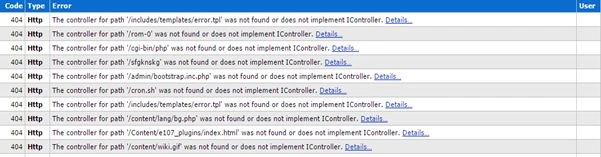
This was actually someone trying to determine the vulnerabilities of the web application by scanning various URL patterns. All these invalid URLs will throw the controller for a path was not found or does not implement IController error. If the code was changed to return null, the error was a null controller returned. In either case, the log continues to grow, annoying and actual errors that must be fixed taht will get buried among the long irrelevant errors. This is one side of the problem. Another problem is the CPU is utilized to resolve a controller that doesn't exist and numerous such requests will drive up CPU utilization compared to the same volume of valid requests.
To handle this, the application could actually return a valid page like a login page or a dummy page and avoid cluttering the log and also decrease the pressure on the CPU to resolve the controller that doesn't exist. The following code is returning the login page for an invalid URL path. This can be changed to return a dummy blank page.
- protected override IController GetControllerInstance(RequestContext requestContext, Type controllerType)
- {
- if (controllerType == null)
- {
- requestContext.HttpContext.RewritePath("/");
- controllerType = GetControllerType(requestContext, "Account");
- requestContext.RouteData.Values["controller"] = "Account";
- requestContext.RouteData.Values["action"] = "UserLogin";
- requestContext.RouteData.Values["area"] = "";
- return base.GetControllerInstance(requestContext, controllerType);
- }
- var controller = (IController)this.container.Resolve(controllerType);
- if (controller != null && controller is BaseController)
- {
- ((BaseController)controller).MefContainer = this._MefContainer;
- }
- return controller;
- }
The code is replacing the request path to the base URL and generates a valid controllerType. Then overwrite the controller action and area to the default routing or dummy page route. The last step generates a controller instance with a modified request and controllerType to return the login page. Now the login page is returned whenever there is an incorrect URL typed in by the user or someone tries to look for vulnerabilities by repeatedly scanning the URL of the web application.
Note: The blocking of an attacker IP is necessary but outsied the scope of this article. Also an attacker can change the source IP and again the log would become filled with errors and will increase CPU usage. Interestingly we saw attacks stopped after implementing the preceding solution. It could be either an attack stopped or an attacker's logic stopped the loop when a valid response is received and tries injecting something on that page.
Nilesh ShahPosted Jan 20, 2017, 3:45 PM
Good example with castle windsor
Santhakumar MunuswamyPosted May 6, 2015, 2:41 PM
Good