


Introduction
In today's digital workplace, managing user information is vital for effective collaboration and communication within organizations. SharePoint, as a powerful platform for content management and collaboration, offers robust features for accessing and utilizing user information. In this comprehensive guide, we will explore the benefits, features, and limitations of accessing user information in SharePoint. Additionally, we'll provide a step-by-step guide on how to access user information lists within SharePoint, empowering you to leverage this valuable resource for your organization's needs.
Benefits
- Improved collaboration: Accessing user information allows for a better understanding of team members' roles, expertise, and contact details, facilitating collaboration and communication.
- Enhanced personalization: By accessing user profiles, organizations can personalize user experiences within SharePoint, providing relevant content and resources tailored to individual needs.
- Streamlined workflows: Access to user information enables automated processes and workflows based on user roles, permissions, and preferences, streamlining business processes and enhancing efficiency.
Features
- User profiles: SharePoint maintains comprehensive user profiles containing information such as name, title, department, contact details, and more.
- User information lists: SharePoint provides pre-defined lists containing user information, organized in a structured format for easy access and utilization.
- Integration with Active Directory: SharePoint seamlessly integrates with Active Directory, ensuring synchronization of user information across systems and platforms.
- Customization: Organizations can customize user information lists and profiles to capture additional information relevant to their specific business requirements.
- Security trimming: SharePoint employs security trimming to control access to user information, ensuring that only authorized users can view and modify sensitive data.
Limitations
- Data accuracy: User information in SharePoint is reliant on accurate and up-to-date data entry and maintenance, which may be challenging to enforce.
- Privacy concerns: Accessing and utilizing user information must comply with privacy regulations and organizational policies to protect sensitive data.
- Limited extensibility: While SharePoint offers robust features for accessing user information, organizations may encounter limitations when customizing or extending these functionalities to meet unique business needs.
Step-by-Step Guide, Accessing User Information List in SharePoint.
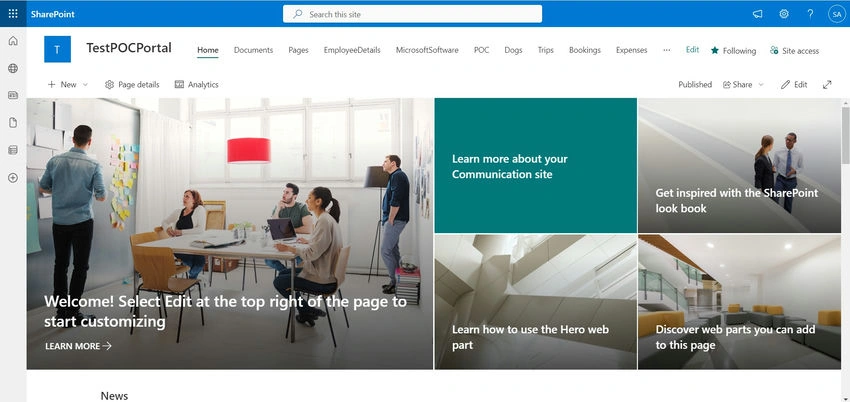
- Open your web browser and navigate to your SharePoint site.
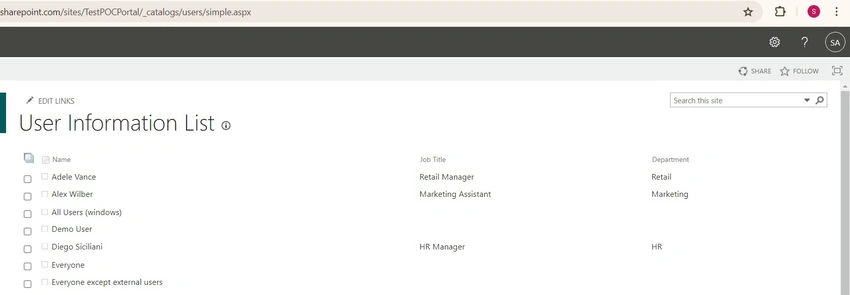
- In the URL bar, append "/_catalogs/users/simple.aspx" to the end of your site's URL. This will take you directly to the User Information List. Below Example.
- https://<DomainName>.sharepoint.com/sites/<SiteName>/_catalogs/users/simple.aspx
- Press Enter to go to the modified URL.
- You will now be able to view and access the User Information List, which contains user details such as names, email addresses, and more.
Conclusion
Accessing user information in SharePoint is a powerful capability that enables organizations to enhance collaboration, personalize user experiences, and streamline business processes. By leveraging the features and functionalities available in SharePoint, organizations can unlock the full potential of user information to drive productivity and innovation across the enterprise. With the step-by-step guide provided in this article, you have the knowledge and tools to access user information lists in SharePoint effectively, empowering you to harness the benefits of user information for your organization's success.
Join the conversation! Your thoughts help the community grow.