

Welcome to an article on how to Build Dictionary in SharePoint 2013 and Office 365 using Nintex Workflows. This article will display the action “Build Dictionary” that can be used while developing Nintex workflows according to our requirement.
Using this action you can add items to build a dictionary. Let’s see the implementation of this functionality.
- Create a list, Dev Testing.
- Click on the List tab on the Top ribbon and click on Nintex Workflows.
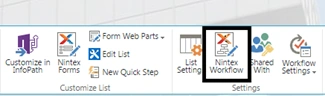
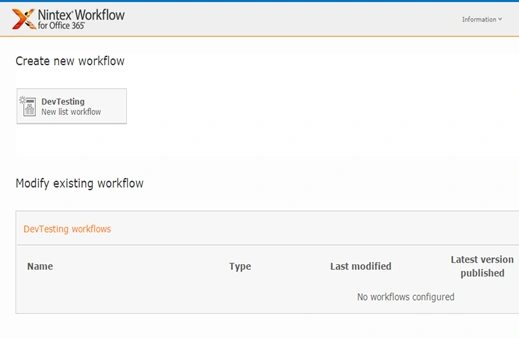
- You will see the following screen, to create a new workflow.
- Click on “Create new workflow”.
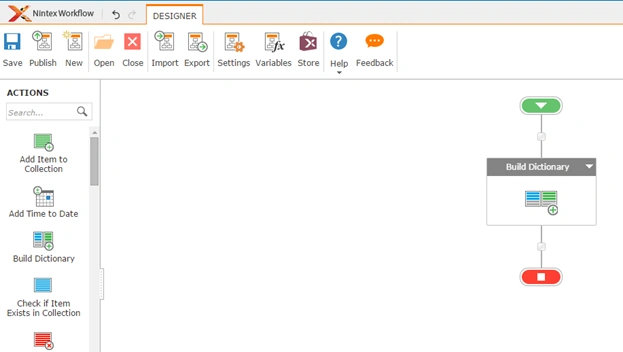
- You will come to the design phase of the Nintex workflows.
- Add the action, “Build Dictionary” either by right click on the workflow or by dragging and dropping from the left toolbox.
- Now let’s configure it.
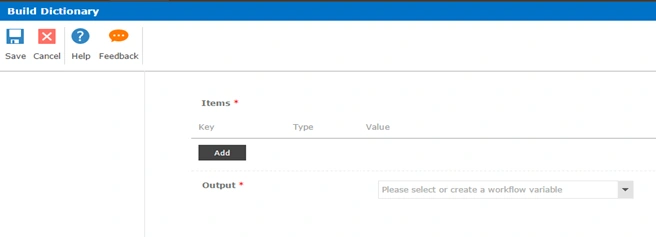
- When you double click on the action the following screen opens up.
Form Parameters
The configuration of the form is divided into two Items and Output where you can add the items using their keys and generate an output.
- Items
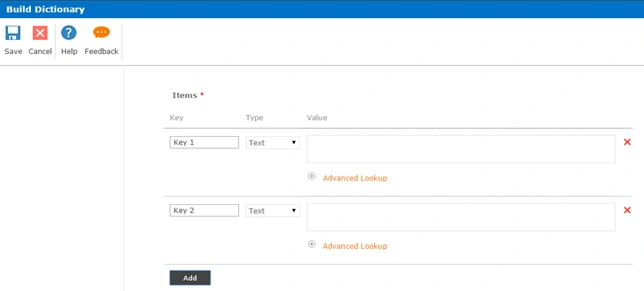
You can click on Add and enter the item values using the keys which start from 0, 1, 2 and so on.
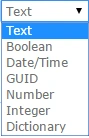
You can define the Type as the following:
Output:
Then you have the output as the dictionary.
You can have as many items you want using the keys which starts from 0 and once you run this workflow it will generate an output as a dictionary of items.
So in this article we saw how to build Dictionary in SharePoint 2013 and Office 365 using Nintex Workflows, we will see more new articles on the actions of Nintex Workflows in the other parts of the article. Till then, keep learning.
Santhakumar MunuswamyPosted Nov 20, 2015, 9:32 AM
Good One
Sibeesh VenuPosted Nov 18, 2015, 7:27 AM
Nice Share
Banketeshvar NarayanPosted Nov 18, 2015, 4:21 AM
Nice article
Harshad PansuriyaPosted Nov 18, 2015, 1:04 AM
Nice one