

Welcome to an article about an Action: Set Next State in Nintex Workflows. This article will display the action “Set Next State” and how to configure it.
In our development we need to set to another stage when some condition is not met or some criteria is not met. This will involve sets of stages which we can add to the workflow where we can divert the flow to another state according to the requirement, hence easing our task of not doing it manually.
This action can only be placed under the State Machine action and can be used to control the flow of the workflow.
Let’s see how we’ll do it
This action can only be placed under the State Machine action and can be used to control the flow of the workflow.
Let’s see how we’ll do it
- Create a list, Dev Testing.
- Click on the List tab on the Top ribbon and click on Nintex Workflows.
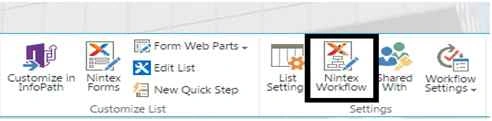
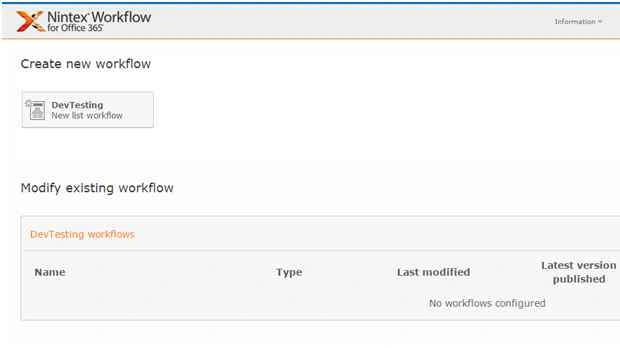
- You will see the following screen, to create a new workflow.
- Click on “Create new workflow”.
- You will come to the design phase of the Nintex workflows.
- Add the action, “Set Next State” either by right clicks on the workflow or by dragging and dropping from the left toolbox.
- This action can only be placed under the State Machine action and can be used to control the flow of the workflow.
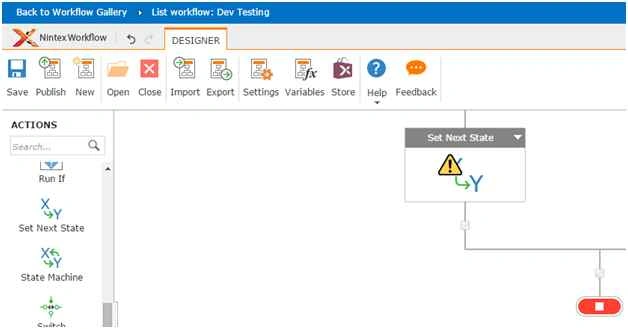
- Let’s see it closely.
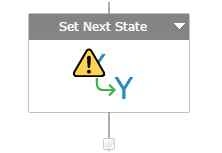
- When you double click on the action, you will see the following.
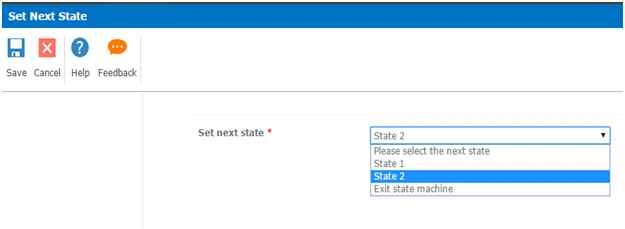
- Set Next State will help you to divert the flow of the workflow to the next state.
Configuration
Set next state:
Here you can configure where the flow of the workflow should go when it reaches this set. It can be either to another set or exit from the state machine.
This action is very helpful for long work flows which runs smoothly without disrupting the other actions. So in this article we saw about the Action: Set Next State in Nintex Workflows. We’ll see more in my other articles. Until then, Keep learning!
Sibeesh VenuPosted Oct 29, 2015, 1:34 AM
Nice Share
Nilesh JadavPosted Oct 28, 2015, 10:20 PM
Nice Article