

Welcome to an article on how to terminate current Workflow in SharePoint 2013 and Office 365 using Nintex Workflows. This article will display the action “Terminate Current Workflow” which can be used while developing workflows.
Using this action you can terminate a running instance of workflow. Let’s see the implementation of this functionality.
- Create a list, Dev Testing.
- Click on the List tab on the Top ribbon and click on Nintex Workflows.
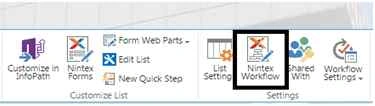
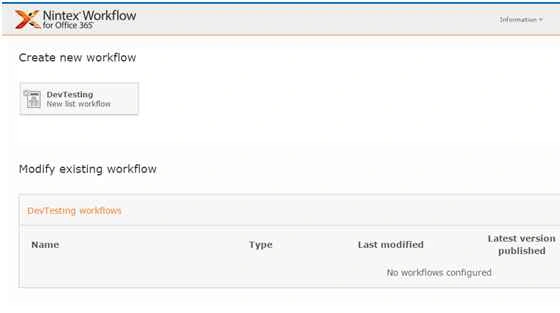
- You will see the following screen, to create a new workflow.
- Click on “Create new workflow”.
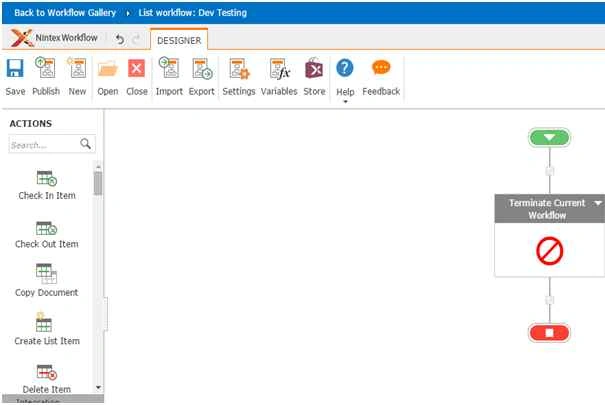
- You will come to the design phase of the Nintex workflows.
- Add the action, “Terminate Current Workflow” either by right click on the workflow or by dragging and dropping from the left toolbox.
- Now let’s configure it.
- When you double click on the action the following screen opens up.
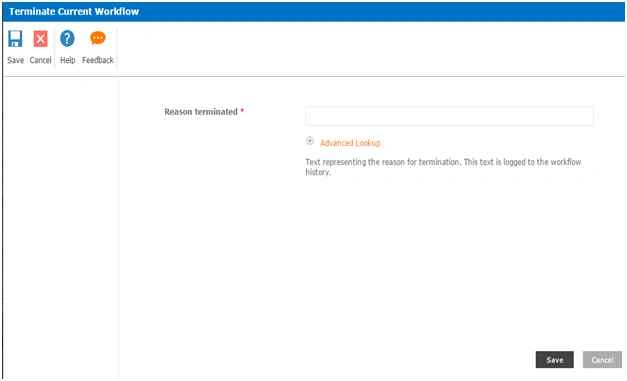
Form Parameters
- Reason Terminated: You have to provide a reason for this termination which will be logged when the workflow is terminated.
This action is added after every workflow ends and it is necessary as it will help to track down the instances of the workflow running thereby easing up the load on the server.
So in this article we saw how to terminate current Workflow in SharePoint 2013 and Office 365 using Nintex Workflows, we will see more new articles on the actions of Nintex Workflows in the other parts of the article. Till then, keep learning!
Deepak SolankiPosted Nov 4, 2015, 2:03 AM
useful share
Mukesh KumarPosted Oct 30, 2015, 2:14 AM
Nice One
Priyaranjan K SPosted Oct 29, 2015, 12:51 PM
Good One
Nilesh JadavPosted Oct 29, 2015, 9:37 AM
Good Share !!
Sibeesh VenuPosted Oct 29, 2015, 8:56 AM
Nice Share