

Property bags in SharePoint act as a key value pair repository, where we can store the metadata values. The property bags more or less serve the same purpose of the app settings section in the Web Config file in ASP.NET, where we can store the configuration values. We can store the property bag values at different scopes in SharePoint like:
- Farm scope
- Web Application scope
- Site collection scope
- Site scope and
- List scope
The property bag values can be added using the SharePoint designer as well as programmatically. In this article, we will see how we can update and read the property bag values using the JavaScript object model.
Add Property Bag Value
- Add reference to jQuery file.
- <script language="javascript" type="text/javascript" src="//ajax.googleapis.com/ajax/libs/jquery/1.8.1/jquery.min.js"></script>
- <script language="javascript" type="text/javascript">
- Within the document, call ready function SP.SOD.executeFunc, so as to load the on demand script SP.js . Call the main starting point function, say: ModifyPropertyBag.
- SP.SOD.executeFunc('sp.js', 'SP.ClientContext', ModifyPropertyBag);
- Instantiate the client context and get the Web instance. Once the Web object is retrieved, get the property bag collection.
- //Get Client Context and Web object.
- clientContext= new SP.ClientContext.get_current();
- varoWeb= clientContext.get_web();
- //Get property bag collection and set the new key value pair
- oPropBag= oWeb.get_allProperties();
- oPropBag.set_item("Updated Name", "Modified List");
- oWeb.update();
- Execute the batch which will send the request to the Server and perform the entire JavaScript object model operation as a batch. Loading of the client context is not necessary to update property bag.
- clientContext.executeQueryAsync(Success,Failure);
Full code
- <script language="javascript" type="text/javascript" src="//ajax.googleapis.com/ajax/libs/jquery/1.8.1/jquery.min.js">
- </script>
- <script language="javascript" type="text/javascript">
- $(document)
- .ready(function()
- {
- SP.SOD.executeFunc('sp.js', 'SP.ClientContext', ModifyPropertyBag);
- });
- varoList, oPropBag;
- function ModifyPropertyBag()
- {
- //Get Client Context and Web object.
- clientContext = new SP.ClientContext.get_current();
- varoWeb = clientContext.get_web();
- //Get property bag collection and set the new key value pair
- oPropBag = oWeb.get_allProperties();
- oPropBag.set_item("Updated Name", "Modified List");
- oWeb.update();
- //Execute the batch
- clientContext.executeQueryAsync(Success, Failure);
- }
- function Success()
- {
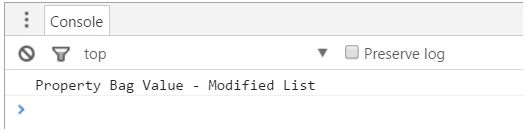
- console.log('Property bag value created');
- }
- function Failure(sender, args)
- {
- console.log('Request failed. ' + args.get_message() + '\n' + args.get_stackTrace());
- }
- </script>
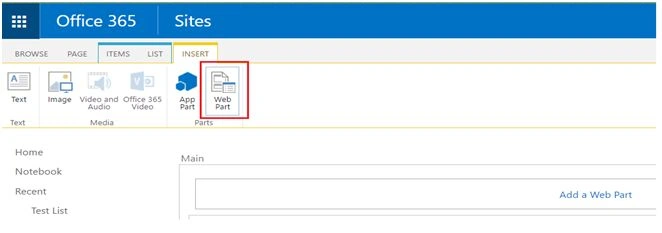
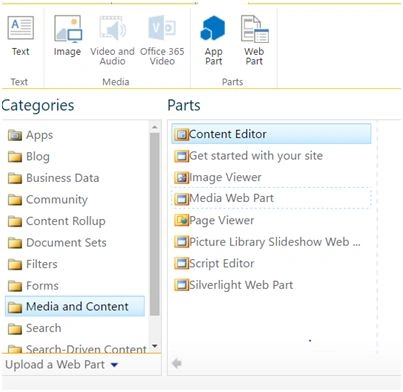
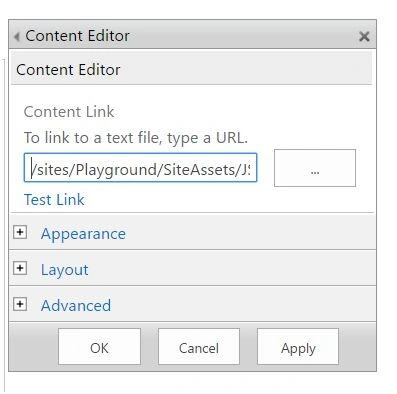
Pratik HajarePosted Jun 29, 2018, 1:33 AM
What are the minimum permissions needed to set and to get the propertybag for each scope? Farm scopeWeb Application scope Site collection scope Site scope and List scope
Santhakumar MunuswamyPosted Jun 25, 2016, 2:31 AM
Nice share
Vignesh ManiPosted Jun 17, 2016, 5:18 AM
Nice
Debasis SahaPosted Jun 17, 2016, 12:49 AM
Nice one..
RajaPosted Jun 17, 2016, 12:46 AM
Nice Sharing...
Thiruppathi RPosted Jun 16, 2016, 11:04 PM
Nice
Prasham SabadraPosted Jun 16, 2016, 10:59 PM
Thanks for Sharing!!!