

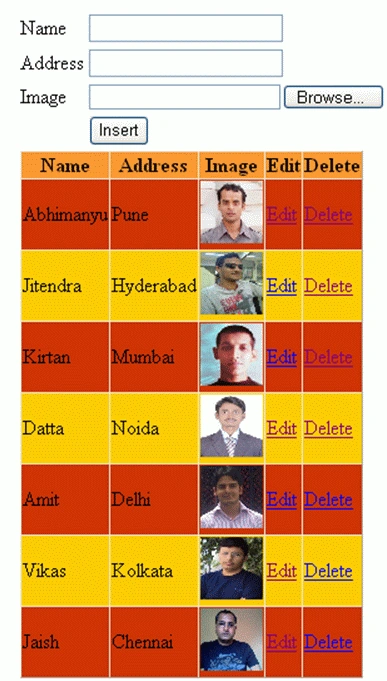
In this article, we will learn how to add details of an employee with an image and display it in a GridView. Here an image will be stored in the application folder. We can also edit, update, delete, and cancel the details of the employee in the GridView.
Table Creation
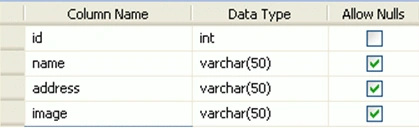
Stored procedure
CREATE PROCEDURE insert_employee
    (
        @name varchar(50),
        @address varchar(50),
        @image varchar(50)
    )
AS
Insert into employee values(@name, @address, @image)

CREATE PROCEDURE update_employee
    (
        @id int,
        @name varchar(50),
        @address varchar(50)
    )
AS
Update employee set name = @name, address = @address where id = @id

CREATE PROCEDURE delete_employee
    (@id int)
AS
Delete from employee where id = @id
Default. aspx Code
<%@ Page Language="C#" AutoEventWireup="true" CodeBehind="Default.aspx.cs" Inherits="Add_update_delete_gridview._Default" %>
<!DOCTYPE html PUBLIC "-//W3C//DTD XHTML 1.0 Transitional//EN" "http://www.w3.org/TR/xhtml1/DTD/xhtml1-transitional.dtd">
<html xmlns="http://www.w3.org/1999/xhtml">
<head id="Head1" runat="server">
    <title>Untitled Page</title>
</head>
<body>
    <form id="form1" runat="server">
    <div>
        <table>
            <tr>
                <td>
                    Name
                </td>
                <td>
                    <asp:textbox id="txt_name" runat="server">
                    </asp:textbox>
                    <asp:requiredfieldvalidator id="RequiredFieldValidator1" runat="server" controltovalidate="txt_name"
                        errormessage="Please enter the name">
                    </asp:requiredfieldvalidator>
                </td>
            </tr>
            <tr>
                <td>
                    Address
                </td>
                <td>
                    <asp:textbox id="txt_address" runat="server">
                    </asp:textbox>
                    <asp:requiredfieldvalidator id="RequiredFieldValidator2" runat="server" controltovalidate="txt_address"
                        errormessage="Please enter the address">
                    </asp:requiredfieldvalidator>
                </td>
            </tr>
            <tr>
                <td>
                    Image
                </td>
                <td>
                    <asp:fileupload id="FileUpload1" runat="server" />
                    <asp:requiredfieldvalidator id="RequiredFieldValidator3" runat="server" controltovalidate="FileUpload1"
                        errormessage="Please browse the image">
                    </asp:requiredfieldvalidator>
                </td>
            </tr>
            <tr>
                <td>
                </td>
                <td>
                    <asp:button id="btn_insert" runat="server" onclick="btn_insert_Click" text="Insert" />
                </td>
            </tr>
            <tr>
                <td colspan="2">
                    <asp:gridview id="GridView1" runat="server" autogeneratecolumns="False" onrowcancelingedit="GridView1_RowCancelingEdit"
                        onrowdeleting="GridView1_RowDeleting" onrowediting="GridView1_RowEditing" onrowupdating="GridView1_RowUpdating"
                        onselectedindexchanging="GridView1_SelectedIndexChanging" backcolor="#CC3300"
                        forecolor="Black">
                        <columns>
                        <asp:TemplateField HeaderText="Name">
                        <EditItemTemplate>
                        <asp:TextBox ID="txt_name" runat="server"
                        Text='<%# Eval("name") %>'></asp:TextBox>
                        <asp:Label ID="Label4" runat="server" Text='<%# Eval("id") %>' Visible="False"></asp:Label>
                        </EditItemTemplate>
                        <ItemTemplate>
                        <asp:Label ID="Label1" runat="server" Text='<%# Eval("name") %>'></asp:Label>
                        <asp:Label ID="Label2" runat="server" Text='<%# Eval("id") %>' Visible="False"></asp:Label>
                        </ItemTemplate>
                        </asp:TemplateField>
                        <asp:TemplateField HeaderText="Address">
                        <EditItemTemplate>
                        <asp:TextBox ID="txt_address" runat="server" Text='<%# Eval("address") %>'></asp:TextBox>
                        </EditItemTemplate>
                        <ItemTemplate>
                        <asp:Label ID="Label3" runat="server" Text='<%# Eval("address") %>'></asp:Label>
                        </ItemTemplate>
                        </asp:TemplateField>
                        <asp:TemplateField HeaderText="Image">
                        <ItemTemplate>
                        <img alt="" src ='images/<%#Eval("image") %>' height="50px" width="50px"/>
                        </ItemTemplate>
                        </asp:TemplateField>
                        <asp:TemplateField HeaderText="Edit">
                        <EditItemTemplate>
                        <asp:LinkButton ID="LinkButton3" runat="server" CausesValidation="False"
                        CommandName="Update">Update</asp:LinkButton>
                        <asp:LinkButton ID="LinkButton4" runat="server" CausesValidation="False"
                        CommandName="Cancel">Cancel</asp:LinkButton>
                        </EditItemTemplate>
                        <ItemTemplate>
                        <asp:LinkButton ID="LinkButton2" runat="server" CausesValidation="False"
                        CommandName="Edit">Edit</asp:LinkButton>
                        </ItemTemplate>
                        </asp:TemplateField>
                        <asp:TemplateField HeaderText="Delete">
                        <ItemTemplate>
                        <asp:LinkButton ID="LinkButton1" runat="server" CausesValidation="False"
                        CommandName="Delete"
                        onclientclick="return confirm('Are you sure you want to delete this record')">Delete</asp:LinkButton>
                        </ItemTemplate>
                        </asp:TemplateField>
                        </columns>
                        <headerstyle backcolor="#FF9933" />
                        <alternatingrowstyle backcolor="#FFCC00" />
                    </asp:gridview>
                </td>
            </tr>
        </table>
    </div>
    </form>
</body>
</html>
Default. aspx.cs Code
using System;
using System.Collections;
using System.Configuration;
using System.Data;
using System.Linq;
using System.Web;
using System.Web.Security;
using System.Web.UI;
using System.Web.UI.HtmlControls;
using System.Web.UI.WebControls;
using System.Web.UI.WebControls.WebParts;
using System.Xml.Linq;
using System.Data.SqlClient;
using System.IO;

namespace Add_update_delete_gridview {
    public partial class _Default : System.Web.UI.Page {
        string strConnString = ConfigurationManager.ConnectionStrings["ConnectionString"].ConnectionString;
        string s1;
        string path;
        SqlConnection cnn = new SqlConnection();
        SqlCommand com = new SqlCommand();
        SqlDataAdapter sqlda;
        DataTable dt;
        int id;
        string name;
        string address;
        string image;
        protected void Page_Load(object sender, EventArgs e) {
            if (!IsPostBack) {
                bindgrid();
            }
        }
        protected void btn_insert_Click(object sender, EventArgs e) {
            if (FileUpload1.PostedFile.ContentLength > 0) {
                s1 = Path.GetFileName(FileUpload1.FileName);
                path = Server.MapPath("images") + "/" + s1;
                FileUpload1.SaveAs(path);
            }
            SqlConnection con = new SqlConnection(strConnString);
            con.Open();
            SqlCommand com = new SqlCommand("insert_employee", con);
            com.CommandType = CommandType.StoredProcedure;
            com.Connection = con;
            com.Parameters.AddWithValue("@name", txt_name.Text);
            com.Parameters.AddWithValue("@address", txt_address.Text);
            com.Parameters.AddWithValue("@image", s1);
            com.ExecuteNonQuery();
            com.Dispose();
            bindgrid();
            con.Close();
            clear();
        }
        private void clear() {
            txt_name.Text = "";
            txt_address.Text = "";
        }
        private void bindgrid() {
            SqlConnection con = new SqlConnection(strConnString);
            con.Open();
            sqlda = new SqlDataAdapter("SELECT * FROM employee ", con);
            dt = new DataTable();
            sqlda.Fill(dt);
            sqlda.Dispose();
            GridView1.DataSource = dt;
            GridView1.DataBind();
            con.Close();
        }
        protected void GridView1_RowDeleting(object sender, GridViewDeleteEventArgs e) {
            SqlConnection con = new SqlConnection(strConnString);
            con.Open();
            try {
                id = Convert.ToInt32(((Label)(GridView1.Rows[e.RowIndex].FindControl("label2"))).Text);
                SqlCommand com = new SqlCommand("delete_employee", con);
                com.CommandType = CommandType.StoredProcedure;
                com.Connection = con;
                com.Parameters.Add("@id", SqlDbType.Int).Value = id;
                SqlDataAdapter sqlda = new SqlDataAdapter("select * from employee where id=@id", con);
                sqlda.SelectCommand.Parameters.Add("@id", SqlDbType.Int).Value = id;
                DataSet ds = new DataSet();
                sqlda.Fill(ds);
                try {
                    image = Convert.ToString(ds.Tables[0].Rows[0]["image"]);
                    File.Delete(Server.MapPath("images") + "\\" + image);
                } catch (Exception) {}
                com.ExecuteNonQuery();
                com.Dispose();
                bindgrid();
            } catch (Exception) {}
        }
        protected void GridView1_RowCancelingEdit(object sender, GridViewCancelEditEventArgs e) {
            GridView1.EditIndex = -1;
            bindgrid();
        }
        protected void GridView1_RowEditing(object sender, GridViewEditEventArgs e) {
            GridView1.EditIndex = e.NewEditIndex;
            bindgrid();
        }
        protected void GridView1_RowUpdating(object sender, GridViewUpdateEventArgs e) {
            SqlConnection con = new SqlConnection(strConnString);
            con.Open();
            id = Convert.ToInt32(((Label)(GridView1.Rows[e.RowIndex].FindControl("label4"))).Text);
            name = (((TextBox)(GridView1.Rows[e.RowIndex].FindControl("txt_name"))).Text);
            address = (((TextBox)(GridView1.Rows[e.RowIndex].FindControl("txt_address"))).Text);
            SqlCommand com = new SqlCommand("update_employee", con);
            com.CommandType = CommandType.StoredProcedure;
            com.Connection = con;
            com.Parameters.Add("@id", SqlDbType.Int).Value = id;
            com.Parameters.Add("@name", SqlDbType.VarChar, 50).Value = name;
            com.Parameters.Add("@address", SqlDbType.VarChar, 50).Value = address;
            com.ExecuteNonQuery();
            com.Dispose();
            con.Close();
            GridView1.EditIndex = -1;
            bindgrid();
        }
        protected void GridView1_SelectedIndexChanging(object sender, GridViewSelectEventArgs e) {
            GridView1.PageIndex = e.NewSelectedIndex;
            bindgrid();
        }
    }
}
Output
Here we will see the output which is given below.
Munesh ChodavadiyaPosted Aug 21, 2017, 5:28 AM
Plz tell me how to add connection string on Default.aspx.cs Code..???
antony victorPosted Jul 1, 2013, 6:40 AM
thanks for detailed explaination.. I have a doubt sir, assume the sample code above is a category page (with name and image) how can i create a subcategory page with a dropdownlist so that category name provided in previous page can populate in it and below that same subcategoryname and image can be added and displayed in gridview..
antony victorPosted Jul 1, 2013, 5:10 AM
thanks. but i have a doubt sir, the actual image is saving in database. so the size of the database increases with it. can we add the path only and store the images in server?
mahiPosted Jul 31, 2012, 12:10 AM
very very thanqs.
Pawan ChandPosted Feb 25, 2012, 1:51 AM
Good article to learn Ado.net operation easily.
Abhishek DubeyPosted Feb 24, 2012, 1:02 AM
Hi Satyapriya very nice example for understanding the gridview.
Sanjoli GuptaPosted Feb 23, 2012, 11:20 PM
very nicely presented...
James LerdorfPosted Feb 23, 2012, 11:19 PM
Thanks for this article and presenting very nice.
Monika AroraPosted Feb 23, 2012, 11:15 PM
Hi Satyapriya. What a presentation. Its really amazing.