Introduction
There are lots of pdf libraries available for Angular 7. We will use jsPDF in this article and will upload an image from the UI rather than a static path, in order to make it dynamic.
Prerequisites
- Basic knowledge of Angular 7
- Visual Studio Code
- Angular CLI must be installed
- NodeJS must be installed
Let’s get started.
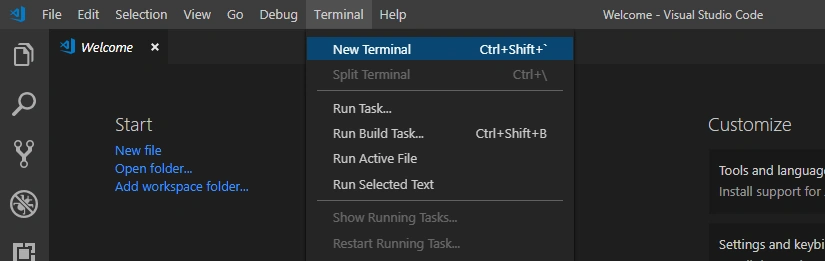
Open Visual Studio Code and open a new terminal.
Type the following command in it.
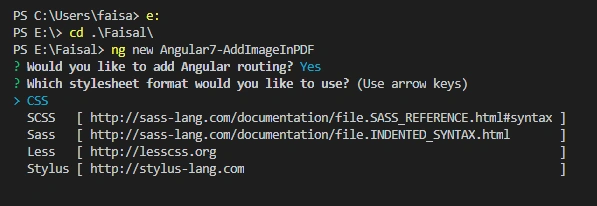
- ng new Angular7-AddImageInPDF
Go to the Root folder, select "Yes" for Angular routing, and use CSS for the stylesheet.
We will also install the jsPDF as we are going to use this library.
- cd .\Angular7-AddImageInPDF\ npm install jspdf
Open the project in Visual Studio Code by opening the folder by command.
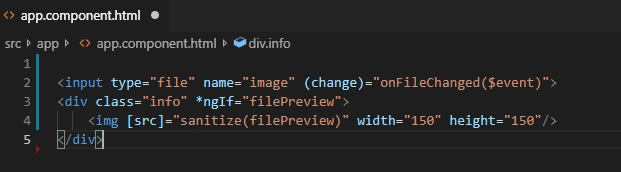
Open the "app.component.html" file to and paste the below HTML code.
- <input type="file" name="image" (change)="onFileChanged($event)">
- <div class="info" *ngIf="filePreview">
- <img [src]="sanitize(filePreview)" width="150" height="150"/>
- </div>
Now, open the "app.component.ts" file to write our main logic which adds an image in pdf and download that pdf file.
Import the below namespaces as we are going to use in code.
- import * as jsPDF from 'jspdf';
- import { DomSanitizer } from '@angular/platform-browser';
Add DomSanitizer in the constructor.
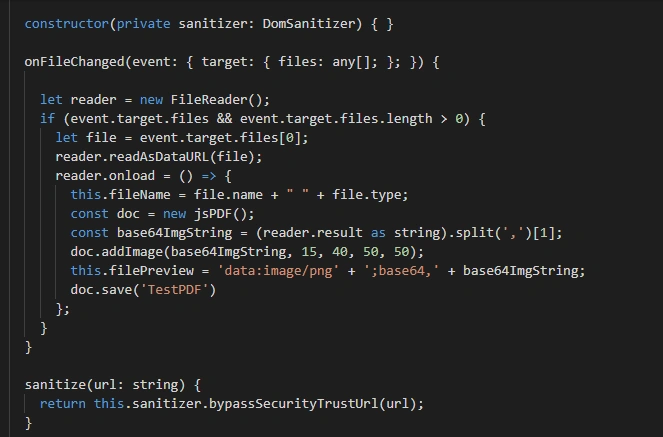
- constructor(private sanitizer: DomSanitizer) { }
Add the below two functions to handle file upload in pdf and download functionalities.
- onFileChanged(event: { target: { files: any[]; }; }) {
-
- let reader = new FileReader();
- if (event.target.files && event.target.files.length > 0) {
- let file = event.target.files[0];
- reader.readAsDataURL(file);
- reader.onload = () => {
- this.fileName = file.name + " " + file.type;
- const doc = new jsPDF();
- const base64ImgString = (reader.result as string).split(',')[1];
- doc.addImage(base64ImgString, 15, 40, 50, 50);
- this.filePreview = 'data:image/png' + ';base64,' + base64ImgString;
- doc.save('TestPDF')
- };
- }
- }
-
- sanitize(url: string) {
- return this.sanitizer.bypassSecurityTrustUrl(url);
- }
The full code of "app.component.ts" file is given below.
- import { Component } from '@angular/core';
- import * as jsPDF from 'jspdf';
- import { DomSanitizer } from '@angular/platform-browser';
-
- @Component({
- selector: 'app-root',
- templateUrl: './app.component.html',
- styleUrls: ['./app.component.css']
- })
- export class AppComponent {
- title = 'Angular7-AddImageInPDF';
- fileName: string;
- filePreview: string
-
- constructor(private sanitizer: DomSanitizer) { }
-
- onFileChanged(event: { target: { files: any[]; }; }) {
-
- let reader = new FileReader();
- if (event.target.files && event.target.files.length > 0) {
- let file = event.target.files[0];
- reader.readAsDataURL(file);
- reader.onload = () => {
- this.fileName = file.name + " " + file.type;
- const doc = new jsPDF();
- const base64ImgString = (reader.result as string).split(',')[1];
- doc.addImage(base64ImgString, 15, 40, 50, 50);
- this.filePreview = 'data:image/png' + ';base64,' + base64ImgString;
- doc.save('TestPDF')
- };
- }
- }
-
- sanitize(url: string) {
- return this.sanitizer.bypassSecurityTrustUrl(url);
- }
-
- }

That’s it. Fire the following command to see the charm!
Open your browser on http://localhost:4200/ or click on “http://localhost:4200/”.
Output
Please give your valuable feedback/comments/questions about this article. Please let me know how you like and understand this article and how I could improve it.
You can download the source code from
here.





Germán MedinaPosted Jan 30, 2020, 6:59 AM
Hello! I've been looking for something like this for long time, Could you help me how could I do this in a existing document? Also, can it be applied to every page in said document?
Saravana kumarPosted Nov 29, 2019, 4:18 AM
Hi sir, First of all, thanks for sharing wonderful article. Its perfectly working. Now, my requirement is download PDF file and at a time that file upload to a server. How to send download PDF file to server sir? or any other ways to upload generating PDF file to server ? Please suggest me any ideas sir. I'm using angular 7(fronfend) and Dot Net Core(backend)