

My scenario is, I need to create Enterprise keyword column in SharePoint host web list using SharePoint hosted app.
After google search, I found that. We have more articles to add the enterprise keyword column using SP object mode but using JavaScript I couldn’t find. I hope the following explained solution is very useful to you,
Implementation
- Get Host Web URL and App web URL in Document Ready.
- Then call AddEnterpriseColumnToList method.
- Get app context site from AddEnterpriseColumnToList method.
- Get web and Task list.
- Add Enterprise keyword column to List.
- Load the List.
- Execute the request.
- Show result in success method.
- Failure method are used to catch the errors.
- //Varibles Declaration
- var appWebURL, hostWebURL, appCtxSite, context;
- // This code runs when the DOM is ready and creates a context object which is needed to use the SharePoint object model
- $(document).ready(function ()
- {
- hostWebURL = decodeURIComponent(manageQueryStringParameter('SPHostUrl'));
- appWebURL = decodeURIComponent(manageQueryStringParameter('SPAppWebUrl'));
- AddEnterpriseColumnsToList();
- });
- //Add column to list
- function AddEnterpriseColumnsToList()
- {
- //get app content site using hostweb URL
- var appCtxSite = new SP.AppContextSite(context, hostWebURL);
- //Get Web using appcontext site
- var web = appCtxSite.get_web();
- //get task list from web
- var list = web.get_lists().getByTitle('Tasks');
- //Get Enterprise column from site
- var field = context.get_site().get_rootWeb().get_fields().getByInternalNameOrTitle("TaxKeyword");
- //Add Enterprise field to List
- list.get_fields().add(field);
- context.load(list);
- context.executeQueryAsync(function ()
- {
- //Success method
- console.log("Field added successfully!!")
- }, function (sender, args)
- {
- //Error method
- console.log("List Items failed" + args.get_message());
- });
- }
- //Get value from Query string
- function manageQueryStringParameter(paramToRetrieve)
- {
- var params = document.URL.split("?")[1].split("&");
- var strParams = "";
- for (var i = 0; i < params.length; i = i + 1)
- {
- var singleParam = params[i].split("=");
- if (singleParam[0] == paramToRetrieve)
- {
- return singleParam[1];
- }
- }
- }
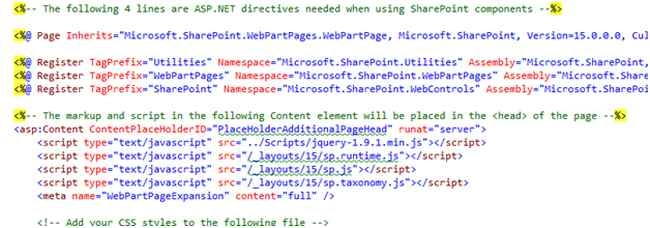
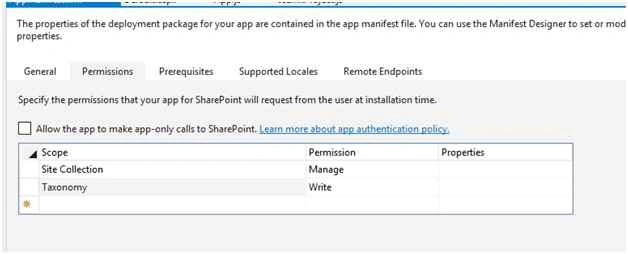
AppManifiest.xml file add the permission level to access the list in your host web.
References
This article says how to activate the Enterprise keyword column in list using OOB feature.
Summary
In this article we have explored how to add the enterprise keyword column in list using JSOM with SharePoint hosted app.
Harshad PansuriyaPosted Dec 11, 2015, 7:08 AM
Nice one
Sibeesh VenuPosted Dec 11, 2015, 7:05 AM
Nice Share
Humayun Kabir MamunPosted Dec 11, 2015, 6:41 AM
Nice...
Raja TPosted Dec 11, 2015, 5:25 AM
Nice, Thanks for sharing
Vinodh NarayananPosted Dec 10, 2015, 4:44 AM
nice