

We will learn here how to bind controls with data without a database and how to handle total sum of a column on controls.
Also read:
Step 1
Open your Visual Studio and create an empty website then provide a suitable name such as GridViewColumnAdd.
Step 2
In Solution Explorer you will get your empty website, then add some web forms.
GridViewColumnAdd (your empty website). Right-click and select Add New Item Web Form. Name it GridViewColumnAdd.aspx.
Design Chamber
Step 3
Open the GridViewColumnAdd.aspx file and write some code for the design of the application.
Choose the control from the toolbox and provide your design page like:
- <form id="form1" runat="server">
- <div>
- <asp:GridView ID="GridView1" runat="server" AlternatingRowStyle-BackColor="Wheat" ShowFooter="true">
- </asp:GridView>
- </div>
- </form>
Here I've designed the GridView Control and used some property as in the following.
Design Page
- <%@ Page Language="C#" AutoEventWireup="true" CodeFile="GridViewColumnAdd.aspx.cs" Inherits="GridViewColumnAdd" %>
- <!DOCTYPE html>
- <html xmlns="http://www.w3.org/1999/xhtml">
- <head runat="server">
- <title></title>
- </head>
- <body>
- <form id="form1" runat="server">
- <div>
- <asp:GridView ID="GridView1" runat="server" AlternatingRowStyle-BackColor="Wheat" ShowFooter="true">
- </asp:GridView>
- </div>
- </form>
- </body>
- </html>
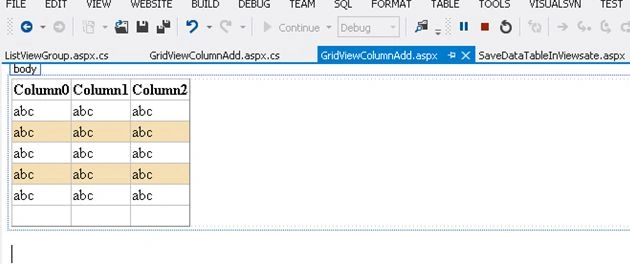
Figure 1
Code Chamber
Step 4
In the code chamber we will write some code so that our application works.
Add the following namespaces to the namespace section of your code behind page:
- using System;
- using System.Collections.Generic;
- using System.Linq;
- using System.Web;
- using System.Web.UI;
- using System.Web.UI.WebControls;
- using System.Data;
- using System.Data.SqlClient;
Code behind Page
- using System;
- using System.Collections.Generic;
- using System.Linq;
- using System.Web;
- using System.Web.UI;
- using System.Web.UI.WebControls;
- using System.Data;
- using System.Data.SqlClient;
- public partial class GridViewColumnAdd : System.Web.UI.Page
- {
- protected void Page_Load(object sender, EventArgs e)
- {
- if (!IsPostBack) {
- BindGridviewFooter();
- }
- }
- protected void BindGridviewFooter()
- {
- //Creating a dataset
- DataSet ds = new DataSet();
- DataTable dt;
- DataRow dr;
- DataColumn pName;
- DataColumn pQty;
- DataColumn pPrice;
- DataColumn pCategory;
- //create an object of datatable
- dt = new DataTable();
- //creating column of datatable with datatype
- pName = new DataColumn("Product_Name", Type.GetType("System.String"));
- pQty = new DataColumn("Quantity", Type.GetType("System.Int32"));
- pPrice = new DataColumn("Price", Type.GetType("System.Int32"));
- pCategory = new DataColumn("Category", Type.GetType("System.String"));
- //bind data table columns in datatable
- dt.Columns.Add(pName);
- dt.Columns.Add(pQty);
- dt.Columns.Add(pPrice);
- dt.Columns.Add(pCategory);
- //creating data row and assiging the value to columns of datatable
- dr = dt.NewRow();
- dr["Product_Name"] = "Product 1";
- dr["Quantity"] = 2;
- dr["Price"] = 200;
- dr["Category"] = "Cat1";
- dt.Rows.Add(dr);
- dr = dt.NewRow();
- dr["Product_Name"] = "Product 2";
- dr["Quantity"] = 5;
- dr["Price"] = 480;
- dr["Category"] = "Cat2";
- dt.Rows.Add(dr);
- dr = dt.NewRow();
- dr["Product_Name"] = "Product 3";
- dr["Quantity"] = 8;
- dr["Price"] = 100;
- dr["Category"] = "Cat1";
- dt.Rows.Add(dr);
- dr = dt.NewRow();
- dr["Product_Name"] = "Product 4";
- dr["Quantity"] = 2;
- dr["Price"] = 500;
- dr["Category"] = "Cat2";
- dt.Rows.Add(dr);
- dr = dt.NewRow();
- dr["Product_Name"] = "Product 5";
- dr["Quantity"] = 8;
- dr["Price"] = 100;
- dr["Category"] = "Cat1";
- dt.Rows.Add(dr);
- dr = dt.NewRow();
- dr["Product_Name"] = "Product 6";
- dr["Quantity"] = 3;
- dr["Price"] = 90;
- dr["Category"] = "Cat1";
- dt.Rows.Add(dr);
- dr = dt.NewRow();
- dr["Product_Name"] = "Product 7";
- dr["Quantity"] = 18;
- dr["Price"] = 1100;
- dr["Category"] = "Cat2";
- dt.Rows.Add(dr);
- ds.Tables.Add(dt);
- GridView1.DataSource = ds.Tables[0];
- GridView1.DataBind();
- //here add code for column total sum and show in footer
- int total = 0; ;
- GridView1.FooterRow.Cells[0].Text = "Total";
- GridView1.FooterRow.Cells[1].Font.Bold = true;
- GridView1.FooterRow.Cells[1].HorizontalAlign = HorizontalAlign.Left;
- for (int k = 1; k < dt.Columns.Count-1; k++)
- {
- total = dt.AsEnumerable().Sum(row => row.Field<Int32>(dt.Columns[k].ToString()));
- GridView1.FooterRow.Cells[k].Text = total.ToString();
- GridView1.FooterRow.Cells[k].Font.Bold = true;
- GridView1.FooterRow.BackColor = System.Drawing.Color.Beige;
- }
- }
- }
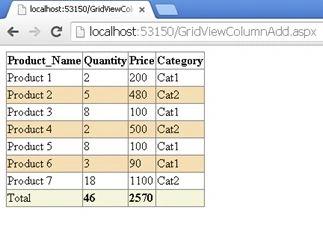
Figure 2
I hope you liked this. Have a good day. Thank you for reading.
kiran veeraPosted Jun 1, 2021, 7:27 AM
Not working while we exporting to CSV and PDF
Habibur RahmanPosted Jul 29, 2019, 2:54 PM
Thanks a lot
Habibur RahmanPosted Jul 29, 2019, 2:54 PM
Thanks a lot
Habibur RahmanPosted Jul 23, 2019, 12:58 PM
It's cool. thanks a alot.
Dharmendra Kumar PanditPosted Jun 29, 2019, 5:12 AM
Its working fine . Nice article.....
dharmendra yadavPosted Jan 31, 2018, 2:28 AM
Specified cast is not valid.
Santhakumar MunuswamyPosted Jul 23, 2015, 3:11 PM
Thanks for nice article:)
Gopi ChandPosted Jul 21, 2015, 3:37 AM
Good share
Sibeesh VenuPosted Jul 21, 2015, 2:09 AM
Nice Share
SharadPosted Jul 21, 2015, 2:06 AM
nice article..
RakeshPosted Jul 20, 2015, 11:27 PM
Good one