

Introduction
Consider a scenario where you need to add users to the user policy for multiple web applications in multiple Farms. PowerShell is useful for that. In this article I will outline how to add users or groups to a SharePoint web application user's policy.
Preparation
Before executing the script you must first identify the users and groups that need to be added to multiple web applications in the SharePoint Farm. Group the web application list into a text file (WebapplicationList.txt). The script parses through this input file and adds the users or groups to the user policy of each web application in the list.
Functionality
The script provides options to do the following tasks:
- Grant FULL CONTROL access
- Grant FULL READ access
- DENY WRITE
- DENY ALL
Function 1
The following piece of code helps you to provide “FULL CONTROL” access:
- Function FullControl()
- {
- $UserOrGroup = read-host "Enter the user or group for which you want to apply FULL CONTROL (e.g domain\user) "
- write-host "Place the WebapplicationList.txt file under the folder where the script exists" -fore Magenta
- $Didyouplacethefile = read-host "Did you place the WebapplicationList.txt file under the folder where the script exists (y/n)?"
- if($Didyouplacethefile -eq 'y')
- {
- $testpath = Test-path -path $scriptbase\WebapplicationList.txt
- if($testpath)
- {
- foreach($webapplication in get-content "$scriptbase\WebapplicationList.txt")
- {
- $webapp = get-spwebapplication $webapplication
- write-host "Adding user or group " $userorgroup " to the webapplication " $webapplication "user policy and providing FULL CONTROL access" -fore yellow
- $policy = $webApp.Policies.Add($userOrGroup, $userOrGroup)
- $policyRole = $webApp.PolicyRoles.GetSpecialRole([Microsoft.SharePoint.Administration.SPPolicyRoleType]::FullControl)
- $policy.PolicyRoleBindings.Add($policyRole)
- $webApp.Update()
- write-host "User or group " $userorgroup " added to the webapplication " $webapplication -fore green
- }
- }
- else
- {
- write-host "The file is not placed or its incorrectly spelled" -fore cyan
- }
- }
- else
- {
- write-host "The user choose to exit.... Please try again after placing the file" -fore cyan
- }
- }
The following piece of code helps you to provide “FULL READ” access:
- Function FullRead()
- {
- $UserOrGroup = read-host "Enter the user or group for which you want to apply FULL READ (e.g domain\user) "
- write-host "Place the WebapplicationList.txt file under the folder where the script exists" -fore Magenta
- $Didyouplacethefile = read-host "Did you place the WebapplicationList.txt file under the folder where the script exists (y/n)?"
- if($Didyouplacethefile -eq 'y')
- {
- $testpath = Test-path -path $scriptbase\WebapplicationList.txt
- if($testpath)
- {
- foreach($webapplication in get-content "$scriptbase\WebapplicationList.txt")
- {
- $webapp = get-spwebapplication $webapplication
- write-host "Adding user or group " $userorgroup " to the webapplication " $webapplication "user policy and providing FULL READ access" -fore yellow
- $policy = $webApp.Policies.Add($userOrGroup, $userOrGroup)
- $policyRole = $webApp.PolicyRoles.GetSpecialRole([Microsoft.SharePoint.Administration.SPPolicyRoleType]::FullRead)
- $policy.PolicyRoleBindings.Add($policyRole)
- $webApp.Update()
- write-host "User or group " $userorgroup " added to the webapplication " $webapplication -fore green
- }
- }
- else
- {
- write-host "The file is not placed or its incorrectly spelled" -fore cyan
- }
- }
- else
- {
- write-host "The user choose to exit.... Please try again after placing the file" -fore cyan
- }
- }
The following piece of code helps you to provide “DENY WRITE” access:
- Function DenyWrite()
- {
- $UserOrGroup = read-host "Enter the user or group for which you want to apply DENY WRITE (e.g domain\user) "
- write-host "Place the WebapplicationList.txt file under the folder where the script exists" -fore Magenta
- $Didyouplacethefile = read-host "Did you place the WebapplicationList.txt file under the folder where the script exists (y/n)?"
- if($Didyouplacethefile -eq 'y')
- {
- $testpath = Test-path -path $scriptbase\WebapplicationList.txt
- if($testpath)
- {
- foreach($webapplication in get-content "$scriptbase\WebapplicationList.txt")
- {
- $webapp = get-spwebapplication $webapplication
- write-host "Adding user or group " $userorgroup " to the webapplication " $webapplication "user policy and providing DENY WRITE access" -fore yellow
- $policy = $webApp.Policies.Add($userOrGroup, $userOrGroup)
- $policyRole = $webApp.PolicyRoles.GetSpecialRole([Microsoft.SharePoint.Administration.SPPolicyRoleType]::DenyWrite)
- $policy.PolicyRoleBindings.Add($policyRole)
- $webApp.Update()
- write-host "User or group " $userorgroup " added to the webapplication " $webapplication -fore green
- }
- }
- else
- {
- write-host "The file is not placed or its incorrectly spelled" -fore cyan
- }
- }
- else
- {
- write-host "The user choose to exit.... Please try again after placing the file" -fore cyan
- }
- }
The following piece of code helps you to provide “DENY ALL” access:
- Function DenyAll()
- {
- $UserOrGroup = read-host "Enter the user or group for which you want to apply DENY ALL (e.g domain\user) "
- write-host "Place the WebapplicationList.txt file under the folder where the script exists" -fore Magenta
- $Didyouplacethefile = read-host "Did you place the WebapplicationList.txt file under the folder where the script exists (y/n)?"
- if($Didyouplacethefile -eq 'y')
- {
- $testpath = Test-path -path $scriptbase\WebapplicationList.txt
- if($testpath)
- {
- foreach($webapplication in get-content "$scriptbase\WebapplicationList.txt")
- {
- $webapp = get-spwebapplication $webapplication
- write-host "Adding user or group " $userorgroup " to the webapplication " $webapplication "user policy and providing DENY ALL access" -fore yellow
- $policy = $webApp.Policies.Add($userOrGroup, $userOrGroup)
- $policyRole = $webApp.PolicyRoles.GetSpecialRole([Microsoft.SharePoint.Administration.SPPolicyRoleType]::DenyAll)
- $policy.PolicyRoleBindings.Add($policyRole)
- $webApp.Update()
- write-host "User or group " $userorgroup " added to the webapplication " $webapplication -fore green
- }
- }
- else
- {
- write-host "The file is not placed or its incorrectly spelled" -fore cyan
- }
- }
- else
- {
- write-host "The user choose to exit.... Please try again after placing the file" -fore cyan
- }
- }
- $LogTime = Get-Date -Format yyyy-MM-dd_hh-mm
- $LogFile = ".\AddUserOrGroupToWebAppPolicyPatch-$LogTime.rtf"
- # Add SharePoint PowerShell Snapin
- if ( (Get-PSSnapin -Name Microsoft.SharePoint.PowerShell -ErrorAction SilentlyContinue) -eq $null ) {
- Add-PSSnapin Microsoft.SharePoint.Powershell
- }
- $scriptBase = split-path $SCRIPT:MyInvocation.MyCommand.Path -parent
- Set-Location $scriptBase
- #Deleting any .rtf files in the scriptbase location
- $FindRTFFile = Get-ChildItem $scriptBase\*.* -include *.rtf
- if($FindRTFFile)
- {
- foreach($file in $FindRTFFile)
- {
- remove-item $file
- }
- }
- start-transcript $logfile
- Function FullRead()
- {
- $UserOrGroup = read-host "Enter the user or group for which you want to apply FULL READ (e.g domain\user) "
- write-host "Place the WebapplicationList.txt file under the folder where the script exists" -fore Magenta
- $Didyouplacethefile = read-host "Did you place the WebapplicationList.txt file under the folder where the script exists (y/n)?"
- if($Didyouplacethefile -eq 'y')
- {
- $testpath = Test-path -path $scriptbase\WebapplicationList.txt
- if($testpath)
- {
- foreach($webapplication in get-content "$scriptbase\WebapplicationList.txt")
- {
- $webapp = get-spwebapplication $webapplication
- write-host "Adding user or group " $userorgroup " to the webapplication " $webapplication "user policy and providing FULL READ access" -fore yellow
- $policy = $webApp.Policies.Add($userOrGroup, $userOrGroup)
- $policyRole = $webApp.PolicyRoles.GetSpecialRole([Microsoft.SharePoint.Administration.SPPolicyRoleType]::FullRead)
- $policy.PolicyRoleBindings.Add($policyRole)
- $webApp.Update()
- write-host "User or group " $userorgroup " added to the webapplication " $webapplication -fore green
- }
- }
- else
- {
- write-host "The file is not placed or its incorrectly spelled" -fore cyan
- }
- }
- else
- {
- write-host "The user choose to exit.... Please try again after placing the file" -fore cyan
- }
- }
- Function FullControl()
- {
- $UserOrGroup = read-host "Enter the user or group for which you want to apply FULL CONTROL (e.g domain\user) "
- write-host "Place the WebapplicationList.txt file under the folder where the script exists" -fore Magenta
- $Didyouplacethefile = read-host "Did you place the WebapplicationList.txt file under the folder where the script exists (y/n)?"
- if($Didyouplacethefile -eq 'y')
- {
- $testpath = Test-path -path $scriptbase\WebapplicationList.txt
- if($testpath)
- {
- foreach($webapplication in get-content "$scriptbase\WebapplicationList.txt")
- {
- $webapp = get-spwebapplication $webapplication
- write-host "Adding user or group " $userorgroup " to the webapplication " $webapplication "user policy and providing FULL CONTROL access" -fore yellow
- $policy = $webApp.Policies.Add($userOrGroup, $userOrGroup)
- $policyRole = $webApp.PolicyRoles.GetSpecialRole([Microsoft.SharePoint.Administration.SPPolicyRoleType]::FullControl)
- $policy.PolicyRoleBindings.Add($policyRole)
- $webApp.Update()
- write-host "User or group " $userorgroup " added to the webapplication " $webapplication -fore green
- }
- }
- else
- {
- write-host "The file is not placed or its incorrectly spelled" -fore cyan
- }
- }
- else
- {
- write-host "The user choose to exit.... Please try again after placing the file" -fore cyan
- }
- }
- Function DenyWrite()
- {
- $UserOrGroup = read-host "Enter the user or group for which you want to apply DENY WRITE (e.g domain\user) "
- write-host "Place the WebapplicationList.txt file under the folder where the script exists" -fore Magenta
- $Didyouplacethefile = read-host "Did you place the WebapplicationList.txt file under the folder where the script exists (y/n)?"
- if($Didyouplacethefile -eq 'y')
- {
- $testpath = Test-path -path $scriptbase\WebapplicationList.txt
- if($testpath)
- {
- foreach($webapplication in get-content "$scriptbase\WebapplicationList.txt")
- {
- $webapp = get-spwebapplication $webapplication
- write-host "Adding user or group " $userorgroup " to the webapplication " $webapplication "user policy and providing DENY WRITE access" -fore yellow
- $policy = $webApp.Policies.Add($userOrGroup, $userOrGroup)
- $policyRole = $webApp.PolicyRoles.GetSpecialRole([Microsoft.SharePoint.Administration.SPPolicyRoleType]::DenyWrite)
- $policy.PolicyRoleBindings.Add($policyRole)
- $webApp.Update()
- write-host "User or group " $userorgroup " added to the webapplication " $webapplication -fore green
- }
- }
- else
- {
- write-host "The file is not placed or its incorrectly spelled" -fore cyan
- }
- }
- else
- {
- write-host "The user choose to exit.... Please try again after placing the file" -fore cyan
- }
- }
- Function DenyAll()
- {
- $UserOrGroup = read-host "Enter the user or group for which you want to apply DENY ALL (e.g domain\user) "
- write-host "Place the WebapplicationList.txt file under the folder where the script exists" -fore Magenta
- $Didyouplacethefile = read-host "Did you place the WebapplicationList.txt file under the folder where the script exists (y/n)?"
- if($Didyouplacethefile -eq 'y')
- {
- $testpath = Test-path -path $scriptbase\WebapplicationList.txt
- if($testpath)
- {
- foreach($webapplication in get-content "$scriptbase\WebapplicationList.txt")
- {
- $webapp = get-spwebapplication $webapplication
- write-host "Adding user or group " $userorgroup " to the webapplication " $webapplication "user policy and providing DENY ALL access" -fore yellow
- $policy = $webApp.Policies.Add($userOrGroup, $userOrGroup)
- $policyRole = $webApp.PolicyRoles.GetSpecialRole([Microsoft.SharePoint.Administration.SPPolicyRoleType]::DenyAll)
- $policy.PolicyRoleBindings.Add($policyRole)
- $webApp.Update()
- write-host "User or group " $userorgroup " added to the webapplication " $webapplication -fore green
- }
- }
- else
- {
- write-host "The file is not placed or its incorrectly spelled" -fore cyan
- }
- }
- else
- {
- write-host "The user choose to exit.... Please try again after placing the file" -fore cyan
- }
- }
- write-host "########################################################################################################" -fore cyan
- write-host "Enter 1 to provide FULL READ access" -fore green
- write-host "Enter 2 to provide FULL CONTROL access" -fore green
- write-host "Enter 3 to DENY WRITE access" -fore green
- write-host "Enter 4 to DENY ALL access" -fore green
- write-host "########################################################################################################" -fore cyan
- $option = read-host "Enter the option "
- switch($option)
- {
- 1{
- FullRead
- }
- 2{
- FullControl
- }
- 3{
- DenyWrite
- }
- 4{
- DenyAll
- }
- }
- write-host ""
- write-host "SCRIPT COMPLETED" -fore Blue
- stop-transcript
Step 1: Download and copy the script to your SharePoint server. Populate the input file (WebapplicationList.txt) with the web application details and place it under the same location where the script exists.
Step 2: Navigate to the script path.
Step 3: Execute the script as in the following:
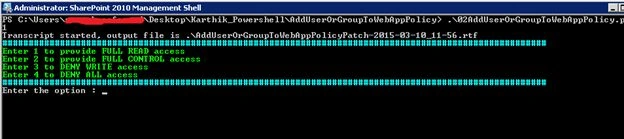
Enter option 1 or 2 or 3 or 4 to get the desired output.
Conclusion
Thus this article provides an outline for how to add users or groups to a web application's user policy using a PowerShell script.
Shruthi BMPosted Sep 7, 2015, 4:34 AM
The script above adds single user to multiple web application. Could you please let me know how can i add multiple users to single web application with different permission level.
Karthik Muthu KaruppanPosted Apr 30, 2015, 11:08 AM
thanks
Vijay SPosted Apr 30, 2015, 3:42 AM
Useful
Karthik Muthu KaruppanPosted Mar 11, 2015, 11:16 AM
Thanks guys
Tom MohanPosted Mar 11, 2015, 4:56 AM
good effort
Rahul Kumar SaxenaPosted Mar 11, 2015, 3:06 AM
Well Explained