In this article I will explain how we can add a new Context menu according to our needs in a simple way through UI by using Content Editor Web part.
Here my requirement is to provide a context menu that will link to an external site from SharePoint library.
Here we will see how we can add a new menu to the library step by step
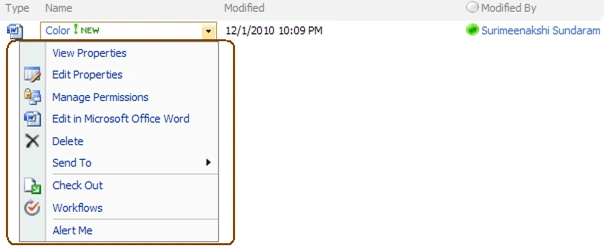
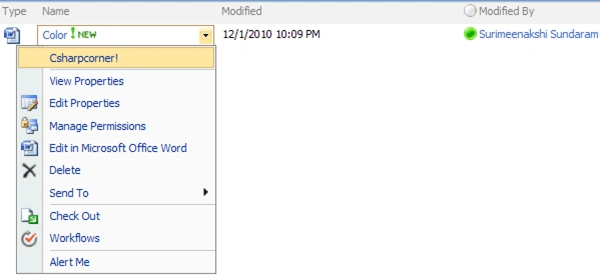
By Default Context Menu is as shown below:
Now we will see how we can add a menu to link to the External site.
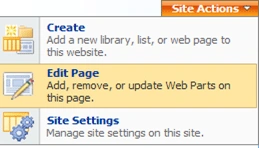
Edit the page using Site Actions
Step 1
Note: - if you are not able to see the "Edit Page" then you need to add the following string at the end of the URL
toolpaneview=2
After that you will see the page in editpage View
Step 2
Then Click Add webpart and select the Content Editor Webpart
Then Click Add
Step 3
Once you added the webpart into that page Click "Open the Tool Pane"
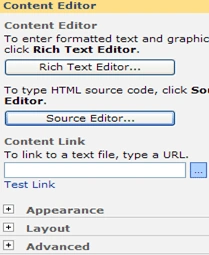
Then you will get the Properties of the webpart In right side of the same page as shown below
Step 4
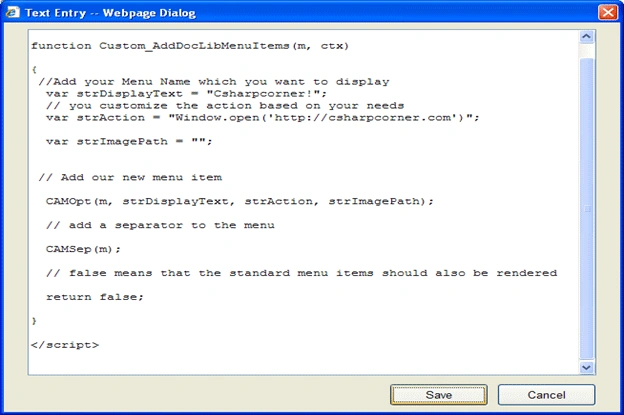
Now click the Source Editor to add the Script to show our Custom Context Menu.
Step 5
Hit the save button and then click ok.
Now menu is available.
Please refer to the image below
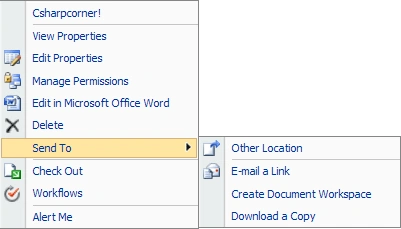
Similarly I want to hide the "Send To" Menu options to avoid other operations like (Download Copy etc...)
Edit the page using site actions menu then edit the Content Editor Webpart
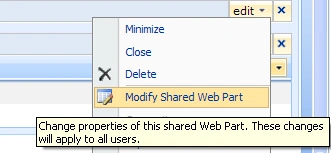
Click the "Modify Shared Web Part" as mentioned below
You will get the Properties of the webpart in the Right side of the page. Add the following script in source editor (which is highlighted).
Once you have added it, hit the save button and Click ok.
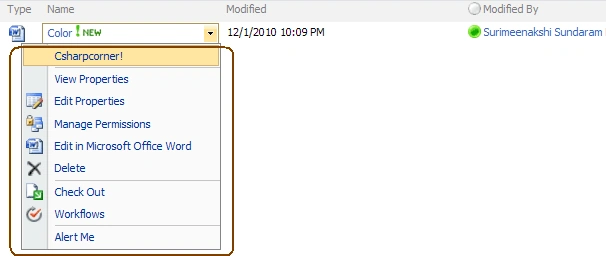
Now the "Send To" option will not be available as shown below
Similary if you want to do for a List, you have to use the Different method name.
For Document Library : Instead "Custom_AddDocLibMenuItems"
For List : "Custom_AddListMenuItems"
Also you can do the following using Script in Content Editor Webpart
To hide the "Delete" (particular) menu item in LibraryContext Menu add this below function
function CAMOpt(p,wzText,wzAct,wzISrc,wzIAlt,wzISeq,wzDesc)
{
var mo=CMOpt(wzText,wzAct,wzISrc,wzIAlt,wzISeq,wzDesc);
if(!mo)return null;
//wzText you can give which one you want hide (like "Edit Properties")
if(wzText != "Delete") AChld(p,mo);
return mo;
}
You can download the script and add it in your content editor webpart; it will take care of the previous actions for document Library.
Use the approriate Script for list / library.
Enjoy!!!...





Ruchi AgarwalPosted Dec 7, 2012, 6:58 AM
please help in hiding "Delete Item" from List Context menu in the same way as done for Library..not able to do the same
rami reddyPosted Dec 17, 2010, 4:49 AM
Now i am using window.open('http://csharpcorner.com')"; instead of Window.open('http://csharpcorner.com')";. issue is resolved now. Thanks alot.
rami reddyPosted Dec 16, 2010, 12:27 AM
///Script for List <script language="javascript"> function Custom_AddListMenuItems(m, ctx) { //Add your Menu Name which you want to display var strDisplayText = "Csharpcorner!"; // you customize the action based on your needs var strAction = "Window.open('http://csharpcorner.com')"; var strImagePath = ""; // Add our new menu item CAMOpt(m, strDisplayText, strAction, strImagePath); // add a separator to the menu CAMSep(m); // false means that the standard menu items should also be rendered // if you set true, it will show only the menu which you added( standard sharepoint menu items will not be available. // you can control by setting the value of true or false return false; } ///Similary you can hide the "Delete Item" (particular) menu item in List Context Menu // Add this below function function CAMOpt(p,wzText,wzAct,wzISrc,wzIAlt,wzISeq,wzDesc) { var mo=CMOpt(wzText,wzAct,wzISrc,wzIAlt,wzISeq,wzDesc); if(!mo)return null; if(wzText != "Delete Item") AChld(p,mo); return mo; } </script>
rami reddyPosted Dec 15, 2010, 8:50 AM
Menu item is displayed, but when i click on it, it is not redirected to corresponding page