

This article has been
excerpted from book "A Programmer's Guide to ADO.NET in C#".
In this example, I'll show you various database operations such as adding;
updating and deleting data form a database using ADO.NET. I've used a Microsoft
Access 2000 database in this application to add, edit, and delete data; however,
working with other data sources such as SQL server is similar to Microsoft
Access. The only difference is creating data adapters objects.
Creating the Application
This application is web applicat6ion developed in Visual C# (see Figure 7-52).
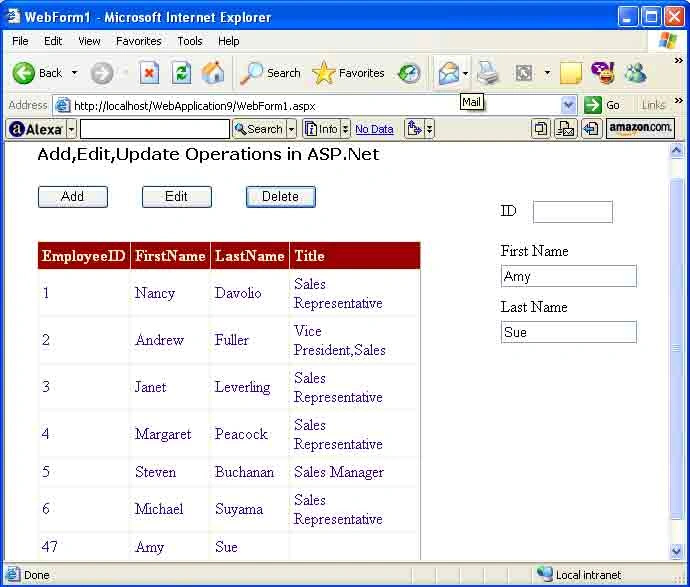
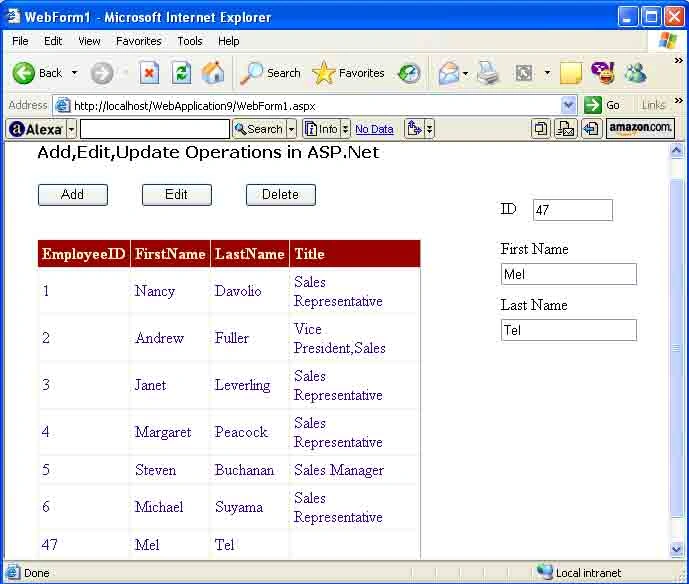
It displays the contents of the Employees table of the Northwind database. You
can set the color, fonts, headers, and footers of a DataGrid by using its
properties window at design-time as well as at run time.
Besides the Grid Control, the page has three buttons, three text boxes, and
three labels. The Add button adds a record to the database, the Edit button
updates a record, and the Delete button deletes a record from the database.
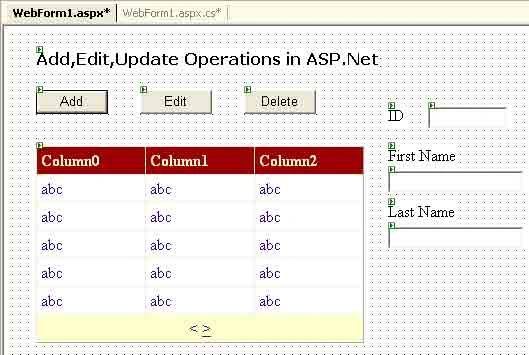
Figure 7-52. Adding, editing, and deleting in an ASP.NET application
Creating the Data Source
Similar to the previous samples, I'll use the same Northwind database in this
application. Listing 7-17 shows the code for the FillDataGrid method. As you can
see, you create a data adapter and dataset and them fill the dataset using the
Fill method of the data adapter. After that you set the DataSource property of
the data grid and call the DataGrid.DataBind method.
Listing 7-17. The FillDataGrid method to fill datagrid
private void
FillDataGrid()
{
// Creating a
connection
OleDbConnection conn = new
OleDbConnection();
conn.ConnectionString =
"Provider=Microsoft.Jet.OLEDB.4.0;" +
" Data Source = C:/Northwind.mdb";
string sql =
"SELECT EmployeeID,FirstName,LastName,Title FROM
Employees";
conn.Open();
// Creating a data
adapter
OleDbDataAdapter da = new
OleDbDataAdapter(sql, conn);
// Creating a
DataSet Object
DataSet ds =
new DataSet();
// Fill DataSet with
the data
da.Fill(ds, "Employees");
DataGrid1.DataSource = ds.Tables["Employees"].DefaultView;
DataGrid1.DataBind();
conn.Close();
}
Executing SQL Queries
You can use the OleDbCommand or SqlCommand object's Execute and ExecuteNonQuery
methods to execute SQL queries. If you want to add, update, or delete data from
a database, executing SQL queries is one of the easiest ways to do so. It's fast
and requires a minimum of code to write.
You use the OleDbCommand object to execute a SQL command. The Execute and
ExecuteNonQuery methods of OleDbCommand execute a SQL query. The
OleDbCommand.Execute method executes the CommandText property and returns data
in the OleDbDataReader object. As you can see from listing 7-18, the
CreateMyOleDbComamnd method executes a SQL statement.
Listing 7-18. Calling the Execute method to execute a SQL statement
public void
CreateMyOleDbComamnd(string sqlQuery,
string myCon)
{
OleDbCommand cmd = new
OleDbCommand(sqlQuery, AdoCon);
OleDbCommand myCom = (oleDbcommand)cmd.Clone();
OleDbDataAdapter reader;
myCom.ActiveConnection.open();
myCom.Execute(out reader);
}
Listing 7-19 shows how to construct OleDbCommand and set the
OleDbCommand.Command text property for performing a SELECT from the database's
Employees table.
Listing 7-19.The CommandText property of the command object
OleDbCommand cmd = new
OleDbCommand();
cmd.CommandText="SELECT * FROM
Employees";
The OleDbCommand.ExecuteNonQuery method executes CommandText and doesn't return
any data. The logical time to use this method is when you're writing to the
database or executing SQL statements that don't return any data (See Listing
7-20).
Listing 7-20. Calling the ExecuteNonQuery method
public void
CreateMyOleDbCommand(string sqlQuery,
string AdoCon)
{
OleDbCommand cmd = new
OleDbCommand(sqlQuery, AdoCon);
cmd.ActiveConnection.Open();
cmd.ExecuteNonQuery();
}
Note: Listing 7-21 shows the complete code for using the ExecuteNonQuery
method to execute SQL statements.
In this example, I used the OleDbCommand.ExecuteNonQuery() method to execute the
INSERT, UPDATE and DELETE SQL queries because I don't need to return any data.
My ExecuteSQL method the execution of a SQL query (see Listing 7-21).
Listing 7-21. The ExecuteSQL method executes a SQL statement using the
ExecuteNonQuery method
Join the conversation! Your thoughts help the community grow.