

This article has been
excerpted from book "A Programmer's Guide to ADO.NET in C#".
Now, why don't you ask the web service to do some more work than just returning
data from a database table?
This time I'm going to write to the database. I read data from a client in the
form of an array, place it in a dataset, and then add the data to the orders
table of the Northwind database.
To do so, I open the OrderRetrievalService project and generate a dataset by
using right-click > Generate DataSet option of the data adapter. The Generate
DataSet option of the date adapter generates a typed dataset and adds the class
DataSet1, which from the dataset.
Now I add a new web method called InsertOrder (see Listing 8-5). In this method,
I read data from a database using a data adapter and filled data from the data
adapter to a dataset using the data adapter's Fill method. As you can see from
Listing 8-5, I've used a SELECT * query with ORDER BY for the OrderId column
values.
It gets the last OrderId in the table to determine what is the next available
OrderId value. Then it creates a new DataRow in the dataset and populates the
row with data passed in from the client. Finally, it calls the Update method of
the data adapter to save the new row into the database.
Listing 8-5 Web service method for populating an order in the database
[WebMethod(Description = "Insert Order from
Array")]
public int
InsertOrder(string[] OrderInfo)
{
DataSet1 ds = new DataSet1();
oleDbDataAdapter1.SelectCommand.CommandText =
"select * from orders ORDER BY OrderId";
oleDbDataAdapter1.Fill(ds, "Orders");
DataRow drLast =
ds.orders.Rows[ds.orders.Rows.Count - 1];
int LastOrderId =
Convert.ToInt32(drLast["OrderId"]);
DataSet1.ordersRow dr = ds.orders.NewordersRow();
dr.OrderID = LastOrderId + 1;
dr.OrderDate = Convert.ToDateTime(OrderInfo[0]);
dr.ShipName = OredrInfo[1];
dr.ShipAddress = OredrInfo[2];
dr.ShipCity = OredrInfo[3];
dr.ShipCountry = OredrInfo[4];
dr.ShipPostalCode = OredrInfo[5];
ds.orders.AddordersRow(dr);
oleDbDataAdapter1.Update(ds, "Orders");
return dr.OrderID;
}
Now build and test the service. This service now has two methods, as shown in
Figure 8-21.

Figure 8-21. The InsertOrder and GetOrderFromDatabase methods of
OrderRetrievalService
Now it's time to test your newly added Web method InsertOrder. To test this
service, follow the same steps as in the previous section when testing your
GetOrderFromDataSet method.
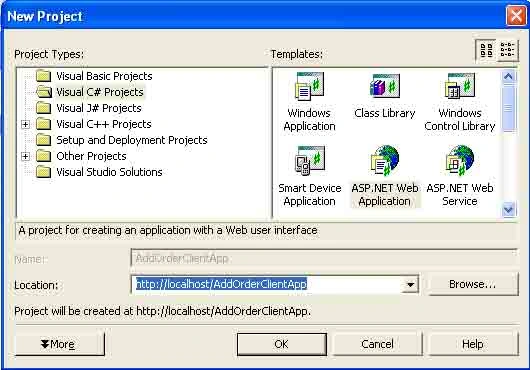
Create a web application project using VS.NET. You can even use the same client
you used to test the GetOrderFromDatabase method. Create a new project called
AddOrderClientApp (see Figure 8-22).


Join the conversation! Your thoughts help the community grow.