

Introduction
In this article I will tell you about how to add ASP.NET Identity to an empty or existing web forms project. I will outline all the Nuget Packages you need to install, and classes you need to add.
Description
Firstly, we will learn what is ASP.NET Identity and why we use them.
ASP.NET Identity
The ASP.NET Identity model is way more flexible than the old membership system.
ASP.NET Identity is the new membership system for building ASP.NET web application. It allows you to add login features to your application and makes it easy to customize data about the logged in user.
ASP.NET Identity can be used with all the ASP.NET framework such as ASP.NET MVC, Web Forms, Web Pages, Web API and SignalR.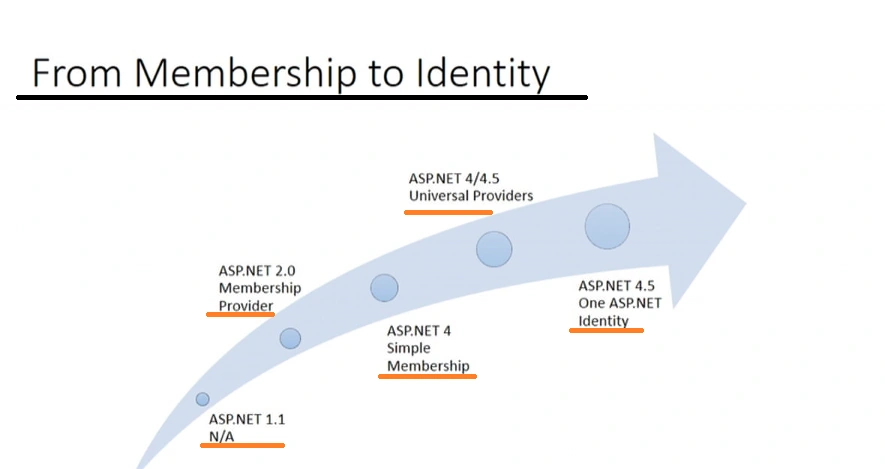
- One ASP.NET membership story-web APIs and Web Apps.
- Profile
- Extensibility allows for non SQL persistence Model.
- Improve unit testability of application code.
- Separate Authentication from membership .
- Full support for Async programming.
- Claims Based
- Roles
Now we will do the step by step process how to use ASP.NET Identity to an empty and existing Web forms project.
- Go to the Start and run Visual Studio 2013 for Web.
- Click new project from the start page or go to the menu and select file and then New project.
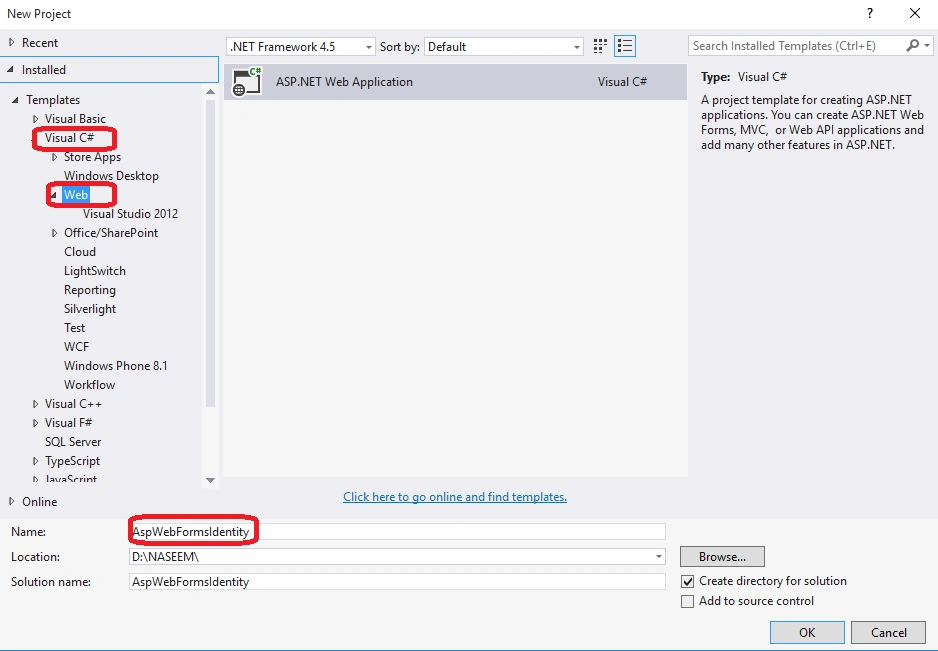
- Select Visual C# in the left side, then Web and then select ASP.NET Web application. Name your project ”AspWebFormsIdentity” and click OK.
- In the New ASP.NET Project dialog, we select the Empty template and then click OK.
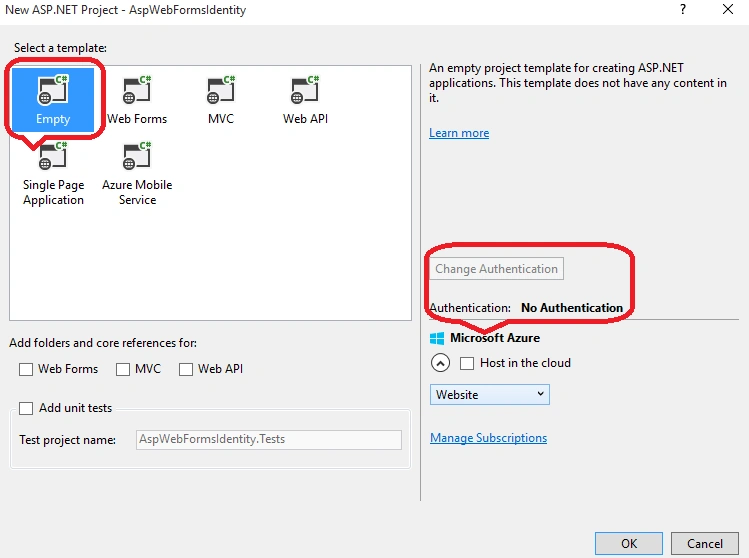
You can see the Change Authentication button is disabled because in this empty template no authentication support is provided. The Web Forms, MVC, and Web API template allow you to select the authentication mode as shown below.
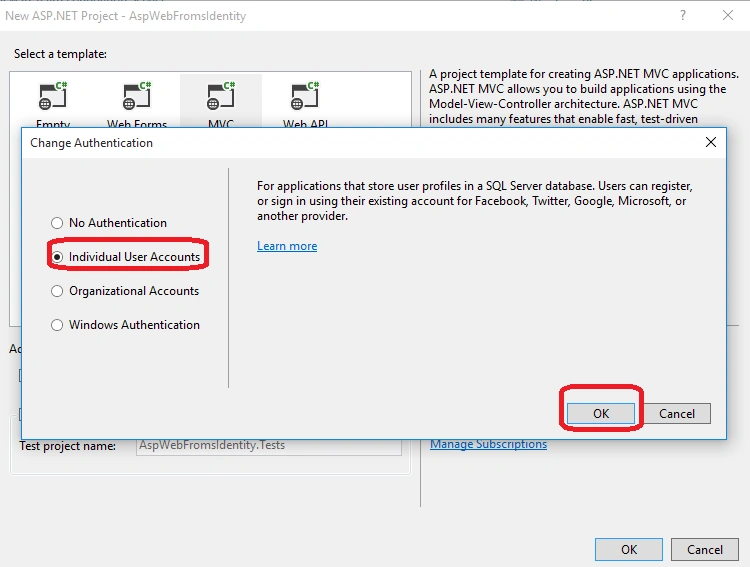
You can Add Identity Packages to App
Go to the Solution Explorer, right-click your project and select Manage NuGet Packages...

In the search text box dialog, type ”identity" and click Install for this package.
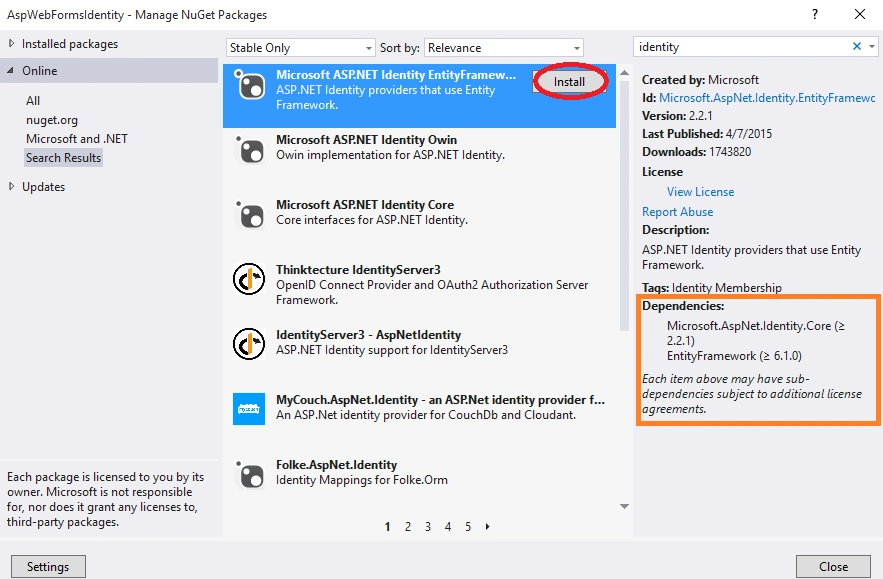
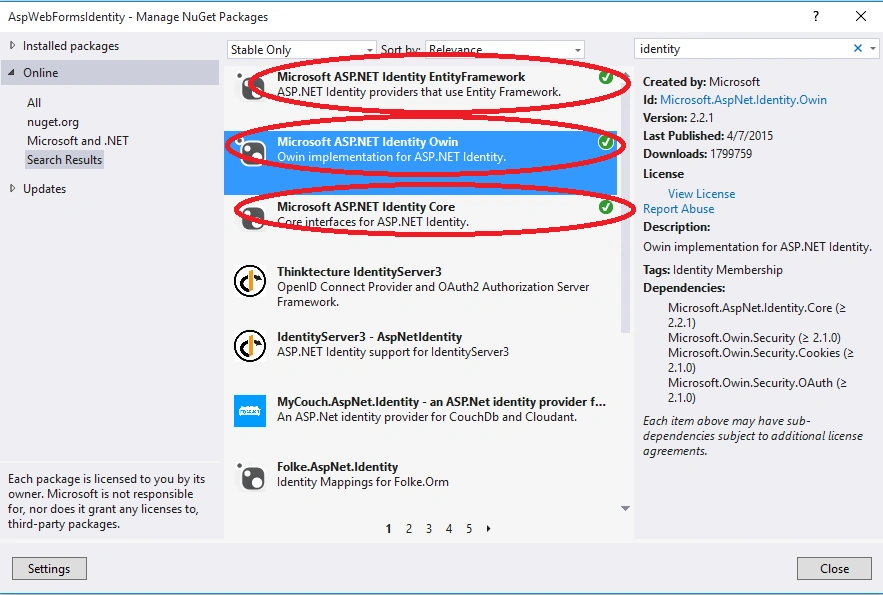
After that Adding the forms to create users
- Go to solution explorer, right click project and click add and then Web form.
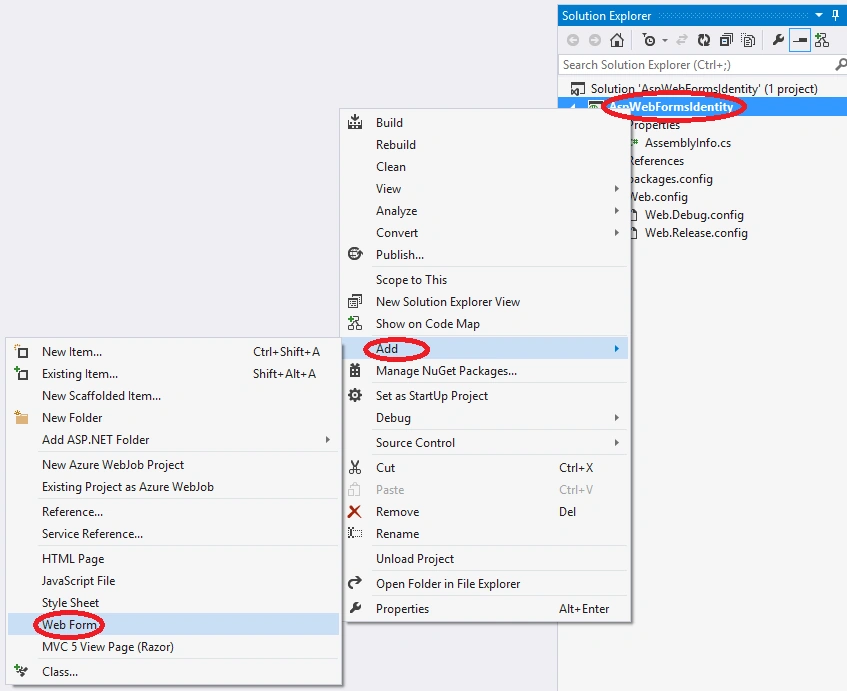
- In the Specify Name for item, name the web form Register, and click OK.
- Register.aspx file with the code below,
- <%@pageLanguage="C#"AutoEventWireup="true"CodeBehind="Register.aspx.cs"Inherits="AspWebFormsIdentity.Register”%>
- <!DOCTYPEhtml>
- <htmlxmlnshtmlxmlns="http://www.w3.org/1979/xhtml">
- <head runat="server">
- <title>My Web Forms Identity </title>
- </head>
- <body>
- <form id="form1" runat="server">
- <div>
- <h4> Create a new user</h4>
- <hr/>
- <p>
- <asp:Literal runat="server" ID="StatusMessage" /> </p>
- <div>
- <asp:Label runat="server" ID="UserName">User name</asp:Label>
- <div>
- <asp:TextBox runat="server" ID="UserName" /> </div>
- </div>
- <div>
- <asp:Label runat="server" ID="Password">Password</asp:Label>
- <div>
- <asp:TextBox runat="server" ID="Password" TextMode="Password" /> </div>
- </div>
- <div>
- <asp:Label runat="server" ID="ConfirmPassword">Confirm Password</asp:Label>
- <div>
- <asp:TextBox runat="server" ID="ConfirmPassword" TextMode="Password" /> </div>
- </div>
- <div>
- <div>
- <asp:Button runat="server" OnClick="CreateUser_Click" Text="Register" /> </div>
- </div>
- </div>
- </form>
- </body>
- </html>
- Now open the Register.aspx.cs file and replace the contents of the file with the following code.
- using System;
- using System.Collections.Generic;
- using System.Linq;
- using System.Web;
- using System.Web.UI;
- using System.Web.UI.WebControls;
- using Microsoft.AspNet.Identity;
- using Microsoft.AspNet.Identity.EntityFramework;
- namespace AspWebFormsIdentity
- {
- public partial class Register: System.Web.UI.Page
- {
- protected void Page_Load(object sender, EventArgs e)
- {}
- protected void CreateUser_Click(object sender, EventArgs e)
- {
- var userStore = new UserStore < IdentityUser > ();
- var manager = new UserManager < IdentityUser > (userStore);
- var user = new IdentityUser()
- {
- UserName = UserName.Text
- };
- IdentityResult result = manager.Create(user, Password.Text);
- if (result.Succeeded)
- {
- StatusMessage.Text = string.Format("User {0} was created successfully!", user.UserName);
- }
- else
- {
- StatusMessage.Text = result.Errors.FirstOrDefault();
- }
- }
- }
- }
- Go to Solution Explorer, right-click your project and click Add, Add ASP.NET folder and then App_Data.
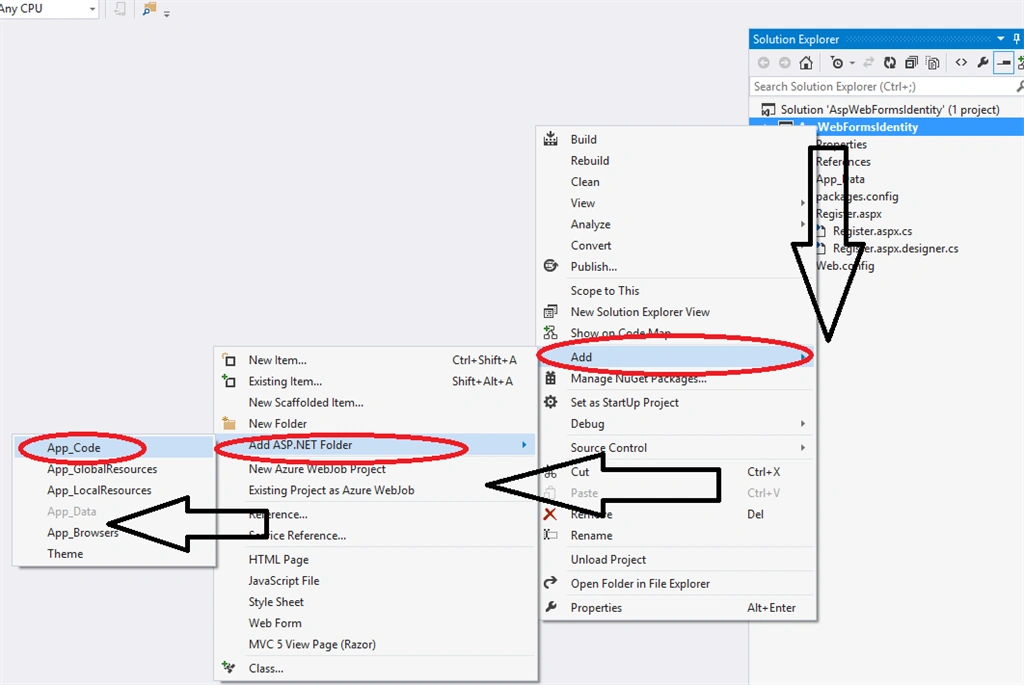
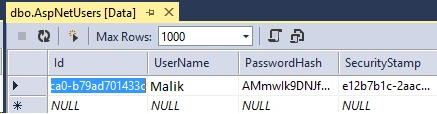
- Open the Web.config file and add a connection string. The database will be created at runtime by EntityFramework for the Identity entities.
- <?xmlversion="1.0"encoding="utf-8"?>
- <configuration>
- <configSections>
- <sectionname="entityFramework" type="System.Data.Entity.Internal.ConfigFile.EntityFrameworkSection, EntityFramework, Version=6.0.0.0, Culture=neutral, PublicKeyToken=b77a5c561934e08" requirePermission="false" /> </configSections>
- <connectionStrings>
- <addname="MalikData" connectionString="Data Source=(LocalDb)\v11.0;AttachDbFilename=|DataDirectory|\AspWebFormsIdentity.mdf;Initial Catalog=aspmem; uid=sa; password=Password$2" providerName="System.Data.SqlClient" /> </connectionStrings>
- <system.web>
- <compilationdebug="true" targetFramework="4.5" />
- <httpRuntimetargetFramework="4.5" /> </system.web>
- <entityFramework>
- <defaultConnectionFactorytype="System.Data.Entity.Infrastructure.LocalDbConnectionFactory, EntityFramework">
- <parameters>
- <parametervalue="v11.0" /> </parameters>
- </defaultConnectionFactory>
- <providers>
- <providerinvariantName="System.Data.SqlClient" type="System.Data.Entity.SqlServer.SqlProviderServices, EntityFramework.SqlServer" /> </providers>
- </entityFramework>
- </configuration>
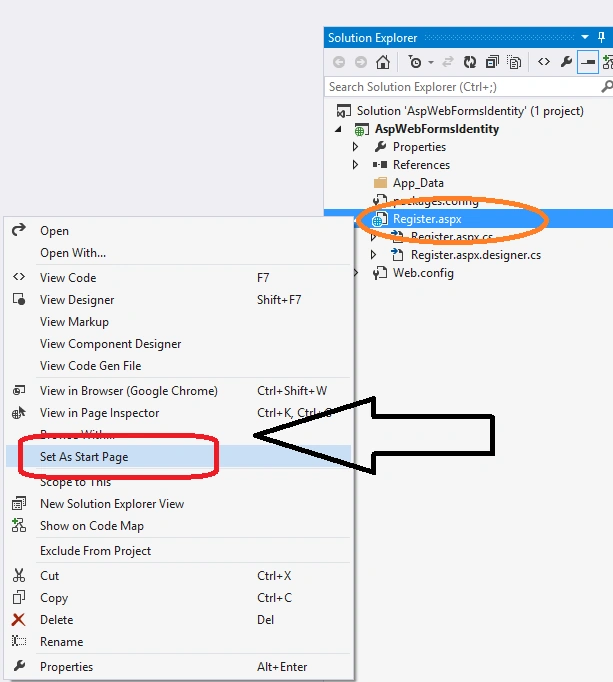
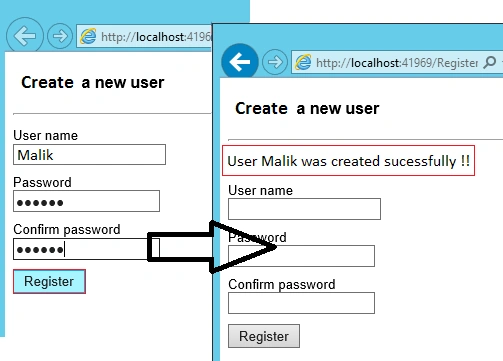
- Go to the Register.aspx andright click file Register.aspx in your project and select Set As Start Page.
NASEEM AHAMADPosted Dec 10, 2015, 5:54 AM
thanks everyone....
Sonu KumarPosted Dec 1, 2015, 6:10 AM
good and continue do it..
Humayun Kabir MamunPosted Dec 1, 2015, 3:29 AM
Nice...
Santhakumar MunuswamyPosted Nov 29, 2015, 11:51 PM
Good one
Mukesh KumarPosted Nov 29, 2015, 3:18 AM
Good One...
Ravi PatelPosted Nov 28, 2015, 5:04 AM
nice article
Sibeesh VenuPosted Nov 28, 2015, 2:37 AM
Nice Share
Harshad PansuriyaPosted Nov 27, 2015, 11:06 PM
Nice one
Muhammad Aqib ShehzadPosted Nov 27, 2015, 8:18 AM
good article dear
Raja TPosted Nov 27, 2015, 7:33 AM
Nice, Thanks for sharing