

In this article I will explain how we can customize the look and feel of a SharePoint List web part.
Step 1: Adding a List Web Part to a SharePoint page.
-
Open SharePoint; click on site action tab and select edit page.
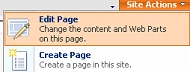
-
Now the Default .aspx page will be open in edit mode.
-
Click on web part zone to add list web part.

-
Now web part window will be open, select Tasks web part from the List and Libraries section and click on ok button.
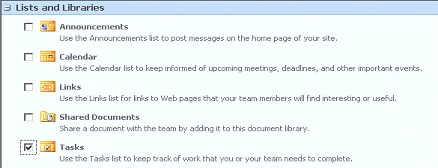
-
Now Tasks list web part will be added to the default.aspx page.
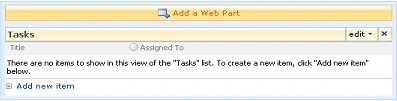
Step 2: Customizing Look and feel of the Task List Web Part.
-
Click on "Add a Web Part" and add a Content Editor Web Part.
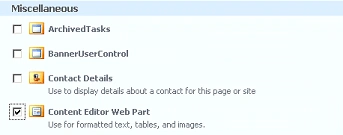
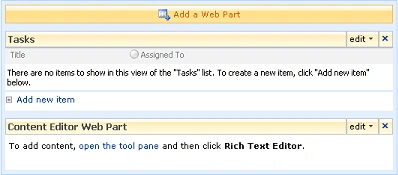
-
Now click on the edit menu of the Content Editor Web Part and choose Modify Shared Web Part.
-
Now Tool Pan will be open to modify web part.
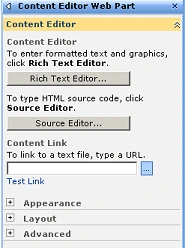
-
Click on source editor and paste the following code.
<style type="text/css">
.ms-WPHeader TD h3
{
.margin: 0;
padding: 3px 0px 2px 5px;
height:24px;
}
.ms-HoverCellInActive
{
margin: 0;
padding: 3px 0px 3px 0px;
height: 10px;
}
.ms-WPBorder
{
border-color: #85B2ED;
border-width: 1px;
height:50px;
overflow:auto;
}
.ms-WPBodyHeight
{
overflow:auto;
}
</style>
<script type="text/javascript" src="/_layouts/LSFIntranet/Scripts/jquery-1.3.1.js"></script>
<script type="text/javascript" src="/_layouts/LSFIntranet/Scripts/jquery.corner.js"></script>
<script type="text/javascript">
//Change these variables
var backColor = "#B5BEC6"
var textColor = "#002473"
AddWebPartCorners();
function AddWebPartCorners() {
$(".ms-WPHeader TD h3").css("color", textColor);
$(".ms-WPHeader TD h3 a:link, .ms-WPHeader TD h3 a:visited").css("color", textColor);
$(".ms-WPHeader TD h3").css("background-color", backColor).corner("tl 7px");
$(".ms-WPHeader td").css("padding-right", "0px");
$(".ms-WPHeader td").css("border-bottom", "0px");
$(".ms-HoverCellInActive").css("background-color", backColor).corner("tr 7px");
$("div[id^=WebPart]").addClass("ms-WPBodyHeight");
}
</script>
-
Now change the chrom state default to none of content editor web part and click on Ok button.

-
Now to add a scrollbar modify Tasks list web part and set height to 100 px from Appearance section.
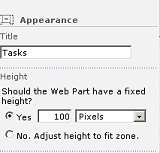
-
Add some items in the tasks list to view scroll bar..
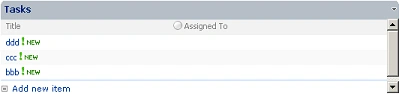
Thanks for reading this article.
Ramu MannemPosted Dec 3, 2019, 5:00 AM
How to insert scrolling text for guest links in sharepoint?
Ruth Omo-EzomoPosted Sep 25, 2017, 12:31 PM
Hello Vivek, this looks easy but I don't see the "task" folder after i clicked "web parts zone"...help please
Mukesh KumarPosted Oct 18, 2015, 2:59 PM
Good Job done by you sir
nge layPosted Feb 6, 2012, 5:13 AM
which webpart need to change here " $("div[id^=WebPart]").addClass("ms-WPBodyHeight");"? thx u
nge layPosted Feb 6, 2012, 4:59 AM
Dear Sir, how did you manage to combine 2 webparts? i want anouncement webpart to show scroll bar. but i can't combine that two webparts. pls explain me asap. Thank you so much.
Lakshmi H SPosted Jun 10, 2011, 2:27 PM
Hi I fallowed the abouve instructions, but scroll bar is not coming. PLease help