

Introduction
In this blog, we will explore the development of an advanced real-time chat application that facilitates communication both between individual users (one-to-one) and within user groups (one-to-many). The application is built using .NET 8, SignalR for real-time communication, and MS-SQL as the database. We will leverage ASP.NET Identity roles to create user groups, enabling targeted messaging within these groups.
Please follow SignalR's official documentation for more information.
Prerequisites
- Visual Studio 2022 installed,
- Microsoft SQL Server 18,
- Basics of Asp .Net Web, SignalR, Javascript
Source Code
This source code is publicly available on the GitHub link.
Step 1. Open Visual Studio 2022 and create a new MVC Project.

Step 2. Right-click on Solution Add new Scafolded Items > Identity > Select all the features > Add.
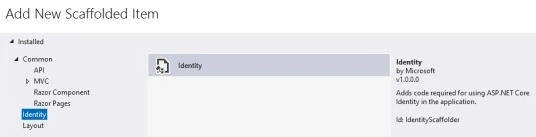
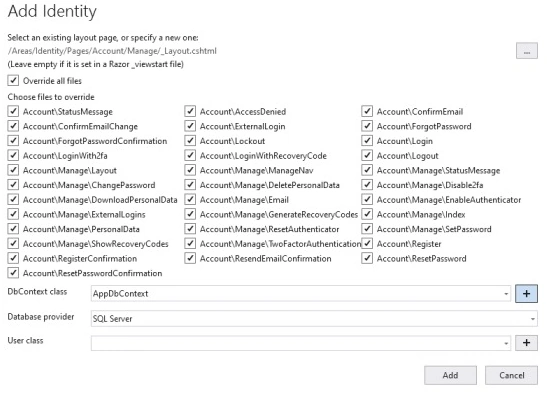
Step 3. Go to the App settings and change your connection string accordingly.
"ConnectionStrings": {
  "AppDbContextConnection": "Data Source = DESKTOP-R22RJF3\\SQLEXPRESS; Database = SignalRMVC; Integrated Security = True; Connect Timeout = 30; Encrypt = False; TrustServerCertificate = False; ApplicationIntent = ReadWrite; MultiSubnetFailover = False"
}
Step 4. Add _loginPartial view to the navbar of the _Layout.cshtml page.
<partial name="_LoginPartial" />

Step 5. Open the Package Manager console, then add a new migration. This will create a migration for the
add-migration FirstMigration
Step 6. Type the update database in the Package Manager console. This will create a database.
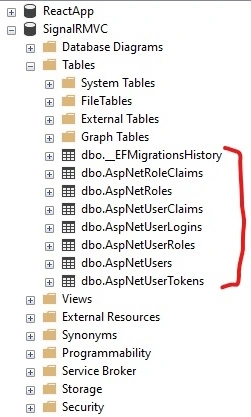
Step 7. Add the following line in the program.cs
app.MapRazorPages();
Step 8. Run the Application.

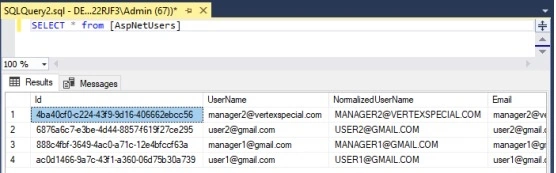
Step 9. Click on Register. Register the four users as [email protected], [email protected], [email protected], [email protected]. And click on Confirm Email.

If you look into the database, four users have been created as below.
Add two roles, User and Manager, into the AspNetRoles table.
INSERT INTO [dbo].[AspNetRoles]
           ([Id],[Name],[NormalizedName])
     VALUES
           ('43064954-d35d-49ef-9cf2-abe84345e891','User','USER'),
		   ('c87fa796-d513-4c1b-aef5-2bfd73e7a439','Manager','MANAGER')
Then, map users to the role in the AspNetUserRoles table.
 Insert into AspNetUserRoles values
		   ('4ba40cf0-c224-43f9-9d16-406662ebcc56','c87fa796-d513-4c1b-aef5-2bfd73e7a439'),
		   ('888c4fbf-3649-4ac0-a71c-12e4bfccf63a','c87fa796-d513-4c1b-aef5-2bfd73e7a439'),
		   ('6876a6c7-e3be-4d44-8857-f619f27ce295','43064954-d35d-49ef-9cf2-abe84345e891'),
		   ('ac0d1466-9a7c-43f1-a360-06d75b30a739','43064954-d35d-49ef-9cf2-abe84345e891')
Note. Please replace UserId according to the ID of the AspNetUsers table.
Step 10. Log in to the App via the credentials of user1.
This will open a home page as below.

Step 11. Go to the solution explorer and add a new class RoleViewModel.
public class RoleViewModel
{
    public IList<string> UserRoles { get; set; }
}
Step 12. Go to the Solution Explorer > Views > Home > index. cshtml and paste the code below.
@model RoleViewModel

<div class="container">
    <div class="row"> </div>

    <div class="row">
        <div class="col-3">Role</div>
        <div class="col-6" id="role" style="color:blue">@Model.UserRoles?.FirstOrDefault()</div>
    </div>
    <div class="row">
        <div class="col-3">Sender</div>
        <div class="col-6"><input class="col-12" type="text" value="@User.Identity?.Name" id="senderEmail" disabled /></div>
    </div>
    <div class="row">
        <div class="col-3">Receiver</div>
        <div class="col-6"><input class="col-12" type="text" id="receiverEmail" /></div>
    </div>
    <div class="row">
        <div class="col-3">Message</div>
        <div class="col-6"><input class="col-12" type="text" id="chatMessage" /></div>
    </div>
    <div class="row"> </div>
    <div class="row">
        <div class="col-6">
            <input type="button" id="sendMessage" value="Send Message" />
        </div>
        <div class="col-6">
            <input type="button" id="sendMessageToGroup" value="Send Message to Group" />
        </div>
    </div>
    <div class="row">
        <div class="col-12">
            <hr />
        </div>
    </div>
    <div class="row">
        <div class="col-6">
            <ul id="messagesList"></ul>
        </div>
    </div>

</div>

<script src="https://cdnjs.cloudflare.com/ajax/libs/microsoft-signalr/8.0.7/signalr.js"></script>
<script>

    var connectionChat = new signalR.HubConnectionBuilder().withUrl("/hubs/basicchat").build();

    document.getElementById("sendMessage").disabled = false;
    connectionChat.on("MessageReceived", function (user, message) {
        var li = document.createElement("li");
        document.getElementById("messagesList").appendChild(li);
        li.textContent = `${user} - ${message}`;
    });

    document.getElementById("sendMessage").addEventListener("click", function (event) {
        var sender = document.getElementById("senderEmail").value;
        var message = document.getElementById("chatMessage").value;
        var receiver = document.getElementById("receiverEmail").value;
        if (receiver.length > 0) {

            $.ajax({
                url: '/SendMessageToReceiver',
                type: 'GET',
                data: { sender: sender, receiver: receiver, message: message },
                success: function (response) {
                    console.log(response);
                },
                error: function (error) {
                    console.error('Error:', error);
                }
            });
        }
        else {
            //send message to all of the users

            $.ajax({
                url: '/SendMessageToAll',
                type: 'GET',
                data: { user: sender, message: message },
                success: function (response) {
                    console.log(response);
                },
                error: function (error) {
                    console.error('Error:', error);
                }
            });

        }
        event.preventDefault();
    })

    document.getElementById("sendMessageToGroup").addEventListener("click", function (event) {
        var message = document.getElementById("chatMessage").value;

        $.ajax({
            url: '/SendMessageToGroup',
            type: 'GET',
            data: { message: message },
            success: function (response) {
                console.log(response);
            },
            error: function (error) {
                console.error('Error:', error);
            }
        });

        event.preventDefault();
    })

    connectionChat.start().then(function () {
        var sender = document.getElementById("senderEmail").value;
        connectionChat.send("JoinGroup", sender);
        document.getElementById("sendMessage").disabled = false;
    });
</script>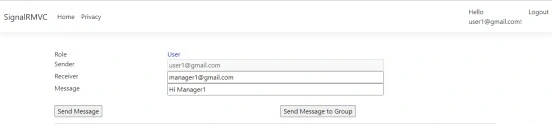
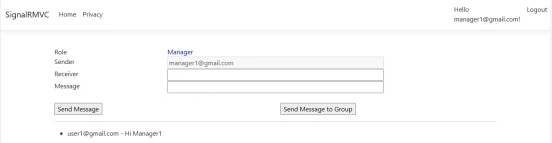
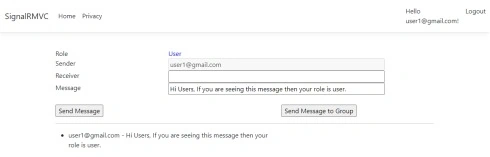
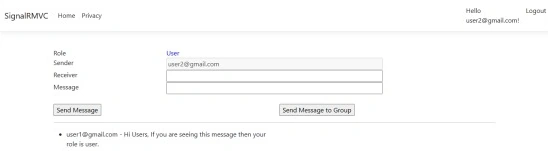
Join the conversation! Your thoughts help the community grow.