

Introduction
This is the "Advanced JavaScript" article series. In this series, we are learning and explaining various concepts of JavaScript. Here are links to all the articles.
- Advance JavaScript: History and role of JavaScript behind modern web
- Advance JavaScript: play with object in JavaScript
- Advance JavaScript: Function Definition Style in JavaScript
- Advance JavaScript: Understand undefined in JavaScript
- Advance JavaScript: Understand "class"-ical concept of JavaScript
- Advance JavaScript: Implement inheritance in JavaScript
- Advance JavaScript: Callback design pattern and callback function in JavaScript
- Advance JavaScript: Exception handling in JavaScript
- Advance JavaScript: Scope of Variable in JavaScript
- Advance JavaScript: closure in JavaScript
In this article, we will learn about the immediate invocation of a function in JavaScript. In general, functions execute when we call them but sometimes it is necessary to execute some code at the time of page loading. For that purpose, there are a few other solutions like we can write code within document.ready in the jQuery method or we can call a function in the body's onLoad event.
The invocation of a function is another solution. The function will be called when the body is loaded. Let's try to understand it with an example.
Define immediately invoke a function
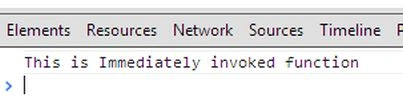
This is the example of an immediately invoked function. We have defined it within a script tag.
- <!DOCTYPE html>
- <html xmlns="http://www.w3.org/1999/xhtml">
- <head>
- <title></title>
- </head>
- <body>
- <script>
- //Immediately invoke function
- (function () {
- console.log("This is Immediately invoked function");
- })();
- </script>
- </body>
- </html>
More than one immediately invoked function
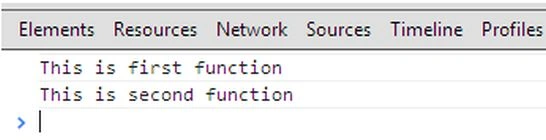
We can define more than one immediately invoked function on the same page and they will all be executed, serially. Have a look at the following code.
- <!DOCTYPE html>
- <html xmlns="http://www.w3.org/1999/xhtml">
- <head>
- <title></title>
- </head>
- <body>
- <script>
- //More than one Immediately invoke function
- (function () {
- console.log("This is first function");
- })();
- (function () {
- console.log("This is second function");
- })();
- </script>
- </body>
- </html>
Make named function
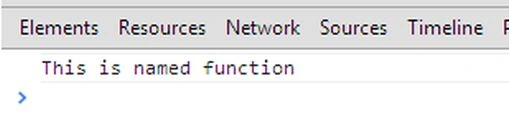
In our previous two articles, we saw how to declare an immediately invoked function, but they are anonymous in nature. We can define a named function. Here is one example:
- <!DOCTYPE html>
- <html xmlns="http://www.w3.org/1999/xhtml">
- <head>
- <title></title>
- </head>
- <body>
- <script>
- //Named function
- (fun= function () {
- console.log("This is named function");
- })();
- </script>
- </body>
- </html>
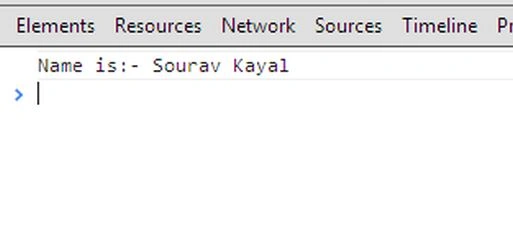
As a normal function, we can pass a value to an immediately invoked function. In this example, the function is taking one argument and within the function body, we are checking whether the argument has been supplied. If supplied then we are printing the value.
- <!DOCTYPE html>
- <html xmlns="http://www.w3.org/1999/xhtml">
- <head>
- <title></title>
- </head>
- <body>
- <script>
- //Named function with argument
- (fun = function (name) {
- if(name !== undefined)
- console.log("Name is:- " + name);
- })();
- fun('Sourav Kayal');
- </script>
- </body>
- </html>
Scope of variable in immediately invoke function
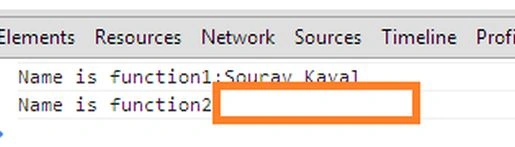
In general rule, the variable defined within JavaScript functions has function scope. In this example, we have defined two functions and the "name" variable is defined in the first function. We are then trying to access it from the second function. We see that it's not accessible from the second function.
- <!DOCTYPE html>
- <html xmlns="http://www.w3.org/1999/xhtml">
- <head>
- </head>
- <body>
- <script>
- (function () {
- var name = "Sourav Kayal";
- console.log("Name is function1:" + name);
- })();
- (function () {
- console.log("Name is function2:" + name);
- })();
- </script>
- </body>
- </html>
Here is the output.
Conclusion
In this article, we have learned how to create an immediately invoked function in JavaScript. I hope you understood the concept. In a future article we will understand a few more concepts of advanced JavaScript.
Sreekanth ReddyPosted Dec 30, 2016, 1:54 AM
What is the use of this type of functions ?
Jaganathan BantheswaranPosted Nov 24, 2013, 9:18 AM
Nice. But title can be "Self Executing function in Javascript". This is basic feature of Javascript