Note about Dictionary<K, T>:
1. It is a KeyValue Collection.
2. Something we can use Key as Primary key.
3. Using primary key we can get data.
4. Get Value by its Key.
5. It is a Generic, so reusable.
Used Namespaces:
using System;
using System.Collections.Generic;
using System.Linq;
Step 1: Adding items to Dictionary as KeyValuePair:
Dictionary<int, string> dic = new Dictionary<int, string>();
dic.Add(1, "Lajapathy");
dic.Add(2, "Parthiban");
dic.Add(3, "AnandBabu");
dic.Add(4, "Sathiya");
Step 2: Displaying the Dictionary items:
foreach (KeyValuePair<int, string> tempDic in dic)
{
Response.Write("Key :" + tempDic.Key + " value :" + tempDic.Value + "<br/>");
}
Step 3: Removing item from the Dictionary:
bool isRemoved = dic.Remove(2);
Response.Write(isRemoved + "<br/>");
Step 4: Displaying items after removing:
foreach (KeyValuePair<int, string> tempDic in dic)
{
Response.Write("Key :" + tempDic.Key + " value :" + tempDic.Value + "<br/>");
}
Step 5: Checking whether the KeyValue Pair is available or not:
bool hasItem = dic.Contains(new KeyValuePair<int, string>(1, "Lajapathy"));
Response.Write(hasItem + "<br/>");
Step 6: Checking whether the Key Exists in the Dictionary:
bool hasKey = dic.ContainsKey(2);
Response.Write(hasKey + "<br/>")
Step 7: Checking whether the Key Exists in the Dictionary:
hasKey = dic.ContainsKey(10);
Response.Write(hasKey + "<br/>");
Step 8: Checking whether the value exists in the Dictionary:
bool hasValue = dic.ContainsValue("Lajapathy");
Response.Write(hasValue + "<br/>"); hasValue = dic.ContainsValue(
"Arun");
Response.Write(hasValue +
"<br/>");
Step 9: Iterating the Keys of the Dictionary:
foreach (int tempKey in dic.Keys)
{
Response.Write("Key :" + tempKey + "<br/>");
}
Step 10: Iterating the Values of the Dictionary:
foreach (string tempValue in dic.Values)
{
Response.Write("Value :" + tempValue + "<br/>");
}
Step 11: Gettting a value in a Dictionary by its Key:
string value = dic[1];
Step 12: Trying to get the value of a Key:
bool hasGetValue = dic.TryGetValue(10, out value);
Response.Write("GetValue :" + value + "," + hasGetValue + "<br/>");
hasGetValue = dic.TryGetValue(2, out value);
Response.Write("GetValue :" + value + "," + hasGetValue + "<br/>");
Step 13: Gettting the values in a Dictionary by their Keys:
foreach (int tempKey in dic.Keys)
{
Response.Write("Key :" +dic[tempKey] + "<br/>");
}
Step 14: Emptying the Dictionary:
dic.Clear();
Response.Write("Count :" + dic.Count + "<br/>");
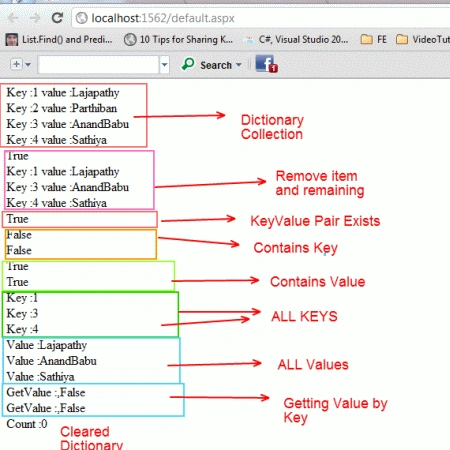
OUTPUT


SubashPosted Sep 16, 2016, 3:53 AM
Nice sir
Ritha BPosted Apr 30, 2012, 2:30 AM
hi In this article In Step 8,first Condtion is true, Second conditon is false(hasValue = dic.ContainsValue("Arun"); Response.Write(hasValue + "<br/>");).. Please correct It Ritha.B
Gaurav GuptaPosted Apr 29, 2012, 11:54 PM
Hi. Can I perform a search using content types and metadata in sharepoint 2010? If yes How?