

If you are new to this plug-in, please go through the previous articles to learn the basics of a jQuery plug-in.
- jQuery Data tables: Part 1
- Exploring Data tables deeply: Part 2
- Using jQuery datatable inside the MVC 4 application: Part 3
Based on the project needs we might need to customize the existing component. Already utilized some of the built-in properties within the project. We will see one by one how to actually use it with an example.
1. Property: Destroy
Generating the new DataTable with a new set of records, it will expect the Boolean property and the default will be False.
2. Property: PagingType
There are four built-in options, the default will be Simple_numbers option.
Simple: It will show Previous and Next only: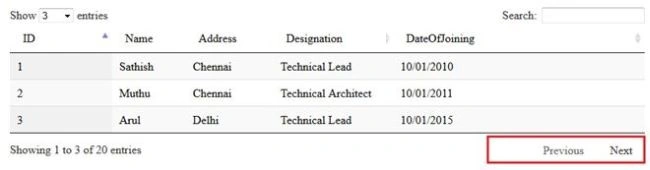
Simple_numbers: Show Previous and Next along with numeric numbers: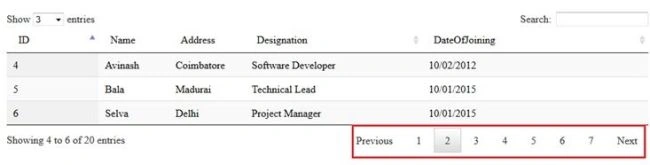
Full: First, Prev, Next, Last buttons only.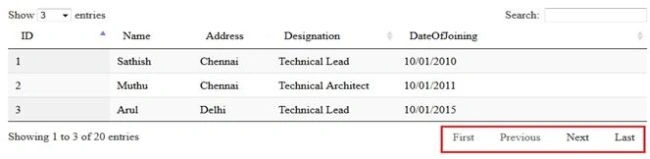
Full_numbers: First, Prev, Next, Last buttons with numeric numbers also.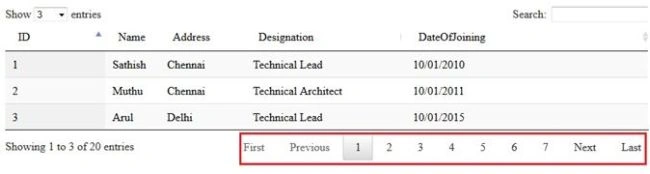
3. Property: Processing
Showing the processing indicator when performing some operation on top of the DataTable such as Sorting, Paging, and so on. Basically it will expect a Boolean property.
4. Function: fnServerParams
Sometimes you might need to pass some data when an invoking Ajax request to the server side, so you can the utilize these events.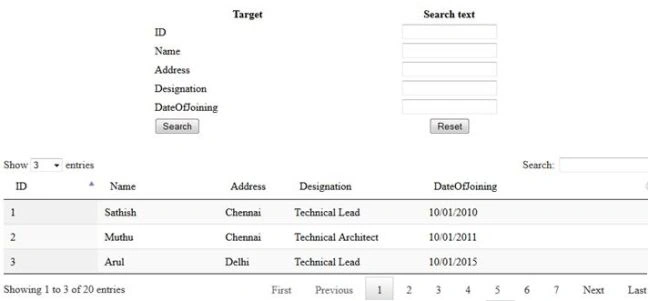
Just consider the previous image that has a similar search page, when triggering the Ajax event we need to pass the user-provided input value to the Ajax method. So at that time you can use this function and get the user input data and pass it into the Ajax method.
- "fnServerParams": function(data) {
- data.push({
- "name": "ID",
- "value": $(‘txtID’).val()
- });
- data.push({
- "name": "Name",
- "value": $(‘txtName’).val()
- });
- data.push({
- "name": "Address",
- "value": $(‘txtAddress’).val()
- });
- data.push({
- "name": "Designation",
- "value": $(‘txtDesg’).val()
- });
- data.push({
- "name": "DateOfJoining",
- "value": $(‘txtDOJ’).val()
- });
- }
- public ActionResult JsonOutputMethod (string ID, string Name, string Address, string Designation, string DateOfJoining)
- {
- //Code Implementation
- }
Sometimes you may need to create a Link button such as Adding, Editing, Deleting records into the existing rows, this event will be the best approach. Once the current row has been generated, if you are able to add some piece of HTML tag to any of the cells.
- "createdRow": function(row, data, index)
- {
- //Code implementation.
- }
- //Row–Generated current row object.
- //Data–All column data
- //Index–Current row index
- "createdRow": function(row, data, index)
- {
- $('td', row).eq(1).css("color", "red");
- var aJueryTag = $("<a>");
- var imageTag = $("<img>");
- imageTag.attr("src", "img/view.png");
- aJueryTag.attr("href", "javascript:void(0);");
- aJueryTag.attr("onclick", "showImg('/content/upload/" + data["imgname"].toString() + "','" + data["description"].toString() + "')");
- aJueryTag.wrapInner(imageTag)
- $('td', row).eq(10).attr("align", "center");
- $('td', row).eq(10).html(aJueryTag).text();
- }
6. Property: Column
Using this property we can pass dynamic columns to the jQuery DataTable plugin.
Example
- "columns": [{
- "data": "Id"
- }, {
- "data": "Name"
- }, {
- "data": "Address"
- }, {
- "data": "Designation"
- }, {
- "data": "DataOfJoining"
- }]
- var dynColumns = [];
- dynColumns.push({
- "data": "ID"
- });
- dynColumns.push({
- "data": "Name"
- });
- dynColumns.push({
- "data": "Address"
- });
- dynColumns.push({
- "data": "Designation "
- });
- dynColumns.push({
- "data": "DateOfJoining"
- });
- $('#tableData').DataTable({
- "columns": dynColumns
- });
Your comments will be highly appreciated.
Kiran AnugantiPosted Jul 18, 2017, 11:30 PM
Hi satish could yu please share download link.
Sibeesh VenuPosted Jul 14, 2015, 1:01 PM
Nice Share. Thank you :)
Sathish KumarPosted Jul 13, 2015, 11:40 PM
Thanks santhakumar
Santhakumar MunuswamyPosted Jul 13, 2015, 2:56 PM
Nice article! Thanks for sharing
Neeraj KumarPosted Jul 13, 2015, 12:12 PM
Nice Article sir
RakeshPosted Jul 13, 2015, 9:09 AM
Good one sir
Sathish KumarPosted Jul 13, 2015, 7:36 AM
Thanks Rakesh
Rakesh KalluriPosted Jul 13, 2015, 7:18 AM
Good One.