

Introduction
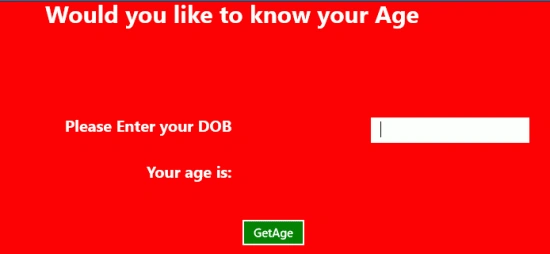
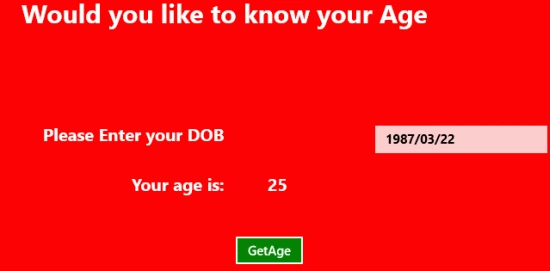
This article will show creation of an application in Metro Style in C# to determine the age of the user based on the date of birth provided by the user. To implement this application we will use the DateTime class in a code behind file. This class has the three properties year, month and day to be used to calculate the difference between the current date and the user's date of birth.
In the following we are including the entire code of the XAML file and the code behind file to create this mini application.
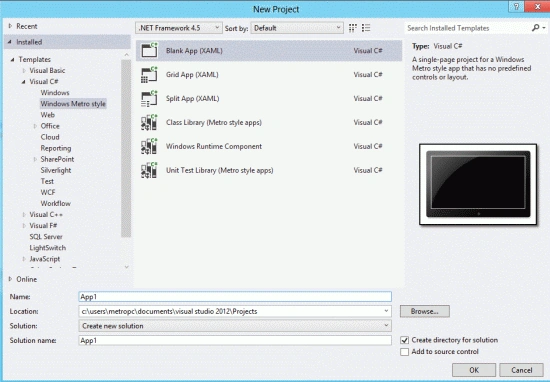
Step 1 : First, you will create a new Metro Style Application. Let us see the description with images of how you will create it.
- Open Visual Studio 2012
- File -> New -> Project
- Choose Template -> Visual C# -> Metro Style Application
- Rename the application
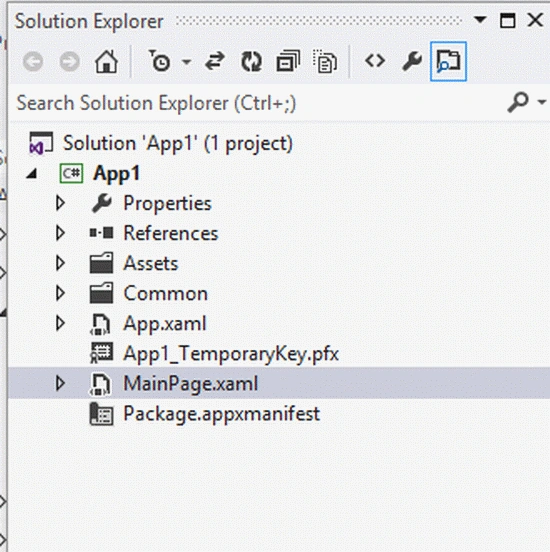
Step 2 : In the Solution Explorer there are two files that we will primarily work with; the MainPage.xaml and MainPage.xaml.cs files.
Step 3 : The MainPage.xaml file is as in the following code:
Code :
<Page
x:Class="App1.MainPage"
IsTabStop="false"
xmlns="http://schemas.microsoft.com/winfx/2006/xaml/presentation"
xmlns:x="http://schemas.microsoft.com/winfx/2006/xaml"
xmlns:local="using:App13"
xmlns:d="http://schemas.microsoft.com/expression/blend/2008"
xmlns:mc="http://schemas.openxmlformats.org/markup-compatibility/2006"
mc:Ignorable="d">
<Grid Background="Red">
<Grid.ColumnDefinitions>
<ColumnDefinition Width=".333*"></ColumnDefinition>
<ColumnDefinition Width=".333*"></ColumnDefinition>
<ColumnDefinition Width=".333*"></ColumnDefinition>
</Grid.ColumnDefinitions>
<Grid.RowDefinitions>
<RowDefinition Height=".083*"></RowDefinition>
<RowDefinition Height=".033*"></RowDefinition>
<RowDefinition Height=".033*"></RowDefinition>
<RowDefinition Height=".133*"></RowDefinition>
<RowDefinition Height=".333*"></RowDefinition>
</Grid.RowDefinitions>
<TextBlock Text="Would you like to know your Age" FontWeight="ExtraBold"
FontSize="30" Grid.Column="1" Grid.Row="0" Grid.ColumnSpan="2"
HorizontalAlignment="Center">
</TextBlock>
<TextBlock Text="Please Enter your DOB" Grid.Column="1" Grid.Row="1"
Mukesh KumarPosted Oct 19, 2015, 1:07 AM
Good Work ...