

In this article I am going to explain how to use aggregate functions in LINQ to SQL as well as in SQL Server.
Aggregate Function
An aggregate function is a function where the values of multiple rows are grouped together as input on certain criteria to form a single value of greater significance or measurement such as a set. Aggregate functions return a single value.
Common Aggregate Functions are:
- SUM() : Returns the sum of column values.
- AVERAGE() : Returns the average of column values.
- COUNT() : Returns the total number of rows in a table.
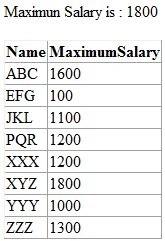
- MAX() : Returns the maximum value in the column.
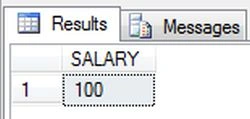
- MIN() : Returns the minimum value in the column.
Create DataContext Class
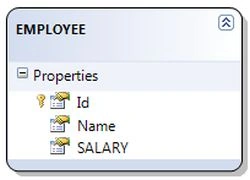
I create a data context class to perform aggregate function operations. So first drag and drop the EMPLOYEE table to the data context class.
Operation Performing Data
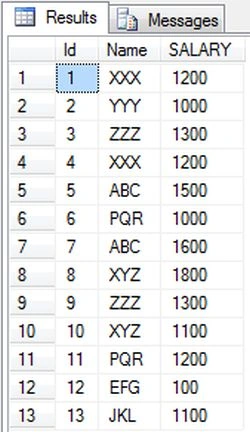
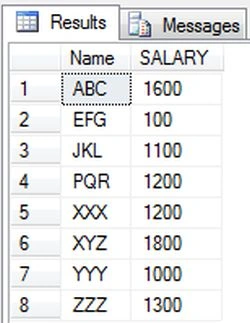
Here I show all the data in the EMPLOYEE table; using:
SELECT * FROM EMPLOYEE
Use GridView Control
Here I am using a GridView control to show employee data:
<asp:GridView ID="grdEmployee" runat="server"></asp:GridView>
SUM() Function
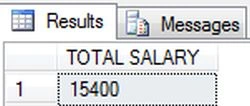
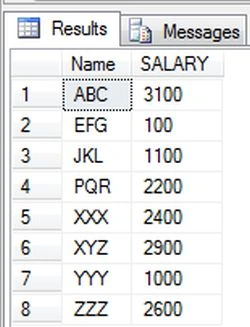
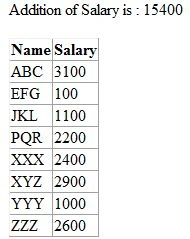
This SUM() function returns a single value that is the result of adding all row's values for a single column or can specify a certain criteria. The SQL SUM() function takes an argument specifying which column to add all values of every row for, or some criteria for a column. In the following code I am showing the sum of salaries for an individual employee and all employees.
1. In SQL Server
SELECT SUM(SALARY) AS [TOTAL SALARY] FROM EMPLOYEE
SELECT Name,SUM(SALARY) AS [SALARY] FROM EMPLOYEE GROUP BY Name
2. In LINQ To SQL
private void SumGroupSalary()
{
EmployeeOperationDataContext employee = new EmployeeOperationDataContext();
/* Addition of salary by employee */
var salaryEmpSum = from emp in employee.EMPLOYEEs
group emp by emp.Name into empg
select new
{
Name = empg.Key,
Salary = empg.Sum(x => x.SALARY)
};
grdEmployee.DataSource = salaryEmpSum;
grdEmployee.DataBind();
/*Total Salaries for all employee */
var salarySum = (from emp in employee.EMPLOYEEs
select emp.SALARY).Sum();
Response.Write(string.Format("Addition of Salary is : {0} ", salarySum));
}
AVERAGE() Function
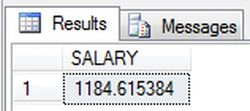
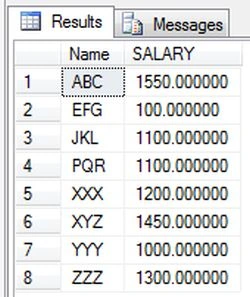
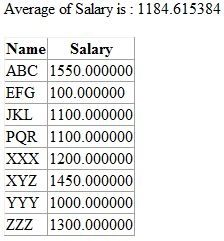
This AVERAGE() function returns a single value that is the average of all row's values for a single column or can specify a criteria for a single column. The SQL AVG() function takes an argument specifying which column to average all values of every row for, or some criteria for a column. In the following code I am showing the average of salaries for an individual employee and all employees.
1. In SQL Server
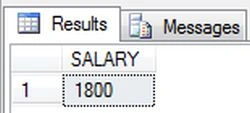
SELECT AVG(SALARY) AS SALARY FROM EMPLOYEE
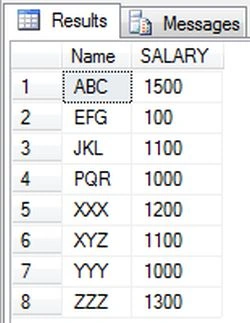
SELECT AVG(SALARY) AS SALARY FROM EMPLOYEE GROUP BY Name
2. In LINQ To SQL
private void AverageSalary()
{
EmployeeOperationDataContext employee = new EmployeeOperationDataContext();
/*Averge salary from multiple salries for employee */
var salaryGroupAvg = from emp in employee.EMPLOYEEs
group emp by emp.Name into empg
select new
{
Name = empg.Key,
Salary = empg.Average(x => x.SALARY)
};
grdEmployee.DataSource = salaryGroupAvg;
grdEmployee.DataBind();
/*Averge of whole salary in Employee table*/
var salaryAvg = (from emp in employee.EMPLOYEEs
select emp.SALARY).Average();
Response.Write(string.Format("Average of Salary is : {0} ", salaryAvg));
Mayur GujrathiPosted May 6, 2016, 11:24 PM
thanks
Kashif AsifPosted Feb 22, 2016, 4:31 PM
thanks