

Introduction
In today’s digital age, harnessing the power of artificial intelligence (AI) is no longer reserved for data scientists or developers. With Microsoft’s AI Builder, organizations of all sizes can now effortlessly infuse AI capabilities into their business processes without the need for extensive coding or technical expertise. In this article, we'll explore what AI Builder is and how you can leverage its capabilities within Power Automate to create intelligent workflows.
What is AI Builder?
AI Builder is a user-friendly solution that democratizes AI by bringing Microsoft's powerful AI capabilities directly to your fingertips. Seamlessly integrated with Power Apps and Power Automate, AI Builder enables you to build and deploy AI models effortlessly, empowering you to make data-driven decisions and automate tasks with ease.
How to Use AI Builder Models in Power Automate?
Integrating AI Builder models into your Power Automate workflows is a straightforward process. Follow these steps to get started.
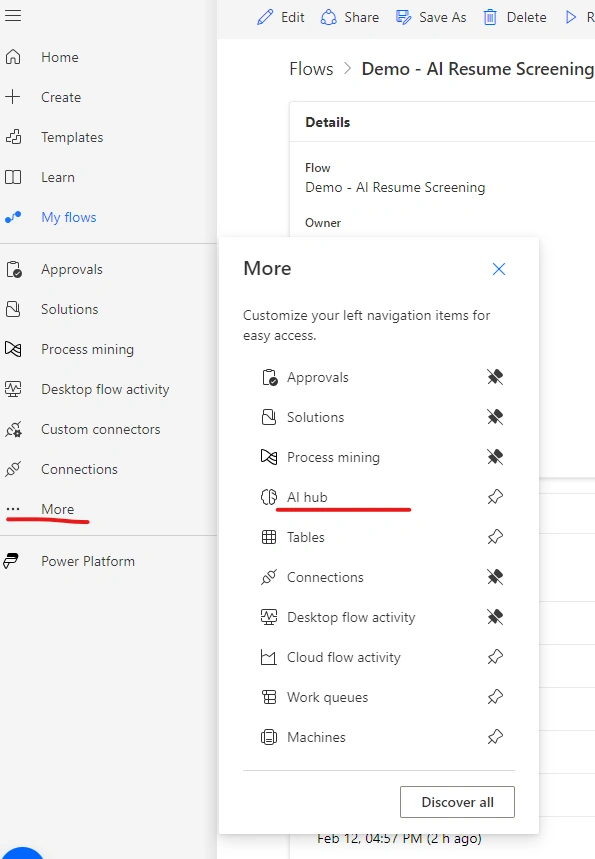
- Sign In: Log in to Power Automate to access your workflows.
- Navigate to AI Hub: Click on "More" in the left pane, then select "AI Hub" to explore AI models.
- Discover AI Capabilities: Under "Discover an AI capability," click on "AI models" to browse available models.
- Pin AI Models: Pin your preferred AI models for easy access by selecting the pin icon.
- Create your AI Model: Choose the appropriate model type that aligns with your workflow requirements. I created a blog on how you can create an AI Model which you can create your own AI model.
Using AI Builder Models in Your Flows
Once you've selected your AI models, incorporating them into your Power Automate flows is a breeze.
- Create a New Flow: Start by creating a new flow within Power Automate.
- Add AI Builder Action: Search for the "AI Builder" action in the actions list and add it to your flow.
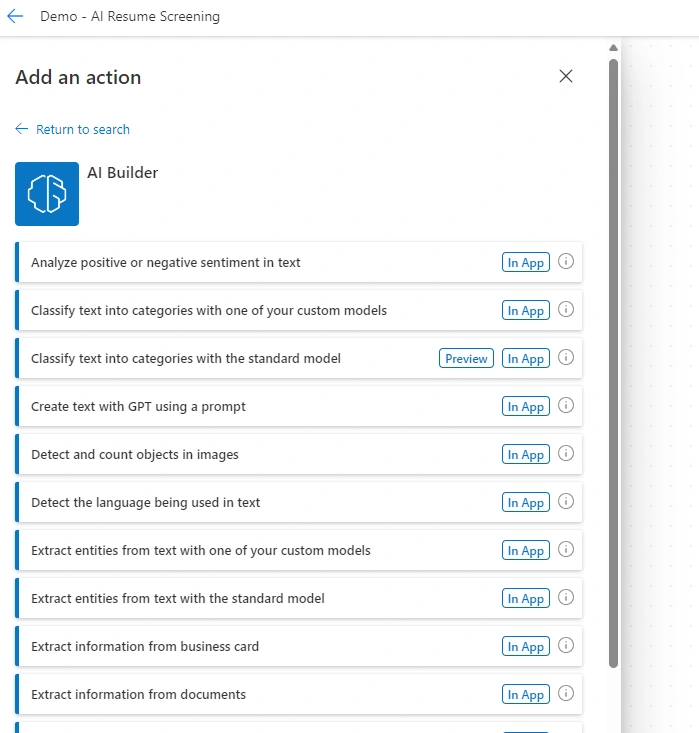
- Configure the Model: Once you select a base model it will allow you to select your custom model which you create using AI builder. Select your desired AI Builder model from the available options and configure it according to your workflow needs.
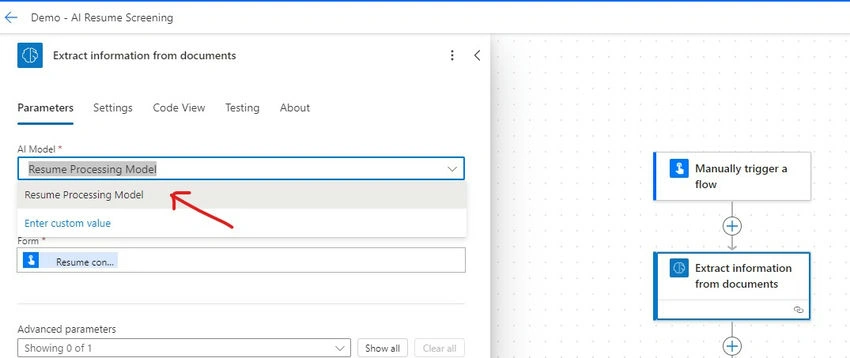
In this example, the base AI model extracts information from a document that I used to create a model “Resume Process Model” which I selected here as my custom model.
Prebuilt and Custom AI Models
AI Builder offers both prebuilt and custom models to suit your unique business needs.
- Prebuilt Models: These ready-to-use models cover various scenarios such as form processing, prediction, and object detection, allowing you to quickly integrate AI capabilities into your workflows.
- Custom Models: For more specialized requirements, you can build and train your own custom AI models using AI Builder, providing tailored solutions for your organization's specific use cases.
Benefits of AI Builder in Power Automate
By leveraging AI Builder in Power Automate, organizations can unlock a myriad of benefits, including.
- Predictive Power: Utilize AI models to predict outcomes based on historical data, enabling proactive decision-making.
- Automated Decision-Making: Enhance workflows by automating decisions using AI predictions, thereby streamlining processes and reducing manual effort.
- Improved Efficiency: Let AI handle repetitive tasks, freeing up valuable time and resources for more strategic initiatives.
- Business Insights: Gain valuable insights from data-driven predictions, empowering informed decision-making and driving business growth.
Summary
AI Builder in Power Automate empowers organizations to create intelligent workflows that drive efficiency, productivity, and innovation. Whether you're automating approvals, analyzing data, or extracting information from forms, AI Builder can be your trusted ally in unlocking the full potential of AI within your organization.
For more detailed information and resources on AI Builder in Power Automate, refer to the official Microsoft Learn documentation. So why wait? Start exploring the possibilities of AI Builder today and embark on a journey towards smarter, more efficient workflows.
Join the conversation! Your thoughts help the community grow.