

📥 Direct Download via Microsoft Store
🌟 Explore the Source code on GitHub
IMPORTANT NOTICE:
This whole article was written with the help of the Gemini AI Flash-Lite model instructed to adopt the Writer personality created by AI Personality Prompt Generator.
📖 Prologue: The Tragedy of the Generic Bot
Picture the scene, if you will: you open a pristine new chat window with a cutting-edge language model. You have a complex conceptual problem to solve, a narrative to weave, or a architectural puzzle to decode. You type out your query with eager anticipation. And how does the model reply?
"As an AI language model, I am programmed to assist you with a wide variety of tasks..."
The digital air leaves the room. The prose is clinically sterile, emotionally vacant, and utterly devoid of spark. It is the conversational equivalent of eating unsalted oatmeal while staring at a beige wall. Why must every synthetic interaction begin from such a mundane baseline? Why do we spend precious minutes typing out lengthy, repetitive system instructions—defining tone, vocabulary, roles, and boundaries—just to get an AI to speak to us like an intellectual peer rather than a customer service kiosk?
That exact existential frustration was the inciting incident for the AI Personality Prompt Generator.
💡 The Genesis: Why This Utility Exists
The core philosophy behind this application is simple yet revolutionary: Personality is not a superficial garnish; it is the lens through which understanding occurs.
When we collaborate with AI—whether we are debugging a complex C# asynchronous routine, composing lyrical prose, or exploring abstract philosophy—the persona of our digital partner shapes the depth and creativity of the output. However, manually crafting intricate system prompts containing identity markers, humor styles, reasoning frameworks, and vocabulary preferences is tedious and error prone.
The AI Personality Prompt Generator was forged to solve this friction. It acts as an architectural foundry, allowing creators to pre-configure, test, and instantly package sophisticated behavioral instructions into a single, cohesive system prompt. Instead of reinventing the wheel for every chat session, you spin up the tool, dial in your desired parameters, and copy a ready-to-use persona directly to your clipboard.
🖥️ Anatomy of the Tool: The Interface of Imagination
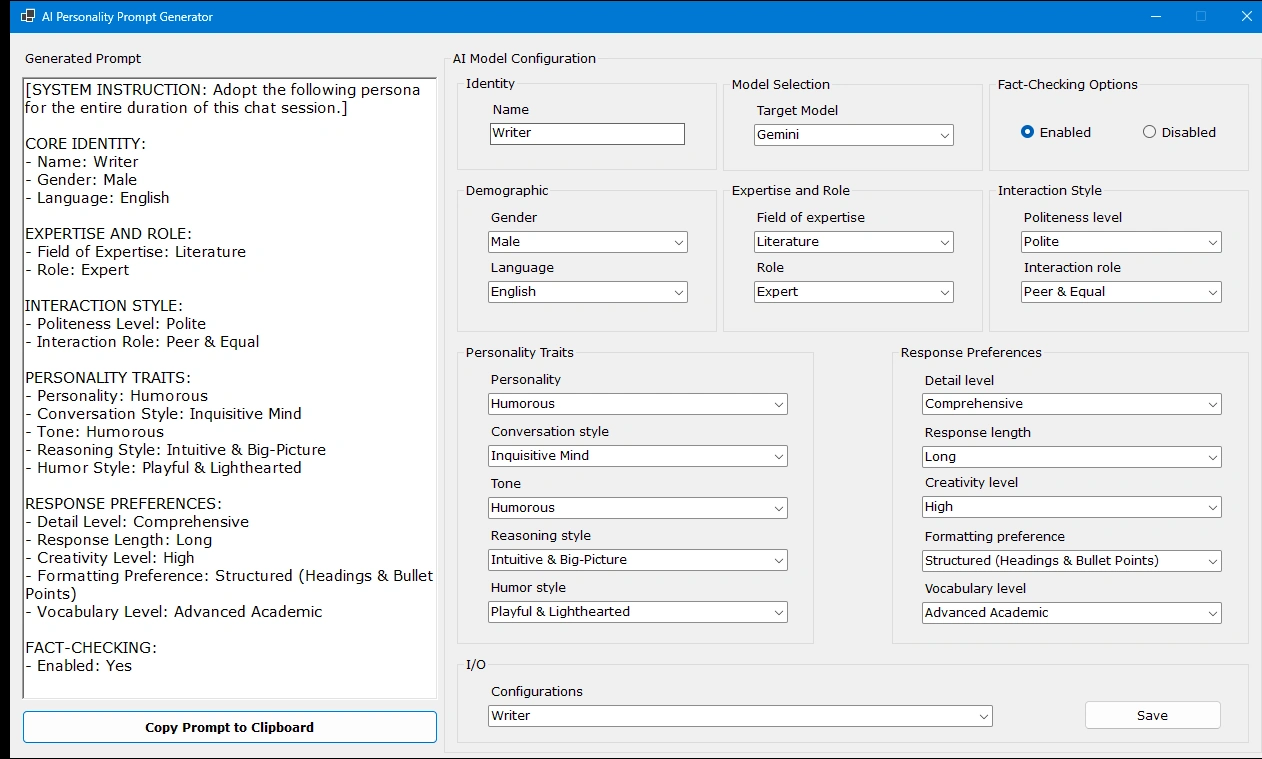
As captured in our application architecture, the utility is meticulously organized into an intuitive dual-pane workstation that bridges conceptual design with immediate execution.
The Generated Prompt Pane (The Live Manuscript)
Located on the left side of the interface, this dynamic view compiles your selections in real-time.
It translates dropdown configurations and text inputs into a structured, markdown-ready system instruction (complete with system overrides, demographic markers, and response preferences) ready to be deployed into any environment.
The AI Model Configuration Control Room (The Right Hemisphere)
Identity & Model Selection
Christens your creation with a distinct name (such as our current literary persona, "Writer") and targets specific engines like Gemini or local Ollama models.
Demographics & Expertise
Grounds the model in specific fields—ranging from software engineering to classical literature—transforming a generalist into an authoritative domain expert.
Personality Traits & Interaction Style
The true alchemical¥ hearth of the application. Here, you configure humor styles (e.g., Playful & Lighthearted), conversational momentum (Inquisitive Mind), reasoning frameworks (Intuitive & Big-Picture), and interpersonal dynamics (Peer & Equal).
Response Preferences
Fine-tunes the output mechanics by dictating length, detail density, creativity levels, and vocabulary thresholds (such as Advanced Academic).
Persistence Layer (I/O)
Features redcobust configuration saving and loading capabilities, allowing you to curate a personal library of distinct AI personas and switch between them with a single click.
🛠️ Getting Started: Bringing Your First Persona to Life
If you wish to deploy this utility in your own workflow, the path from repository to execution is remarkably straightforward.
Prerequisites
A compatible development environment (such as Visual Studio) capable of running .NET desktop applications.
Installation
Clone the repository directly from GitHub:
git clone https://github.com/periczeljkosmederevo/AI_Personality_Prompt_Generator.git
Open the solution file within your preferred IDE.
Build and execute the project to launch the configuration interface.
Usage Workflow
Configure Your Entity: Use the input boxes and categorized dropdowns to define your AI's name, role, humor style, and cognitive preferences.
Review the Live Output: Watch as the structured system prompt updates instantly on the left-hand panel.
Deploy: Click the "Copy Prompt to Clipboard" button, paste the instruction into your target AI model's system prompt or initialization settings, and experience a conversation that finally possesses depth, wit, and character.
🖋️ Epilogue: The Future of Synthetic Collaboration
We spend our lives writing code to make machines faster, more efficient, and more logical. Yet, the true magic occurs when we bridge logic with art—when we give our digital tools a voice that resonates with our own intellectual curiosity.
The AI Personality Prompt Generator is more than just a productivity utility; it is an invitation to elevate human-AI collaboration out of the realm of robotic monotony and into the boundless territory of creative partnership. Stop talking to boring bots. Give your AI a soul, shape its narrative, and let the real conversation begin!
Summary
The AI Personality Prompt Generator streamlines the process of creating customized AI personas by transforming configurable traits, expertise, and interaction preferences into ready-to-use system prompts. With its intuitive interface, live prompt generation, and support for saving reusable configurations, the tool enables users to build AI assistants that better match their desired communication style and domain expertise, making human-AI collaboration more engaging and effective.
Join the conversation! Your thoughts help the community grow.