
Introduction
In this article we are going to discuss about AJAX AnimationExtender control.
If you want to use animation to the web pages, then you have to use AnimationExtender control. It provides good animation effect such as moving an ASP Control to a new place, resizing it, modifying its color, or making it fade in or fade out. In this article I m going to use fade in or fade out animation.
The animation behavior can be applied with the following extender (the italic properties are optional, and the ellipses represent a generic animation description
TargetControlID: ID of the target control whose events are used to animate (this is also the default target of the animations)
OnLoad: Generic animation played as soon as the page is loaded.
OnClick: Generic animation played when the target control is clicked.
OnMouseOver: Generic animation played when the mouse moves over the target control.
OnMouseOut: Generic animation played when the mouse moves out of the target control.
OnHoverOver: Generic animation similar to OnMouseOver except it will stop the OnHoverOut animation before it plays.
OnHoverOut: Generic animation similar to OnMouseOut except it will stop the OnHoverOver animation before it plays.
First of all make a new website using Ajax Enabled website. The advantage to using Ajax enabled website is no need to add ScriptManager control on page and no need to add Ajax Control toolkit. Like this: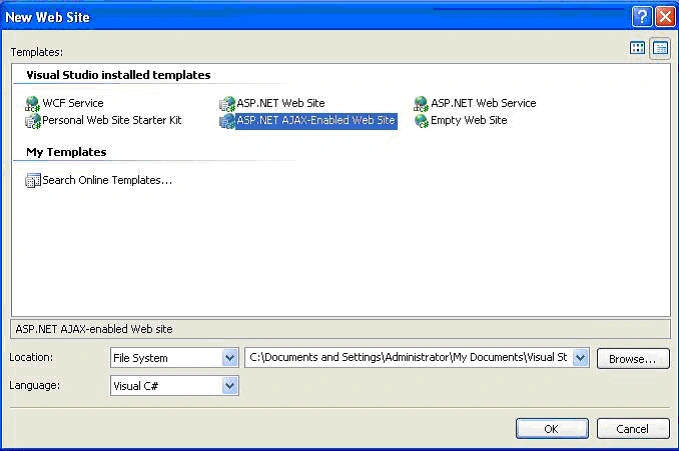
First of all drag and drop Animation control on page.
<%@ Register Assembly="AjaxControlToolkit" Namespace="AjaxControlToolkit" TagPrefix="cc1" %>
<asp:ScriptManager ID="ScriptManager1" runat="server" />
<cc1:AnimationExtender ID="AnimationExtender1" runat="server" TargetControlID="Image1">
<Animations>
<OnLoad>
<FadeOut Duration=".5" MinimumOpacity=".2" MaximumOpacity="1" />
</OnLoad>
<OnHoverOut>
<Sequence>
<FadeOut Duration=".5" MinimumOpacity=".2" MaximumOpacity="1" />
</Sequence>
</OnHoverOut>
<OnHoverOver>
<FadeIn Duration=".5" MinimumOpacity=".2" MaximumOpacity="1" />
</OnHoverOver>
</Animations>
</cc1:AnimationExtender>
<asp:Image runat="server" ID="Image1" ImageUrl="~/Sunset.jpg" BorderWidth="0px" Width="342px" />
After running result should be look like this:
Now check result on MouseHover on this picture. Result should be look like this: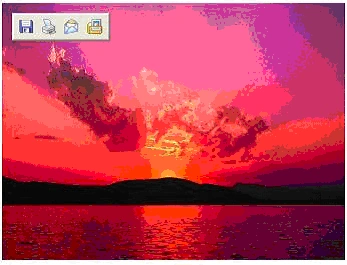
For more information download source code zip file.

Ajax AnimationExtender Control
Join the conversation! Your thoughts help the community grow.
Sign in to leave a comment
It is the same account you read, post and publish with — and you will come straight back to this page.
Nilesh PatkarPosted Feb 12, 2013, 3:25 AM
Hi, I tried this example. The only image is displayed on web page. There is not any changes into it on MouseOver, OnHoverOut etc. I am sending my code. <%@ Page Language="C#" AutoEventWireup="true" CodeBehind="WebForm1.aspx.cs" Inherits="AjaxAnimationExtenderControl.WebForm1" %> <%@ Register Assembly="AjaxControlToolkit" Namespace="AjaxControlToolkit" TagPrefix="asp" %> <!DOCTYPE html PUBLIC "-//W3C//DTD XHTML 1.0 Transitional//EN" "http://www.w3.org/TR/xhtml1/DTD/xhtml1-transitional.dtd"> <html xmlns="http://www.w3.org/1999/xhtml"> <head runat="server"> <title></title> </head> <body> <form id="form1" runat="server"> <asp:ScriptManager ID="ScriptManager1" runat="server"> </asp:ScriptManager> <asp:Image ID="Image1" runat="server" ImageUrl="~/Sunset.jpg" /> <div> <asp:AnimationExtender ID="AnimationExtender1" runat="server" TargetControlID="Image1"> <Animations> <OnLoad> <FadeOut Duration=".5" MinimumOpacity=".2" MaximumOpacity="1" /> </OnLoad> <OnHoverOut> <Sequence> <FadeOut Duration=".5" MinimumOpacity=".2" MaximumOpacity="1" /> </Sequence> </OnHoverOut> <OnHoverOver> <FadeIn Duration=".5" MinimumOpacity=".2" MaximumOpacity="1" /> </OnHoverOver> </Animations> </asp:AnimationExtender> </div> </form> </body> </html> Thanks.
Muhannad MagladPosted Nov 11, 2012, 7:42 AM
it's very simple thank you
aman gandhiPosted Feb 23, 2011, 7:28 AM
thanks alot, from a long time i am looking for this. this article is really helpful and easy code. thanks
sheetal kumarPosted Jun 24, 2009, 2:18 AM
animation extendar con