
Introduction:
This DataGrid is a Client Side Control. It is created by JavaScript and uses Ajax.net technology to communicate with ASP.NET code behind, from there, using ADO.NET to access the database and update the database with dataset.
This control has all the features that a DataGrid should have and all the functions work automatically without writing any code after you setup the connection string and table names.
The datagrid support:
- Pages.
- Sort.
- Master - Detail (the detail part also support page and sort)
- Customized row color based on the Column condition.
- Edit.
- Scroll bar without head scroll when no page supported.
- Support controls (Image, TextBox, Hyper link, DropdownBox, CheckBox).
- Auto split head name.
- Automatic validate textbox for Decimal, email and number.
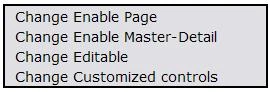
The datagrid can be switched between different modes by right click on the screen to open a popup screen:
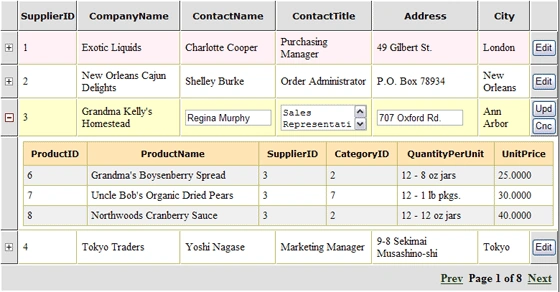
The Datagrid with Page, Master-Detail and Edit function
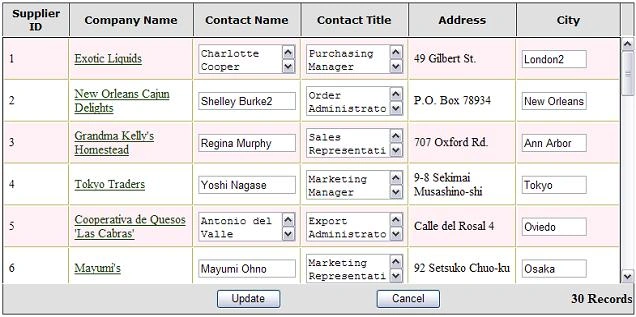
The Datagrid with custom controls and scrollbar with static head
Performance:
The grid is created by javascript on demand and JavaScript is not a compiled language. It is slower than render xtml code directly to the page. If the datagrid contains more than 200 records it is better to use the page mode. Otherwise the performance will slowdown a lot.
The CSS (Cascading Style Sheets) is used to configure the look of the control, so the user can make the change very easily.
Usage:
The user control includes five parts:
- User control .ascx file.
- JavaScript file.
- Database access file.
- CSS file.
- AJAX.NET dll.
First, Add reference to ajax.dll.
Copy the UserControl directory to your project and add the user control to your ASP.Net page: (see the project in the source code)
<%@ Register TagPrefix="WebDataGridDemo" TagName="WebDataGrid" Src= "UserControl/WebDataGridUserControl.ascx"%>
<
WEBDATAGRIDDEMO:WEBDATAGRID id="wdg1" runat="server"> </WEBDATAGRIDDEMO:WEBDATAGRID>In the Web.config file, setup the connection string. Add reference to Ajax.net dll:
<appSettings>
<add key="ConnectionString" value="Data Source=(local);Initial Catalog=Northwind;User Id=sa;Password=xxx;" />
</appSettings>
<httpHandlers>
<add verb="POST,GET" path="
type="Ajax.PageHandlerFactory,
</httpHandlers>
In the DynamicDataGrid.js file, most parameters have default values that you can overwrite some of them in your webform that use the control.
private void Page_Load(object sender, System.EventArgs e)
{
if(!Page.IsPostBack)
{
WebDataGridUserControl.MainTableName="suppliers";
WebDataGridUserControl.DetailTableName = "products";
// optional these values will overwrite default properties
WebDataGridUserControl.Height =300;
WebDataGridUserControl.Width = 780;
WebDataGridUserControl.Editable = 1;
WebDataGridUserControl.PageSize = 4;
}
}
Configuration:
Also you can modify some parameters in the WebDataGridUserControl.ascx.cs file:
If you don't use page mode, you may need to change the array ResetIfNoEditable and columnWidth to adjust the grid head column size and columns size.
[Ajax.AjaxMethod]
public ArrayList InitializeInfo()
{
// int pageable=1; masterDetail =1;editable = 1;pageSize=10; height=300
string [] FunctionProperty = {"1", "1", gEdit, gPageSize, gridHeight, gridWidth};
// ={} no control available; 0 label, 1 image, 2 href link 3 textbox 4 checkbox 5 dropdown
string [] ColumnControlType = {"0","2","3","3","0","3","4"};
// indicate which column 3,4,5,7 is editable
string [] ColumnEditable = {"0","0","1","1","1","0","1"};
// following properties only for no page supported
// this rearrange size of edit button to column 3, 4, 5 with added size 10,10,10
string [] ResetIfNoEditable = {"0","0","10","10","10", "0"};
string [] CustomizedHeadZize={"68","140","120","120","120", "0"};
// Column size needed when no page support is set; you should set one column to "0"
string [] columnWidth ={"68","140","120","120","120","0"};
...
return al;
}
[Ajax.AjaxMethod]
public ArrayList GetHeadArray()
{
// this array should match with the edit fields column3= Decimal, column4=Email,column5=Number
string [] ValidateType = {"","","Decimal","Email","Number"};
// assign ColumnDisplayName = {}; if don't use customized display name
string [] ColumnDisplayName = {};
}
Thanks Michael Schwarz who created a ajax.net that build the bridge between JavaScript and the .Net.
BobLovePosted Dec 16, 2010, 12:07 PM
I have errors when I convert the application. Help please
ramesh tPosted Nov 25, 2008, 10:16 AM
its great job..its helping me to a lot....
murali thangarajPosted Sep 1, 2008, 6:20 AM
How can we install and customize it?
MichaelPosted Jan 4, 2008, 5:03 AM
Thanks u is good sample
MichaelPosted Jan 4, 2008, 5:03 AM
Thanks u is good sample
MichaelPosted Jan 4, 2008, 5:03 AM
Thanks u is good sample
Eric ViegaseditedPosted Jul 9, 2006, 2:55 AMEdited Sep 4, 2006, 1:55 PM
89-89
Tran Tien DzungPosted Jun 5, 2006, 11:38 PM
Good!
wiseyeditedPosted May 22, 2006, 10:08 AMEdited Jul 9, 2006, 12:52 AM
Is there a way to implement your datagrid with using results a query intead of the database table structure. For example binding the two tables with dataset instead of giving the table names? Thanks in advance