Introduction
It is a practical approach so we will create an example to add a user and show in the list. The add user form will be submitted using JavaScript.
Using the Code
When a form is submitted using a POST request then it returns a response in JSON format. That's why we create a common class so that all form POSTs have a common data structure in response. The following code snippet is for the ResponseData class.
- namespace AjaxForm.Serialization
- {
- public class ResponseData<T>
- {
- public T Data { get; set; }
- public string RedirectUrl { get; set; }
- public bool IsSuccess { get { return this.Data == null; } }
- }
- }
Since we need to return data in JSON format, the action methods will return a JsonResult. We install “Newtonsoft.Json.5.0.8” using the Nuget package and write a custom class that inherits JsonResult. The following is the code snippet for the JsonNetResult class.
- using Newtonsoft.Json;
- using Newtonsoft.Json.Serialization;
- using System;
- using System.IO;
- using System.Web;
- using System.Web.Mvc;
-
- namespace AjaxForm.Serialization
- {
- public class JsonNetResult : JsonResult
- {
- public JsonNetResult()
- {
- Settings = new JsonSerializerSettings
- {
- ReferenceLoopHandling = ReferenceLoopHandling.Error,
- ContractResolver = new CamelCasePropertyNamesContractResolver()
- };
- }
-
- public JsonSerializerSettings Settings { get; private set; }
-
- public override void ExecuteResult(ControllerContext context)
- {
- if (context == null)
- {
- throw new ArgumentNullException("context");
- }
- if (this.JsonRequestBehavior == JsonRequestBehavior.DenyGet && string.Equals(context.HttpContext.Request.HttpMethod, "GET", StringComparison.OrdinalIgnoreCase))
- {
- throw new InvalidOperationException("JSON GET is not allowed");
- }
-
- HttpResponseBase response = context.HttpContext.Response;
- response.ContentType = string.IsNullOrEmpty(this.ContentType) ? "application/json" : this.ContentType;
-
- if (this.ContentEncoding != null)
- {
- response.ContentEncoding = this.ContentEncoding;
- }
- if (this.Data == null)
- {
- return;
- }
- var scriptSerializer = JsonSerializer.Create(this.Settings);
-
- using (var sw = new StringWriter())
- {
- scriptSerializer.Serialize(sw, this.Data);
- response.Write(sw.ToString());
- }
- }
- }
- }
Now we have done the work for the serialization of the result, thereafter we create a BasController that has methods for the JSON result and model the error as in the following code snippet.
- using AjaxForm.Serialization;
- using System.Linq;
- using System.Text;
- using System.Web.Mvc;
-
- namespace AjaxForm.Controllers
- {
- public class BaseController : Controller
- {
- public ActionResult NewtonSoftJsonResult(object data)
- {
- return new JsonNetResult
- {
- Data = data,
- JsonRequestBehavior = JsonRequestBehavior.AllowGet
- };
- }
-
- public ActionResult CreateModelStateErrors()
- {
- StringBuilder errorSummary = new StringBuilder();
- errorSummary.Append(@"<div class=""validation-summary-errors"" data-valmsg-summary=""true""><ul>");
- var errors = ModelState.Values.SelectMany(x => x.Errors);
- foreach(var error in errors)
- {
- errorSummary.Append("<li>" + error.ErrorMessage + "</li>");
- }
- errorSummary.Append("</ul></div>");
- return Content(errorSummary.ToString());
- }
- }
- }
Ajax Form Implementation on UI
To implement the Ajax form we will create a JavaScript namespace in which we define a JavaScript class for the form POST request. The class checks whether the form is valid or not on form submit. If it's valid then it submits, else it will show an error message. You can also define callback methods like onSuccess on initialization of the class. The following is the code snippet for Global namespace:
- var Global = {};
- Global.FormHelper = function (formElement, options, onSucccess, onError) {
- var settings = {};
- settings = $.extend({}, settings, options);
-
- formElement.validate(settings.validateSettings);
- formElement.submit(function (e) {
- if (formElement.valid()) {
- $.ajax(formElement.attr("action"), {
- type: "POST",
- data: formElement.serializeArray(),
- success: function (result) {
- if (onSucccess === null || onSucccess === undefined) {
- if (result.isSuccess) {
- window.location.href = result.redirectUrl;
- } else {
- if (settings.updateTargetId) {
- $("#" + settings.updateTargetId).html(result.data);
- }
- }
- } else {
- onSucccess(result);
- }
- },
- error: function (jqXHR, status, error) {
- if (onError !== null && onError !== undefined) {
- onError(jqXHR, status, error);
- $("#" + settings.updateTargetId).html(error);
- }
- },
- complete: function () {
- }
- });
- }
- e.preventDefault();
- });
-
- return formElement;
- };
Now we will create a controller for the UI that handles GET/POST requests for the user add and shows the user list. The following is the code snippet for UserController:
- using AjaxForm.Models;
- using AjaxForm.Serialization;
- using System.Collections.Generic;
- using System.Web.Mvc;
-
- namespace AjaxForm.Controllers
- {
- public class UserController : BaseController
- {
- public static List<UserViewModel> users = new List<UserViewModel>();
-
- public ActionResult Index()
- {
- return View(users);
- }
-
- [HttpGet]
- public ActionResult AddUser()
- {
- UserViewModel model = new UserViewModel();
- return View(model);
- }
-
- [HttpPost]
- public ActionResult AddUser(UserViewModel model)
- {
- if (ModelState.IsValid)
- {
- users.Add(model);
- return NewtonSoftJsonResult(new ResponseData<string> { RedirectUrl = @Url.Action("Index", "User") });
- }
- return CreateModelStateErrors();
- }
- }
- }
Now we create a view that shows the add user list and renders by Index action. The following is the code snippet for the Index view.
- @model List<AjaxForm.Models.UserViewModel>
- <div class="panel panel-primary">
- <div class="panel-heading panel-head">User List</div>
- <div class="panel-body">
- <div class="btn-group">
- <a id="addUser" href="@Url.Action("AddUser")" class="btn btn-primary">
- <i class="fa fa-plus"></i> Add User
- </a>
- </div>
-
- <table class="table table-striped">
- <thead>
- <tr>
- <th>UserName</th>
- <th>Email</th>
- </tr>
- </thead>
- <tbody>
- @foreach (var item in Model)
- {
- <tr>
- <td>@item.UserName</td>
- <td>@item.Email</td>
- </tr>
- }
- </tbody>
- </table>
- </div>
- </div>
Then we will create an AddUser view as in the following code snippet:
- @model AjaxForm.Models.UserViewModel
-
- <div class="panel panel-primary">
- <div class="panel-heading panel-head">Add User</div>
- <div id="frm-add-user" class="panel-body">
- @using (Html.BeginForm())
- {
- <div id="validation-summary"></div>
- <div class="form-horizontal">
- <div class="form-group">
- @Html.LabelFor(model => model.UserName, new { @class = "col-lg-2 control-label" })
- <div class="col-lg-9">
- @Html.TextBoxFor(model => model.UserName, new { @class = "form-control" })
- @Html.ValidationMessageFor(model => model.UserName)
- </div>
- </div>
- <div class="form-group">
- @Html.LabelFor(model => model.Email, new { @class = "col-lg-2 control-label" })
- <div class="col-lg-9">
- @Html.TextBoxFor(model => model.Email, new { @class = "form-control" })
- @Html.ValidationMessageFor(model => model.Email)
- </div>
- </div>
- <div class="form-group">
- <div class="col-lg-9"></div>
- <div class="col-lg-3">
- <button class="btn btn-success" id="btnSubmit" type="submit">
- Submit
- </button>
- </div>
- </div>
- </div>
- }
- </div>
- </div>
-
- @section scripts
- {
- @Scripts.Render("~/bundles/jqueryval","~/Scripts/global.js","~/Scripts/user_add_user.js")
- }
Then we will create a JavaScript (user_add_user.js) that initializes the form submit using a POST request. We can pass additional callback methods in it or also pass additional validate settings in this. The following is the code snippet:
- (function ($) {
-
- function AddUser(){
- var $this = this;
-
- function initilizeUser() {
- var formAddUser = new Global.FormHelper($("#frm-add-user form"), { updateTargetId: "validation-summary" })
- }
-
- $this.init = function () {
- initilizeUser();
- }
- }
- $(function () {
- var self = new AddUser();
- self.init();
- })
-
- }(jQuery))
Now run the application, the landing page shows that it has user the list and adds a user button. Now clicking on the Add User button we have the following Add User screen.
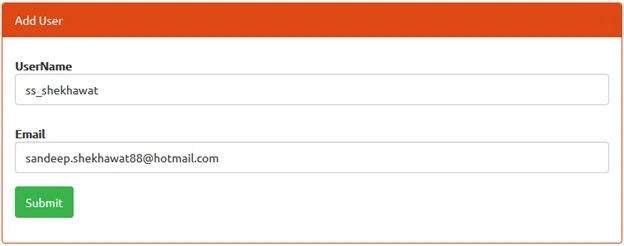 Figure 1:
 Add User UI Form
Now click on the Submit button and get the result as in the following screen.
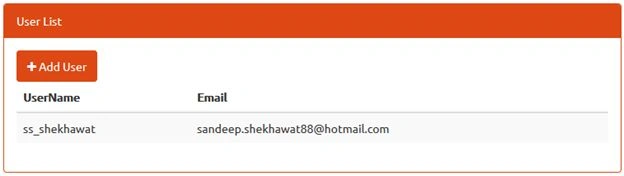
Figure 2: Landing Page Screen
Download
If you would like to download complete solution source code, please
click here.


Raja TPosted Jul 26, 2016, 4:57 AM
Nice, Thanks for sharing
Ravi MakhijaPosted Sep 3, 2015, 5:21 AM
good one :)
Sandeep Singh ShekhawatPosted Jul 19, 2015, 8:43 AM
Thanks all friends :)
Narasimha Reddy ChennupalliPosted Jul 18, 2015, 1:55 PM
Good one, thanks for sharing.
Santhakumar MunuswamyPosted Jul 17, 2015, 4:40 PM
Thanks for nice article:)
Chervine BhiwooPosted Jul 17, 2015, 3:07 PM
Great Article!
Sandeep Singh ShekhawatPosted Jul 17, 2015, 9:29 AM
Thanks all :)
Vipul MalhotraPosted Jul 17, 2015, 6:20 AM
Thank you for sharing sir
Nilesh JadavPosted Jul 17, 2015, 6:18 AM
Nice one sir
Gopi ChandPosted Jul 17, 2015, 5:49 AM
Good
SharadPosted Jul 17, 2015, 5:39 AM
great article with examples..