

In this article, I am going to show two AJAX Control - TextBoxWatermarkExtender and ValidatorCalloutExtender. We use error validation control, now by using AJAX we can use these controls in a very attractive way.
Here are the brief descriptions of these two controls.
TextBoxWatermarkExtender
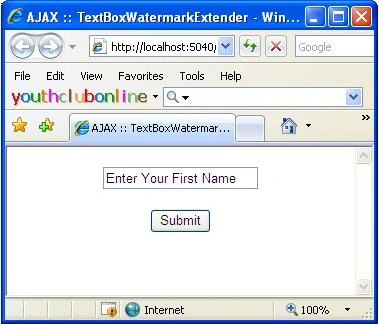
This Ajax control attached to Textbox control to get WaterMark behavior. When a Textbox control is empty it display Watermark text.To attach TextBoxWatermarkExtender to TextBox, set TargetControlId of TextBoxWatermarkExtender to particular TextBox. Here, I set TargetControlID of twFirstname to txtFirstname and set WatermarkText for txtFirstname.
ValidatorCalloutExtender
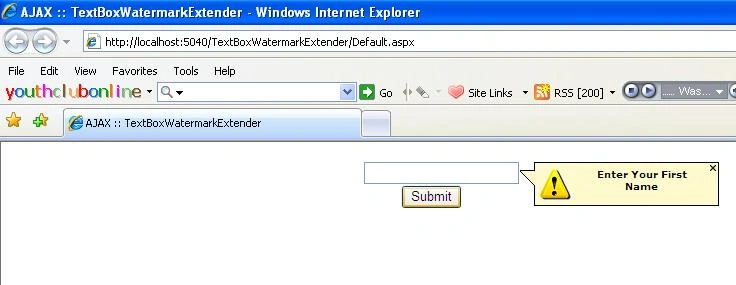
This Ajax control enhances the functionality of existing ASP.NET validators. To use this control, add an input field and a validator control as you normally would. Then add the ValidatorCallout and set its TargetControlID property to reference the validator control.
The following code of ASP.NET page shows how to use both of these controls.
<%@ Page Language="C#" AutoEventWireup="true" CodeFile="Default.aspx.cs" Inherits="_Default" %>
<!DOCTYPE html PUBLIC "-//W3C//DTD XHTML 1.0 Transitional//EN" "http://www.w3.org/TR/xhtml1/DTD/xhtml1-transitional.dtd">
<html xmlns="http://www.w3.org/1999/xhtml">
<head runat="server">
<title>AJAX :: TextBoxWatermarkExtender</title>
</head>
<body>
<form id="form1" runat="server">
<asp:ScriptManager ID="ScriptManager1" runat="server">
</asp:ScriptManager>
<div>
<table cellpadding="0" cellspacing="0" width="50%" align="center">
<tr>
<td>
<div>
arpan shahPosted Aug 6, 2012, 10:21 AM
Thanks friend It is worked . Thanks again Please help in one thing what about regular expression in which how to omit extender msg value at time of submit button
arpan shahPosted Aug 6, 2012, 10:20 AM
Thanks friend It is worked . Thanks again Please help in one thing what about regular expression in which how to omit extender msg value at time of submit button