
Most of the time while developing reports people wonder how to have alternating row colors in the report like below.
| Customer Name | Address | City | State | Zip |
| Suparba panda | 123 olive rd | St Louis | MO | 54678 |
| John Doe | 456 Tree drive | Raleigh | NC | 14676 |
| Jane Doe | 768 Hudson rd | Atlanta | GA | 76555 |
There is a cool trick to it.
Go to the format section of the Details. Click the Color Tab. Then click the button next to the Background Color CheckBox...
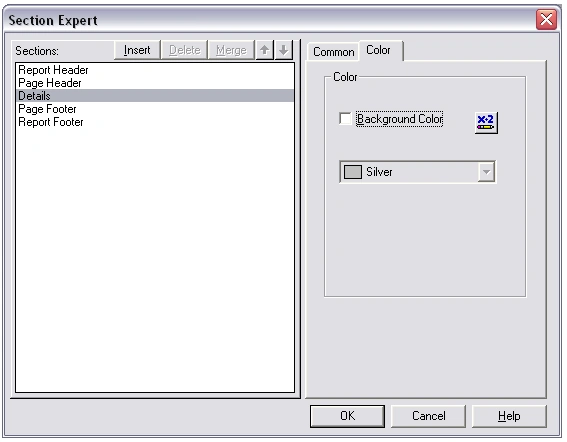
In the formula editor of background color, type the following:
if RecordNumber mod 2 = 0 then crSilver else crNoColor.
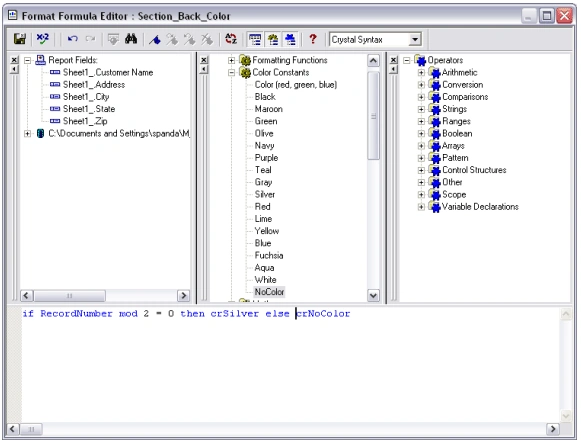
Save and close the editor.
And now when you run the report you will see alternate colors of silver and white in the details section.
Conclusion
In this article, you learned how to have alternating colors in the report detail section.
Joseph ThomasPosted Oct 29, 2011, 2:01 AM
thats excellent thanks for the idea..anyway can you give me an idea to change color of a particular record in details crytal report
Jonatan RangelPosted May 5, 2011, 6:00 PM
How can I do this since VB.net 2008?
Ahmed YoussefPosted Nov 9, 2010, 6:00 PM
I have a crystal report that contains alternating row colors. I developed it the same way as you discussed here but i have a problem. When i run the report, the rows that have silver background is coming out of table boundries. I mean the shadow background is coming out of table boundries. Do you know why?
eliza sahooPosted Mar 18, 2010, 5:56 AM
When we represent some data in a grid view we usually prefer to set alternative row color.For this we can use two css classes with different background colors or inline styles. What we need to do is that while constructing the grid by looping through data set, we can check the loop count is odd or even and then attach an alternative class or inline CSS accordingly. Suppose we need two alternative colors '#ffffff' and '#dedede' . Using jQuery we can do this very easily. jQuery provides :even and :odd selectors through which we can select odd and even element and set background color. Eliza
Ahmet MehmetPosted Mar 2, 2010, 1:31 AM
Crystalreport not working server. error = "Report Load Failed.". help me please.
GCeasereditedPosted Aug 25, 2009, 1:39 PMEdited Aug 25, 2009, 1:41 PM
The background color of the details section will extend beyond your data if your data does not go to both sides of the report. Is there any easy was to fix this? (I am using Crystal Report inside Visual Studio 2008)
Allen LichaPosted Jun 19, 2009, 5:22 PM
Keep in mind that you can use color codes instead of constants if you don't want to be limited to the list of colors. e.g. "If RecordNumber Mod 2 = 0 Then Color (227,223,172) Else NoColor"
Prasanta DasPosted Feb 11, 2009, 8:24 AM
Thank you very much for a very Useful article.i have implemented in my Reporting. Thanking You... Prasanta kumar das
Eddie MoragaPosted Dec 13, 2007, 1:35 PM
When I enter the formula in Crystal V10 I get the following error "The special variable 'Formula' must be assigned a value within the formula". Does anyone know what this means?
Srinivasan SeshadriPosted Sep 8, 2007, 2:19 AM
I am trying to export an excel workbook with a single worksheet as a page to be archived by Crystal Reports. The worksheet needs to be approved & then sent by the press of a button. Please let me know if there is a solution.
LeeKAPosted May 30, 2007, 11:05 PM
I was looking for the solution, and I didn't know it's so simple. Thanks for the tutorial. I've added this to my report. ^_^