
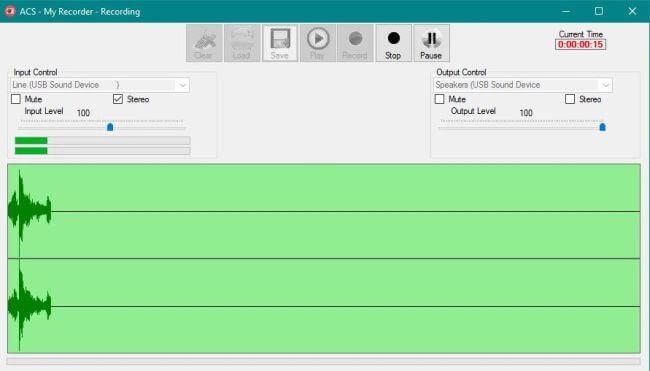
The Recorder with VU and Real Time Graphing
So, what is involved in recording live audio with the WinMM API?
Short Answer
- Open the desired WaveInDevice using waveInOpen.
- Create a number of WAVHDR instances.
- Pass these instances to the DLL by calling waveInPrepareHeader and WaveInAddBuffer. This tells the DLL that there are buffers available, and gives the DLL permission to use them. Finally, call waveInStart to actually start recording.
- When the DLL has filled one of those buffers, it will call a designated callback function that reads that filled buffer and then prepares and sends that buffer back to the DLL. When you are done recording, you must inform the DLL that it can release those buffers back to the system. When all buffers are 'Un-Prepared', you must finally call waveInStop to close the device but it can not be called from within the callback routine.
- I actually launched a new thread from the callback routine which calls waveInStop, waveInReset, waveInUnprepareHeader (for each WAVEINHDR) and finally waveInClose.
Long Answer
When the form loads, it calls MixerGetDevCaps, waveInGetDevCaps, and waveOutGetDevCaps to get the available input and output devices. For the recorder, we are interested in the input device retrieved with waveInGetDevCaps. The order in which they are presented to us gives us the device index for each when calling waveInOpen. We must first create a binary file to store the data in when the DLL does record it. We create a binary file called TheData.bin. To this file, we add a dummy wave header that has all known values except the size of the final recording. We must also start a timer that will be used to apprise the UI of our progress.
- // create a binary file to hold the recorded data
- if (!Directory .Exists (Application.StartupPath + @"\Safe"))
- Directory .CreateDirectory (Application.StartupPath + @"\Safe");
- if (File.Exists(Application.StartupPath + @"\Safe\TheData.bin"))
- File.Delete (Application.StartupPath + @"\Safe\TheData.bin");
- fs = new FileStream(Application.StartupPath + @"\Safe\TheData.bin", FileMode.OpenOrCreate, FileAccess.ReadWrite);
- bw = new BinaryWriter(fs);
- Int32 riffsize = 0, datasize = 0;
- //create a dummy wave header to be filled in when done recording
- /*
- Standard CD Quality Audio
- wavFmt.wFormatTag = 1;//pcm
- wavFmt.nChannels = 2;//stereo
- wavFmt.nSamplesPerSec = 44100;//44100 samples per sec
- wavFmt.nAvgBytesPerSec = 176400;//2 channels*2 bytes * 44100 samples
- wavFmt.wBitsPerSample = 16;//16 bits per sample
- wavFmt.nBlockAlign = (ushort)(wavFmt.nChannels * wavFmt.wBitsPerSample / 8);
- wavFmt.cbSize = (ushort)Marshal.SizeOf(wavFmt);
- */
- bw.Write(RIFF);
- bw.Write(riffsize);
- bw.Write(WAVE);
- bw.Write(FMT);
- bw.Write(wavFmt.cbSize - 4);
- bw.Write(wavFmt.wFormatTag);
- bw.Write(wavFmt.nChannels);
- bw.Write(wavFmt.nSamplesPerSec);
- bw.Write(wavFmt.nAvgBytesPerSec);
- bw.Write(wavFmt.nBlockAlign);
- bw.Write(wavFmt.wBitsPerSample);
- bw.Write(DATA);
- bw.Write(datasize);
- IntPtr dwCallback = IntPtr.Zero;// a pointer that will eventually point to our WaveDelegate callback routine(HandleWaveIn)
- BufferInProc = new WaveDelegate(HandleWaveIn);//the callback function must be cast as a WaveDelegate
- dwCallback = Marshal.GetFunctionPointerForDelegate(BufferInProc);// point our callback pointer to our WaveDelegte function
- //open the recording device ...
- //hWaveIn will be the handle to the device for all future calls
- //InputDeviceIndex is the index of the device as returned to us from a call to waveInGetDevCaps
- //wavfmt is the format the DLL will be using to record the audio... it was set in clsPlayer() to be the same standard as used in CD quality audio
- //dwCallback is the pointer to our WaveDelegate function (where the recorded data is returned to us)
- // 0 dwCallbackInstance ... User - instance data passed to the callback mechanism. This parameter is not used with the window callback mechanism.
- // a flag to let the DLL know that we want to use a callback function
- rv0 = waveInOpen(ref hWaveIn, InputDeviceIndex, ref wavFmt, dwCallback, 0, (uint)WaveInOpenFlags.CALLBACK_FUNCTION);
- if (0 != rv0)
- rv = mciGetErrorString(rv0, errmsg, (uint)errmsg.Capacity);
Next, we have to create several WAVEHDR structures that the DLL can use to put the recorded data and send it back to us. We need at least two because while one is being examined by us, the other is being filled in. Once we define a structure, we must tell the DLL to prepare it with waveInPrepareHeader and then we call waveInAddBuffer to add it to the DLL's queue. When all structures have been added, call to actually start recording.
- header = new WAVEHDR[NUMBER_OF_HEADERS ];// WAVEHDR structures * 4(NUMBER_OF_HEADERS)
- for (int i = 0; i < NUMBER_OF_HEADERS; i++)
- {
- HeaderDataHandle = GCHandle.Alloc(header, GCHandleType.Pinned);
- HeaderData = new byte[size]; //.1 seconds worth of bytes
- HeaderDataHandle = GCHandle.Alloc(HeaderData, GCHandleType.Pinned);
- header[i].lpData = HeaderDataHandle.AddrOfPinnedObject();// a pointer to where the data will be stores
- header[i].dwBufferLength = size;// let the DLL know how big the buffer is
- header[i].dwUser =new IntPtr(i);// not really important to us here ... we only use it for debug purposes
- rv1 = waveInPrepareHeader(hWaveIn, ref header[i], (uint)Marshal.SizeOf(header[i]));//tell the DLL to prepare the header
- if (0 != rv1)
- {
- rv = mciGetErrorString(rv1, errmsg, (uint)errmsg.Capacity);
- return false;
- }
- rv1 = waveInAddBuffer(hWaveIn, ref header[i], size);// tell the tell that it is ready to use
- if (0 != rv1)
- {
- rv = mciGetErrorString(rv1, errmsg, (uint)errmsg.Capacity);
- return false;
- }
- }
- rv1 = waveInStart(hWaveIn);// start recording
- if (0 != rv1)
- {
- rv = mciGetErrorString(rv1, errmsg, (uint)errmsg.Capacity);
- return false;
- }
The callback function is what gets called when the DLL is finished filling one of the WAVEHDR structures. The callback function must create a managed byte array to hold the recorded data and copy the data from the pointer to the byte array. If we are not paused (monitoring only), the function must write the retrieved data to the aforementioned binary file (TheData.bin). Here, we also must find the min and max short values that are present in the data returned (in this example, we are recording two channels with sixteen-bit samples for each channel. We must, therefore, turn the raw byte array returned to us into two separate Int16 arrays and examine them for the min and max value) to be used elsewhere for VU and Plotting functions done through the separate timer function. At this point, we are ready to return the structure to the DLL by calling waveInAddBuffer.
If we are ready to stop recording, we do not call waveInAddBuffer. Instead, we call waveInUnprepareHeader for each structure that we have created. When all of the structures have been un-prepared, we set a flag that the timer will examine independantly.
- /// <summary>
- /// Our WaveDelegate function
- /// </summary>
- /// <param name="hdrvr"></param>
- /// <param name="uMsg"></param>
- /// <param name="dwUser"></param>
- /// <param name="waveheader">the place where the recorded data is stored</param>
- /// <param name="dwParam2"></param>
- private void HandleWaveIn(IntPtr hdrvr, int uMsg, int dwUser, ref WAVEHDR waveheader, int dwParam2)
- {
- uint rv1;
- lock (lockobject)// critical section
- {
- if (uMsg == MM_WIM_DATA )//&& recording)
- {
- try
- {
- uint i = (uint)waveheader.dwUser.ToInt32();// for debug purposes only
- // Debug.Print("User "+i.ToString());// try to not do this because it takes a lot of time
- byte[] _imageTemp = new byte[waveheader.dwBytesRecorded];// create an array that is big enough to hold the data
- Marshal.Copy(waveheader.lpData, _imageTemp, 0, (int)waveheader.dwBytesRecorded);// copy that data
- if (!paused)// if we are not paused
- bw.Write(_imageTemp);//write the data to a file
- VU(_imageTemp);// find the min and max for this sample so we can do VU and Plotting (from a timer function ... not here)
- if (!stopstruct.Stopping)// not stopping so add the header back to the queue
- {
- rv1=waveInAddBuffer(hWaveIn, ref waveheader, size);
- if (rv1 != 0)// if not success then get the associated error message
- {
- mciGetErrorString(rv1, errmsg, (uint)errmsg.Capacity);
- }
- }
- else// stopping
- {
- stopstruct.NumberofStoppedBuffers++;// keep track of the buffers that are finished
- rv1 = waveInUnprepareHeader(hWaveIn, ref waveheader, size);// un-prepare the headers as they come back
- if (rv1 != 0)// if not success then get the associated error message
- {
- mciGetErrorString(rv1, errmsg, (uint)errmsg.Capacity);
- }
- if (stopstruct.NumberofStoppedBuffers == NUMBER_OF_HEADERS)// when they are all done set a flag that we are done
- {
- stopstruct.Stopped = true;
- }
- }
- }
- catch
- {
- }
- }
- }
- }
The timer function is where we inform the UI of levels or that the recorder has actually finished. It is responsible for closing the waveindevice. Finally, the wave file must be created from binary file and the UI can the load it to play back and/or save elsewhere.
- private void timer1_tick(object sender,EventArgs e)
- {
- int i,j;
- short leftlevel,rightlevel;
- LevelEventArgs lea=new LevelEventArgs ();
- if (recording)
- {
- if (LeftMinMax.Count > 1)
- {
- lea.numberofchannels = (byte)wavFmt.nChannels;//arguments for VU and Plotting culled from the min amx info that was obtained from the callback
- i = LeftMinMax.Count - 1;
- j = RightMinMax.Count - 1;
- MinMax lmm, rmm;
- lmm = LeftMinMax[i];
- if (-1 * lmm.Min > lmm.Max)
- leftlevel = (short)(-1 * lmm.Min);
- else
- leftlevel = lmm.Max;
- lea.leftlevel = leftlevel;
- lea.leftminmax = lmm;
- if(wavFmt .nChannels >1)
- {
- rmm = RightMinMax[j];
- if (-1 * rmm.Min > rmm.Max)
- rightlevel = (short)(-1 * rmm.Min);
- else
- rightlevel = rmm.Max;
- lea.rightlevel = rightlevel;
- lea.rightminmax = rmm;
- }
- RaiseLevelEvent(lea); // call the UI to Plot and do VU
- }
- if (stopstruct.Stopped)
- {
- timer1.Enabled = false;
- Stop();// close the waveindevice
- RaiseRecordingStoppedEvent();
- }
- }
- }
- // when the waveinhandler has no more headers to stop adding, the timer will call this function to close out the device
- private void Stop()
- {
- uint rv;
- bool rv1;
- if (recording)
- {
- rv = waveInStop(hWaveIn);// Infor the DLL that we are not recording anymore
- if (0 != rv)
- {
- rv1 = mciGetErrorString(rv, errmsg, (uint)errmsg.Capacity);
- Debug.Print("waveInStop Err " + errmsg);
- }
- else
- {
- rv = waveInClose(hWaveIn);// close the recording device
- if (0 != rv)
- {
- rv1 = mciGetErrorString(rv, errmsg, (uint)errmsg.Capacity);
- Debug.Print("waveInClose Err " + errmsg);
- }
- bw.Close();
- }
- }
- }
I won't go into the UI functions because I do believe that if you have got through this narative so far, you are more than capable of creating a better UI than I have.
RobbPosted Oct 23, 2019, 2:06 PM
I'm just wondering if you put this code under WinForms, then how much time would elapsed before this code hangs the App? Since it is connected to Unmanaged code.. )))
venu jayasankarPosted Dec 8, 2017, 12:17 AM
This project is not working for 64-bit and it works only for 32-bit.Can you send me the updated project code which works for 64-bit.
Sebastien GagnonPosted Oct 30, 2017, 1:40 PM
Can I download this project ?