In the enterprise banking sector, one of the most persistent challenges is handling "cold-start" users new employees, clients, or systems with little to no historical interaction data and managing sparse behavior histories where transactional data is incomplete or irregular. This is particularly critical in core financial modules like General Ledger (GL) and Accounts Payable (AP). Traditional rule-based systems often fail here because they lack the contextual nuance to interpret ambiguous or minimal data. This article explores how an Enterprise Multi-Agent System built on LangGraph, enhanced with Retrieval-Augmented Generation (RAG), Long-Term Memory, and State Management, can effectively address these challenges. By leveraging bank policy documents as a knowledge base, we create a system that doesn’t just react to data but understands intent, compliance, and context, even when user history is sparse.
1. The Challenge: Cold-Start Users in Financial Systems
When a new vendor is added to the Accounts Payable system, or a new accountant accesses the General Ledger, there is no behavioral history to predict risk, categorize transactions, or suggest approvals. Sparse data leads to:
Increased manual review times.
Higher risk of compliance violations.
Inconsistent application of bank policies.
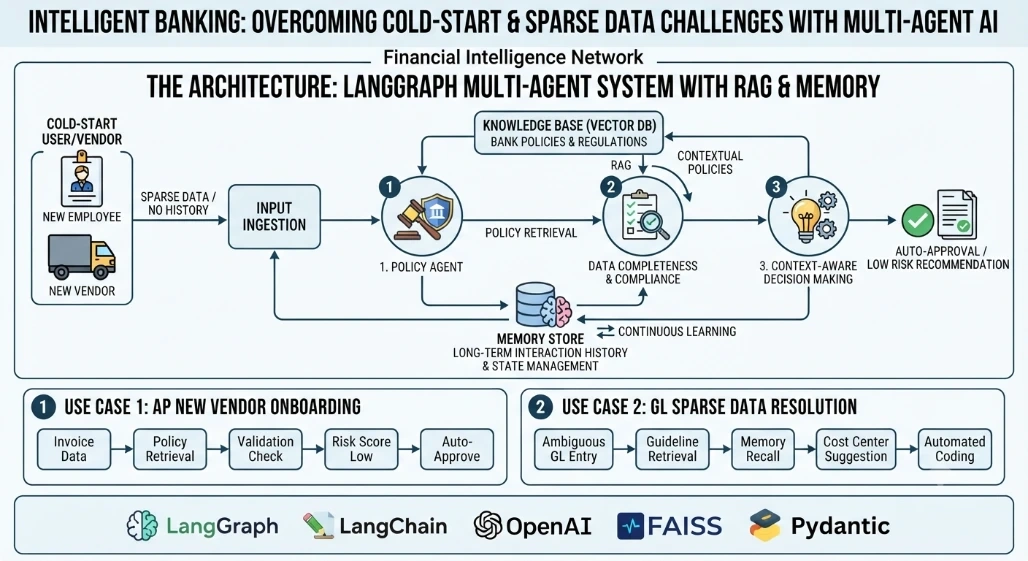
2. Architecture Overview: Multi-Agent LangGraph with RAG
Our solution uses a multi-agent architecture where specialized agents collaborate:
Policy Agent: Retrieves relevant bank policies using RAG.
Validation Agent: Checks data completeness and compliance.
Decision Agent: Makes recommendations based on policy and context.
Memory Store: Maintains state across interactions, allowing the system to "learn" from each sparse interaction.
3. Real-Time Use Case: Onboarding a New Vendor in Accounts Payable
Imagine a new vendor, "TechSupply Co.," submits their first invoice. The system has no history with them. Instead of flagging it for manual review immediately, the multi-agent system activates:
Ingestion: The invoice data is parsed.
Policy Retrieval: The Policy Agent queries the vector database for "new vendor onboarding" and "invoice validation" policies.
Contextual Analysis: The Validation Agent checks the invoice against retrieved policies (e.g., required tax IDs, payment terms).
Decision: The Decision Agent recommends approval with a "Low Risk" tag, citing specific policy clauses, despite the lack of historical data.
4. Code Implementation: Building the Agent State and Policy RAG
Below is a simplified implementation using LangGraph and Pydantic for state management.
from typing import TypedDict, List, Annotated
from langgraph.graph import StateGraph, END
from langchain_core.documents import Document
from langchain_community.vectorstores import FAISS
from langchain_openai import OpenAIEmbeddings
import operator

# Define the State
class AgentState(TypedDict):
    vendor_id: str
    invoice_data: dict
    policy_context: str
    validation_result: str
    decision: str
    history: Annotated[List[str], operator.add]

# Mock RAG Retrieval
def retrieve_policy(state: AgentState) -> AgentState:
    # In production, this would query a vector DB like FAISS or Azure AI Search
    policies = [
        "New vendors must have a valid Tax ID and W-9 form.",
        "Invoices over $10,000 require dual approval.",
        "Payment terms for new vendors are Net-30."
    ]
    state['policy_context'] = " | ".join(policies)
    return state

# Validation Agent
def validate_invoice(state: AgentState) -> AgentState:
    policy = state['policy_context']
    invoice = state['invoice_data']

    if 'tax_id' not in invoice:
        state['validation_result'] = "FAIL: Missing Tax ID per policy."
    else:
        state['validation_result'] = "PASS: Basic compliance met."
    return state

# Decision Agent
def make_decision(state: AgentState) -> AgentState:
    if "FAIL" in state['validation_result']:
        state['decision'] = "REJECT: Manual Review Required"
    else:
        state['decision'] = "APPROVE: Auto-approved under new vendor policy"
    state['history'].append(f"Vendor {state['vendor_id']} processed: {state['decision']}")
    return state

# Build the Graph
workflow = StateGraph(AgentState)
workflow.add_node("retrieve_policy", retrieve_policy)
workflow.add_node("validate", validate_invoice)
workflow.add_node("decide", make_decision)

workflow.set_entry_point("retrieve_policy")
workflow.add_edge("retrieve_policy", "validate")
workflow.add_edge("validate", "decide")
workflow.add_edge("decide", END)

app = workflow.compile()

# Execution
initial_state = {
    "vendor_id": "VENDOR_001",
    "invoice_data": {"amount": 5000, "tax_id": "12-3456789"},
    "policy_context": "",
    "validation_result": "",
    "decision": "",
    "history": []
}

result = app.invoke(initial_state)
print(result['decision'])
5. Handling Sparse Data in General Ledger Entries
For General Ledger entries, sparse data might mean missing cost center codes or ambiguous descriptions. The Policy Agent retrieves coding guidelines, while the Memory Store recalls how similar ambiguous entries were resolved in the past, even if from different users. This creates a "collective intelligence" that compensates for individual sparse histories.
6. The Role of Memory in Continuous Learning
The history field in our state is crucial. Each interaction, even from a cold-start user, enriches the system’s memory. Over time, the system builds a robust context map, reducing reliance on explicit policy retrieval for common scenarios and improving accuracy for sparse data points.
Handling cold-start users and sparse behavior histories in banking requires more than just rules; it demands context-aware intelligence. By implementing an Enterprise Multi-Agent system with LangGraph, RAG, and persistent memory, banks can automate complex decisions in General Ledger and Accounts Payable with confidence. This approach not only mitigates risk but also accelerates processing times, turning a traditional weakness into a competitive advantage.


Join the conversation! Your thoughts help the community grow.