

Introduction
In this article, we will learn about CLR database procedures in C#. Let’s discuss CLR database stored procedure.
Description
Why use CLR procedures instead of T-SQL procedures & functions.
- If you'd prefer to write the code in (VB.Net, C#, etc.) rather than SQL.
- If you want to do complex operations on data in CLR.
- If you want to be close to the data (i.e. not in ASP.NET or a WinForms app etc.)
- The CLR has RegEx but SQL does not.
- You can call web services in CLR, but you can't in T-SQL.
- The CLR has better performance (if you had to do a lot of math on every row, for example).
- You can re-use code.
CLR Stored Procedures
This article will show how to create four types of CLR database stored procedures:
- A stored procedure that returns a result set
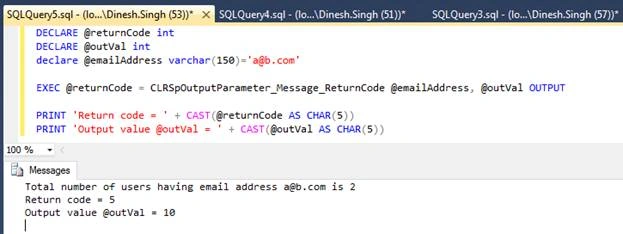
- A stored procedure that returns an output parameter, message, and returns code
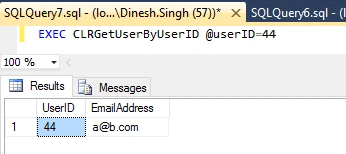
- A stored procedure that returns a dynamically created result set with a single row
- A stored procedure that returns a dynamically created result set containing multiple rows.
Let’s see CLR stored procedures practically,
Step 1
Create a library project (CLR Procedures) in Visual Studio as below.

Create one class files “CLRDynamicProcedures.cs”.
In file “CLRDynamicProcedures.cs” add the below lines of code.
- using Microsoft.SqlServer.Server;
- using System.Data;
- using System.Data.SqlClient;
- namespace CLRProcedures
- {
- public class CLRDynamicProcedures
- {
- [SqlProcedure]
- public static void GetUsers()
- {
- using (SqlConnection connection = new SqlConnection("context connection=true"))
- {
- connection.Open();
- SqlCommand cmd = new SqlCommand(@"SELECT * FROM [dbo].[Users]", connection);
- SqlContext.Pipe.ExecuteAndSend(cmd);
- }
- }
- [SqlProcedure]
- public static int SpOutputParameter_Message_ReturnCode(string emailAddress, out int outVal)
- {
- outVal = 10;
- using (SqlConnection connection = new SqlConnection("context connection=true"))
- {
- connection.Open();
- SqlCommand cmd = new SqlCommand(@"SELECT COUNT(*) FROM [dbo].[Users] WHERE EmailAddress=@EmailAddress", connection);
- SqlParameter modifiedSinceParam = cmd.Parameters.Add("@EmailAddress", SqlDbType.NVarChar);
- modifiedSinceParam.Value = emailAddress;
- int userCount = (int)cmd.ExecuteScalar();
- SqlContext.Pipe.Send(string.Format("Total number of users having email address {0} is {1}", emailAddress, userCount));
- }
- return 5;
- }
- [SqlProcedure]
- public static void GetUserByUserID(int userID)
- {
- SqlMetaData[] md = new SqlMetaData[2];
- md[0] = new SqlMetaData("UserID", SqlDbType.Int);
- md[1] = new SqlMetaData("EmailAddress", SqlDbType.NVarChar, 150);
- SqlDataRecord row = new SqlDataRecord(md);
- using (SqlConnection connection = new SqlConnection("context connection=true"))
- {
- connection.Open();
- SqlCommand cmd = new SqlCommand(@"SELECT TOP 1 UserID,EmailAddress FROM [dbo].[Users] WHERE UserID=@UserID", connection);
- SqlParameter modifiedSinceParam = cmd.Parameters.Add("@UserID", SqlDbType.NVarChar);
- modifiedSinceParam.Value = userID;
- using (SqlDataReader reader = cmd.ExecuteReader())
- {
- while (reader.Read())
- {
- row.SetSqlInt32(0, (int)reader.GetSqlInt32(0));
- row.SetSqlString(1, (string)reader.GetSqlString(1));
- }
- }
- }
- SqlContext.Pipe.Send(row);
- }
- [SqlProcedure]
- public static void GetUsersByEmail(string emailAddress)
- {
- SqlMetaData[] md = new SqlMetaData[2];
- md[0] = new SqlMetaData("UserID", SqlDbType.Int);
- md[1] = new SqlMetaData("EmailAddress", SqlDbType.NVarChar, 150);
- SqlDataRecord row = new SqlDataRecord(md);
- SqlContext.Pipe.SendResultsStart(row);
- using (SqlConnection connection = new SqlConnection("context connection=true"))
- {
- connection.Open();
- SqlCommand cmd = new SqlCommand(@"SELECT UserID,EmailAddress FROM [dbo].[Users] WHERE EmailAddress=@EmailAddress", connection);
- SqlParameter modifiedSinceParam = cmd.Parameters.Add("@EmailAddress", SqlDbType.NVarChar);
- modifiedSinceParam.Value = emailAddress;
- using (SqlDataReader reader = cmd.ExecuteReader())
- {
- while (reader.Read())
- {
- row.SetSqlInt32(0, (int)reader.GetSqlInt32(0));
- row.SetSqlString(1, (string)reader.GetSqlString(1));
- SqlContext.Pipe.SendResultsRow(row);
- }
- }
- }
- SqlContext.Pipe.SendResultsEnd();
- }
- }
- }
Step 2
Open project property and set output path= C:\dlls as below,

Step 3
Build or compile library project and verify the dll copied in output folder (C:\dlls).
Step 4
Open new query window for the targeted database in MSSQL Server Management Studio and add below SQL statement in a query window to create “Users” table with some data.
- CREATE TABLE [dbo].[Users](
- [UserID] [int] IDENTITY(1,1) NOT NULL,
- [UserName] [nvarchar](200) NOT NULL,
- [RealName] [nvarchar](200) NOT NULL,
- [EmailAddress] [varchar](150) NULL,
- [ModifiedDate] [date] NULL,
- CONSTRAINT [PK_Users] PRIMARY KEY CLUSTERED
- (
- [UserID] ASC
- )WITH (PAD_INDEX = OFF, STATISTICS_NORECOMPUTE = OFF, IGNORE_DUP_KEY = OFF, ALLOW_ROW_LOCKS = ON, ALLOW_PAGE_LOCKS = ON) ON [PRIMARY]
- ) ON [PRIMARY]
- GO
- SET ANSI_PADDING OFF
- GO
- SET IDENTITY_INSERT [dbo].[Users] ON
- INSERT [dbo].[Users] ([UserID], [UserName], [RealName], [EmailAddress], [ModifiedDate]) VALUES (44, N'dinesh.singh', N'Dinesh', N'[email protected]', CAST(N'2018-05-15' AS Date))
- INSERT [dbo].[Users] ([UserID], [UserName], [RealName], [EmailAddress], [ModifiedDate]) VALUES (45, N'ramesh.singh', N'Ramesh', N'[email protected]', CAST(N'2018-05-15' AS Date))
- SET IDENTITY_INSERT [dbo].[Users] OFF
Step 5
Let’s create a CLR database stored procedure that returns a result set.
Open SQL management studio query window and write & execute below SQL statement to create the stored procedure:
- CREATE PROCEDURE CLRGetUsers
- AS EXTERNAL NAME StoredProcedures.[CLRProcedures.CLRDynamicProcedures].GetUsers
Note
At First, Run creates an assembly statement; after that run create procedure statement don’t run both at the same time otherwise you will get an error as below.

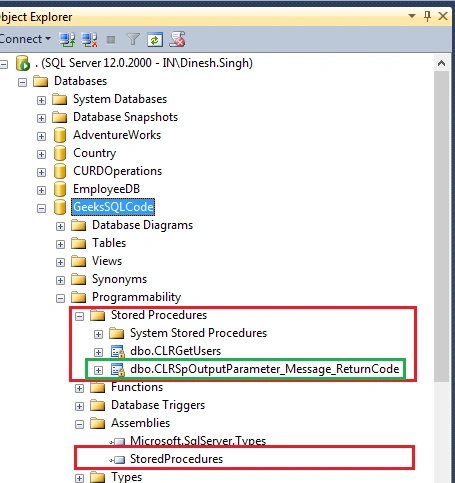
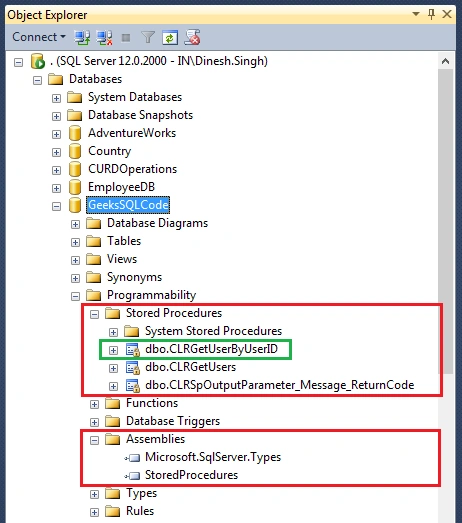
Let’s see whether CLR database assembly and procedure are created in SQL database object explorer or not.

From the above screen, CLR assembly and procedure have been created in SQL database. Now, let’s run the created CLR procedure “CLRGetUsers” and see the output.



Viknaraj ManogararajahPosted Jul 21, 2018, 10:52 PM
Nice Article, Thank you for sharing