

Introduction
In this article, I'll explain cookies in Asp.Net and how to use cookies in C# and VB.Net with an appropriate example. A way to use Browser Cookies in ASP.Net is reading values and keeping it in Cookies, writing (saving) values in Cookies and additionally, a way to delete/remove/clear Cookies in ASP.Net using C# and VB.Net.
What is Cookie in ASP.Net?
A cookie could be a tiny little bit of text that accompanies requests and pages as they're going between the online server and browser. The cookie contains data the online application will scan whenever the user visits a website.
For example, if a user requests a page from your website and your application sends not simply a page, however additionally a cookie containing the date and time, once the user's browser gets the page, the browser additionally gets the cookie, that it stores in an exceeding folder on the user's magnetic disk.
Later, if user requests a page from your website once more, when the user enters the universal resource locator (URL) the browser appearance on the native magnetic disc for a cookie related to the universal resource locator (URL). If the cookie exists, the browser sends the cookie to your website together with the page request. Your application will then confirm the date and time that the user last visited the positioning. you may use the data to show a message to the user or check expiration date.
Cookies are related to an internet website, not with a particular page, therefore the browser and server can exchange cookie data despite what page the user requests from your website. because the user visits completely different sites, every website would possibly send a cookie to the user's browser as well; the browser stores all the cookies on an individual basis.
How to Read, Write and Clear Cookies in ASP.Net?
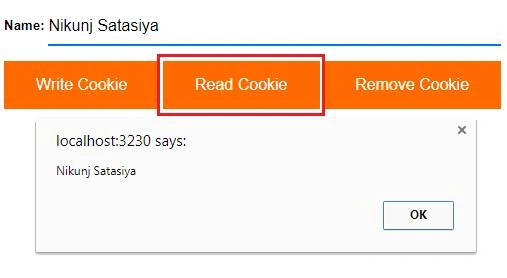
The following markup language consists of associate ASP.Net TextBox and 3 ASP.Net Buttons for Writing, Reading and Deleting browser cookies.
- <%@ Page Language="C#" AutoEventWireup="true" CodeFile="CS.aspx.cs" Inherits="CS" %>
- <!DOCTYPE html PUBLIC "-//W3C//DTD XHTML 1.0 Transitional//EN" "http://www.w3.org/TR/xhtml1/DTD/xhtml1-transitional.dtd">
- <html xmlns="http://www.w3.org/1999/xhtml">
- <head id="Head1" runat="server">
- <title></title>
- <style type="text/css">
- body
- {
- font-family: Arial;
- font-size: 10pt;
- }
- .button {
- background-color: #ff6a00; /* Green */
- border: none;
- color: white;
- padding: 15px 32px;
- text-align: center;
- text-decoration: none;
- display: inline-block;
- font-size: 16px;
- }
- input[type=text] {
- border: none;
- width :33.5%;
- height:35px;
- font-size: 16px;
- border-bottom: 2px solid #0072ff;
- }
- </style>
- </head>
- <body>
- <form id="form1" runat="server">
- <b> Name:</b>
- <asp:TextBox ID="txtName" runat="server" />
- <br />
- <br />
- <asp:Button ID="btnWrite" CssClass="button" Text="Write Cookie" runat="server" OnClick="WriteCookie" />
- <asp:Button ID="btnRead" CssClass="button" Text="Read Cookie" runat="server" OnClick="ReadCookie" />
- <asp:Button ID="btnDelete" CssClass="button" Text="Remove Cookie" runat="server" OnClick="RemoveCookie" />
- </form>
- </body>
- </html>
How to Write Cookies in ASP.Net?
When the Write Cookie Button is clicked, the individual Button click event handler is executed that saves the worth of the Name TextBox to the Browser Cookie using the item of the HttpCookie category.
Finally the Cookie is added to the Response.Cookies assortment.
Write following code in click event of button WriteCookie.
C# Code
- protected void WriteCookie(object sender, EventArgs e)
- {
- //Create a Cookie with a suitable Key.
- HttpCookie nameCookie = new HttpCookie("Name");
- //Set the Cookie value.
- nameCookie.Values["Name"] = txtName.Text;
- //Set the Expiry date.
- nameCookie.Expires = DateTime.Now.AddDays(30);
- //Add the Cookie to Browser.
- Response.Cookies.Add(nameCookie);
- }

Join the conversation! Your thoughts help the community grow.