


To-Do helps you manage, prioritize, and complete the most important things you need to achieve every day, powered by Office 365 integration.
Currently, it is available as a web app, as well as a desktop application which can be installed from the Microsoft Store, or a Mobile app that can be installed from the iOS App Store for an iOS device or Play Store for an Android device respectively.
To-Do allows the users to create lists to group their tasks with due days and reminders. A user can attach files or links to a task, and they can even put notes. These tasks can even be set to be recurring on various schedules, such as weekly, or weekdays only.
Below, we will explore a few features but there are many more that are available, and you can learn more about them here.
In this article, I have tried to cover the main features of Microsoft To-Do list.
- Outlook Integration
- Sharing Lists
- Microsoft Planner Integration
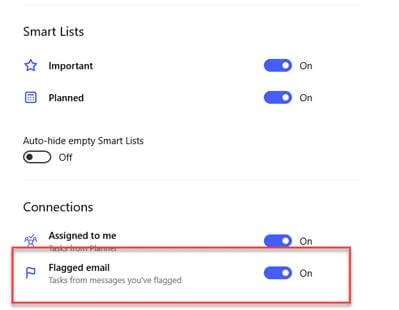
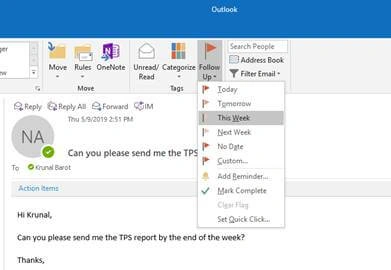
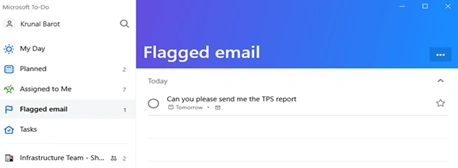
Outlook Integration
Sharing Lists
In addition to your personal lists, you may share some lists with others just like you can share some files with colleagues. Inviting others to share lists will allow for additional collaboration and keeping projects up-to-date.
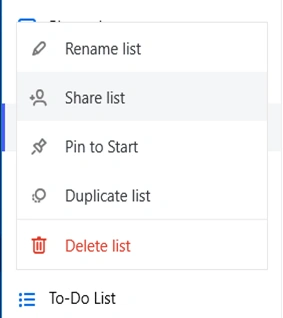
To share, right-click on the list and click "Share List" to create an invitation link. You can then send this link to anyone who you would like to access the list with you.
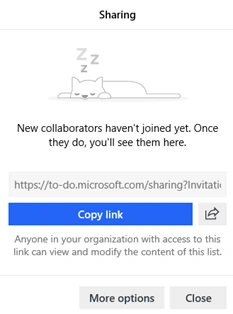
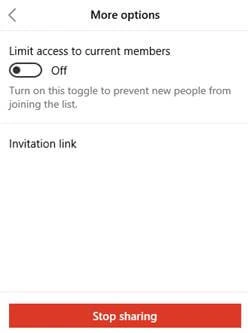
To stop users accessing the shared list, you can follow the same process and click "Stop sharing".
Microsoft Planner Integration
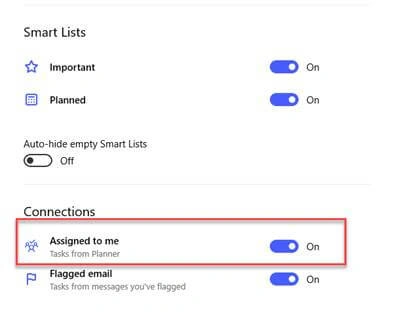
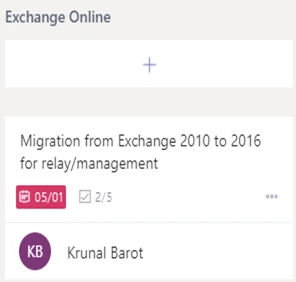
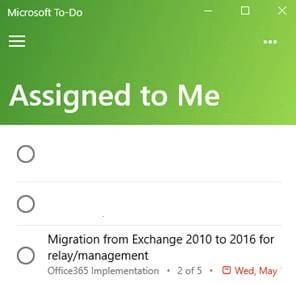
After enabling the setting in To-Do, creating a new task under Microsoft planner will show as a task under "Assigned to Me" in To-Do.
Thank you for reading.
Mahesh ChandPosted May 11, 2019, 10:06 AM
Yes its definitely a good app. I would like it to get more evolved into a business productivity app like Asana or others.
Divyang DesaiPosted May 10, 2019, 12:16 PM
Microsoft To-Do is a great app, I'm using it since long time, you can directly create a tasks from Skype too! Cheers.