

Hi Friends!
So, how we are going to find out table size information of a given database?
Here we go….
- In this section, I am going to explain two queries regarding size.
- Both are related to analyzing the size of database.
- It's always necessary to find out the size of a table due to the large amount of data.
Query 1
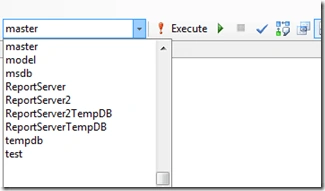
In this, we have to first select DATABASE from the SQL Server and fire the query so as to get the information about current size and free space of the selected database.
In this, we have to first select DATABASE from the SQL Server and fire the query so as to get the information about current size and free space of the selected database.
Let's say I have selected master database as shown below.
Now, execute the following query on it.
- --Database size information
- SELECT Db_name()AS dbname,
- name AS filename,
- size / 128.0 AS currentsizemb,
- size / 128.0 - CAST(Fileproperty(name,'SpaceUsed') AS INT) / 128.0 AS freespacemb
- FROM sys.database_files
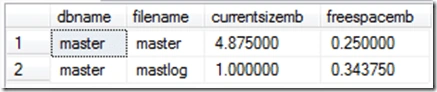
We will get the output in the following format.
Query 2
This query is informative and contains almost all the required information that we require about any table.
- –Detailed Database size information
- DECLARE
- @max INT,
- @min INT,
- @owner NVARCHAR(256),
- @table_name NVARCHAR(256),
- @sql NVARCHAR(4000)
- DECLARE @table TABLE(
- ident INT IDENTITY(1,1) PRIMARY KEY,
- owner_name NVARCHAR(256),
- table_name NVARCHAR(256))
- IF (SELECT OBJECT_ID('tempdb..#results')) IS NOT NULL
- BEGIN
- DROP TABLE #results
- END
- CREATE TABLE #results(
- ident INT IDENTITY(1,1) PRIMARY KEY, --Will be used to update the owner.
- table_name NVARCHAR(256),
- owner_name NVARCHAR(256),
- table_rows INT,
- reserved_space NVARCHAR(55),
- data_space NVARCHAR(55),
- index_space NVARCHAR(55),
- unused_space NVARCHAR(55))
- --Loop through statistics for each table.
- INSERT @table(owner_name, table_name)
- SELECT
- su.name,
- so.name
- FROM
- sysobjects so
- INNER JOIN sysusers su ON so.uid = su.uid
- WHERE
- so.xtype = 'U'
- SELECT
- @min = 1,
- @max = (SELECT MAX(ident) FROM @table)
- WHILE @min <= @max
- BEGIN
- SELECT
- @owner = owner_name,
- @table_name = table_name
- FROM
- @table
- WHERE
- ident = @min
- SELECT @sql = 'EXEC sp_spaceused ''[' + @owner + '].[' + @table_name + ']'''
- INSERT #results(table_name, table_rows, reserved_space, data_space, index_space, unused_space)
- EXEC (@sql)
- UPDATE #results
- SET owner_name = @owner
- WHERE ident = (SELECT MAX(ident) FROM #results)
- SELECT @min = @min + 1
- END
- SELECT * FROM #results order by table_rows
The output of the above query is shown in the following image. We can see that the solution has size and row info.

That's it. I hope it will help someone learning database management.
Join the conversation! Your thoughts help the community grow.