

Introduction
Android is regularly improving its functionality, security, and features through regular updates and releasing new android versions. With its previous release of Android, 13 androids added user privacy with a photo picker and notification permission. Improve productivity with themed app icons, per-app languages, and clipboard previews. Now Android is getting ready to release its new Android 14, which is named 'Upside Down Cake'. If you're eager to discover the latest advancements in Android technology, don't miss out on this comprehensive article detailing the new features of Android 14 - it's a must-read for anyone looking to stay ahead of the curve!
Android 14 release Roadmap
The roadmap for Android 14 is identical to that of earlier versions. We're looking at two developer previews, with the first issued in February and the second released in March, as you can see in the chronology supplied by Google below.
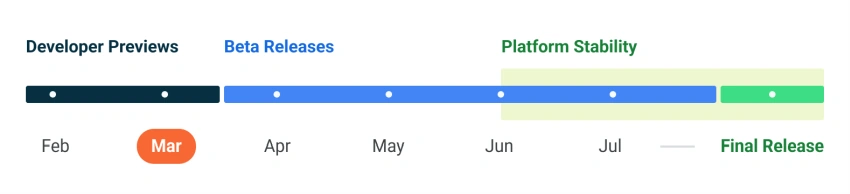
Although the first beta of Android 14 hasn't yet come, we already know what to anticipate. With each new iteration, the Android system's many components get a bit better and gain new functionality. We received the second developer preview on the 8th of March. You've come to the right page if you want all the information about Android 14 in one place.
Get Android 14 Developer Preview on a Google Pixel device
Android 14 Developer Preview images are available for the following Pixel devices:

- Pixel 4a (5G)
- Pixel 5 and 5a
- Pixel 6 and 6 Pro
- Pixel 6a
- Pixel 7 and 7 Pro
Conclude Changes in Android from Developer Preview 1 & 2 of Android 14
Android 14 Developer Preview 2 includes several new features and changes to try out:

Behavior changes
1. Schedule exact alarms are denied by default
Most newly installed apps intended for Android 13 and higher no longer come pre-granted with SCHEDULE EXACT ALARM, the permission introduced in Android 12 for apps to schedule precise alarms (will be set to deny by default).
2. Context-registered broadcasts are queued while apps are cached
Starting from android 14, the OS may place context-registered broadcasts in a queue while the app is in the cached state. Hence, it is recommended to declare broadcast in Manifest. Apps are removed from the cached state, and Manifest-declared broadcasts are not queued for delivery.
3. Apps can kill only their own background processes
On android 14, your app can call killBackgroundProcesses(), but it can kill only the background processes of your app. Passing another app package name results in the following error on logcat.
Invalid packageName: com.example.any_another_app
4. Security - Minimum installable target API level
To improve security in Android 14, apps that targetSdkVersion lower than 23 can't be installed. This prevents apps that target older API levels to bypass the security and privacy that newer android versions have introduced.
INSTALL_FAILED_DEPRECATED_SDK_VERSION: App package must target at least SDK version 23, but found 7

5. Media owner package names might be redacted
This behavior change results in Limited app visibility filtration on Android. Starting in Android 14, this value is redacted unless at least one of the following conditions is true:
- The app that stores the media file has a package name always visible to other apps.
- The app that queries the media store requests
QUERY_ALL_PACKAGESpermission.
6. User experience - Changes to how users experience non-dismissable notifications
Android 14 has modified the behavior to allow users to dismiss such notifications if your app displays non-dismissible foreground notifications to them.
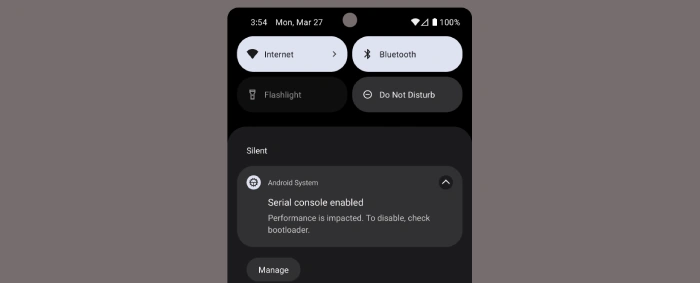
These changes are applied on Notification.FLAG_ONGOING_EVENT through -
- Notification.Builder#setOngoing(true)
- NotificationCompat.Builder#setOngoing(true).
But, it will not affect if -
- Notifications created using
MediaStyle - Policy limiting use to security and privacy cases
- Device policy controller (DPC) and supporting packages for enterprise
7. Grant partial access to photos and videos
This change was first introduced in android 13 and provide only particular or partial access to their photos and videos when the app request run time permissions.

8. Accessibility- Non-linear font scaling to 200%
Starting from Android 14, now the system can scale font up to 200 % and provide better visuality. This additional accessibility option aligns with Web Content Accessibility Guidelines (WCAG).
Warning - don't use scale pixel (sp) units to define your UI elements.
Apps targeting Android 14 or higher
1. Foreground service types are required - From Android 14 if your app uses foreground service, it must specify a service type. In any case, if it isn't, then you should migrate your logic to use WorkManager or user-initiated data transfer jobs.
2. Security-
Restrictions to implicit and pending intents - To prevent malicious apps from intercepting implicit intents, Now the app must follow the ways -
- To deliver intent to exported components, the app must use implicit intent and explicit intent to deliver to unexported components.
- The app must specify a component or package if a mutable pending intent is created. If not, now the system will throw an exception.
Runtime-registered broadcast receivers must specify export behavior - The App must specify a flag to indicate whether or not the receiver should be exported to all other apps on the device. This will help protect the app from security vulnerabilities.
Safer dynamic code loading - Starting from android 14, if your app uses Dynamic Code Loading (DCL), all dynamically-loaded files must be marked as read-only. Otherwise, the system throws an exception.
Handle dynamically- loaded files that already exist - Android 14 recommends deleting and recreating the files before you try to load them again in your app dynamically. This will help your file to verify its integrity first and use it.
Additional restrictions on starting activities from the background - From android 14, the system restricts the app from initiating an activity from the background -
- The app must now opt if it wants to grant its background activity launch privileges to start the pending intent.
- The app must also opt if it wants to grant its background activity launch privileges to bound service When a visible app binds a service of another app that's in the background using the
bindService()method.
3. Updated non-SDK restrictions -
It is recommended not to use non-SDK interfaces. Starting from Android 14, include the updated list of the restricted non-SDK interfaces. The Android team will ensure that public alternatives are available before restricting non-SDK interfaces.
Features and APIs Overview
1. Per-app language preferences -
Android 14 adds new capabilities to the per-app language features first offered in Android 13 (API level 33).
- Dynamic updates for an app's
localeConfig - App language visibility for input method editors (IMEs)
2. Grammatical Inflection API -
If your app provides sentence-based support, then this API can make things easier by providing a more personalized and natural-sounding user experience for languages. Example - To provide Masculine, Feminine, and Neutral inflected forms.
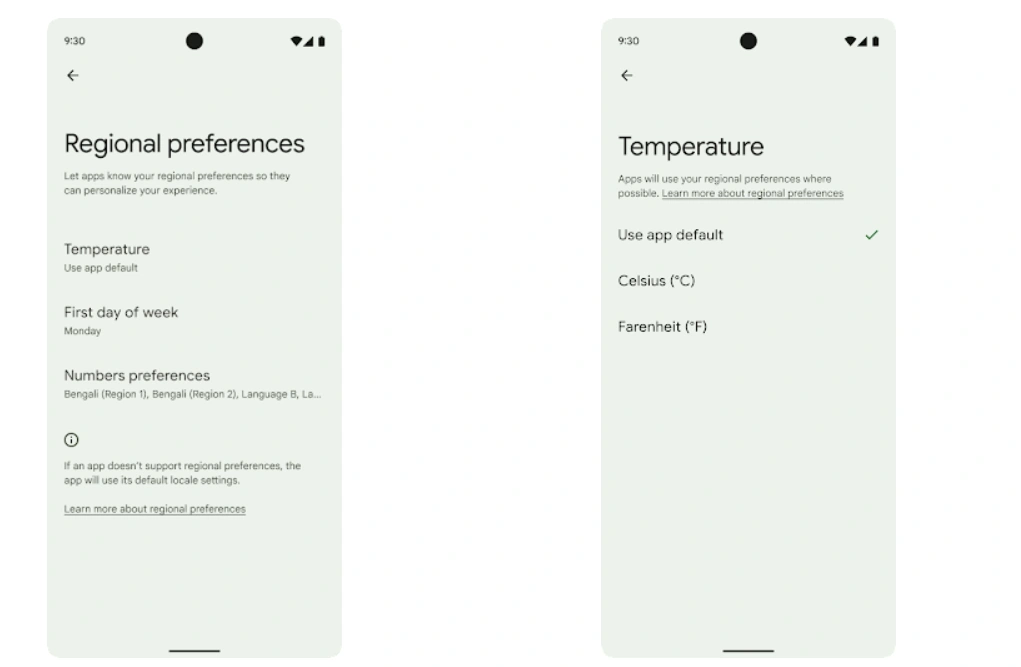
3. Regional preferences -
Now users can enable Regional preferences that will enable users to personalize temperature units, the first day of the week, and numbering systems. Users living in European can prefer temperature units to be in Celsius rather than Fahrenheit.
4. User experience-
- Improvements for app stores - With the addition of numerous new PackageInstaller APIs in Android 14, app shops can enhance their user interface.
- Request install approval before downloading - Earlier installer apps have to download and install the session prior to requesting permission and committing session. Now Starting from Android 14, the
requestUserPreapproval()the method lets installers request user approval before committing to the install session. - Claim responsibility for future updates - This functionality allows developers to define update ownership, meaning the app is only permitted to install automatic updates to the app from a specific installer.
- Update apps at less-disruptive times - To avoid killing the app process if the user update while using the app, Android 14 has introduced
InstallConstraintsthat make sure that an update is only committed when the user is no longer interacting with the app, - Seamlessly install optional splits - The app store has provided split APKs to optimize the delivery of different app components from API level 22. Now in Android 14, the
setDontKillApp()method allows an installer to indicate that the app's running processes shouldn't be killed when new splits are installed. App stores can use this feature to seamlessly install new features of an app while the user is using the app.
5. Detect when users take device screenshots
Android 14 includes a privacy-preserving screenshot detection API to establish a more consistent experience for screenshot detection. With the help of this API, programs can register callbacks for each activity. When a screenshot is taken while that activity is visible, these callbacks are activated, and the user is notified.

Summary
This article explains Android 14 new version Upside down cake. For developers, Android 14 brings some fantastic new features and APIs. The sections below assist you in learning about app features and getting started with associated APIs. Your insights and opinions are valuable to me! I would love to hear your thoughts on my article exploring new features of Android 14, your comments and feedback could spark an insightful discussion about the future of mobile technology.
Join the conversation! Your thoughts help the community grow.