

Introduction
Angular 14 was released in the month of June 2022 and it has some cool enhancements. The features include typed forms, standalone components, page title handling using routes and related patterns, better diagnostics and error handling features, and CLI improvements. We are going to cover one of these cool features, Typed forms. This feature has been introduced to improve the developer experience and provide uniformity in the way we develop forms in Angular.
What are Typed Forms?
Typed forms enforce a model through which we can access the properties in a uniform way for Angular forms. In the concept of typed form we have the property name and its data type defined. This was not possible in older versions of angular. Prior to Angular 14, we used a loosely typed forms model. To access the forms property we have to pass the field name. If the field used to exist we used to get the response value. The forms model was of type ‘any’. We could pass any invalid form property name and it would throw any error after that when we invoked it. This concept is not complex, it simply means we know what we are dealing with like field names and their data types and that’s it. This feature has just been released in Angular 14 and is only limited to Reactive forms and we cannot control bindings using directives. It is expected to have some improvements in upcoming releases.
Setting up Project
Download Angular CLI version 14
npm install -g @angular/cli
Check the angular version to make sure it's Angular 14.
ng version
Create angular application
ng new ng14-demo
Select your preferences for routing and CSS
Create new component
cd ng14-demo/src/app
ng g c typed-contact-form
Code walkthrough
app.module.ts
@NgModule({
  declarations: [
    AppComponent,
    TypedContactFormComponent
  ],
  imports: [
    BrowserModule,
    AppRoutingModule,
    ReactiveFormsModule //Import reactive forms module
  ],
  providers: [],
  bootstrap: [AppComponent]
})
export class AppModule { }
contactFormGroup.ts
import { FormControl } from "@angular/forms";

//Interface that will contain strongly typed definition for form
export interface contactFormGroup
{
  name: FormControl<string>;
  email: FormControl<string>;
  contactNumber?: FormControl<number|null>; //? makes controls as optional
  query?: FormControl<string|null>;//? makes controls as optional
}
typed-contact-form.component.ts
import { Component, OnInit } from '@angular/core';
import { FormControl, FormGroup } from '@angular/forms';
import { contactFormGroup } from  './contactFormGroup';

@Component({
  selector: 'app-typed-contact-form',
  templateUrl: './typed-contact-form.component.html',
  styleUrls: ['./typed-contact-form.component.css']
})
export class TypedContactFormComponent implements OnInit {
  contactForm = new FormGroup<contactFormGroup>({
    name: new FormControl<string>('', { nonNullable: true }),
    email: new FormControl<string>('', { nonNullable: true}),
    contactNumber: new FormControl<number>(0, { nonNullable: false}),
    query:new FormControl<string>('I would like to connect!', { nonNullable: false })
  });
  dataOutput: string = '';
  constructor() {
   }
  ngOnInit(): void {
  }
  onSubmitContactForm(){
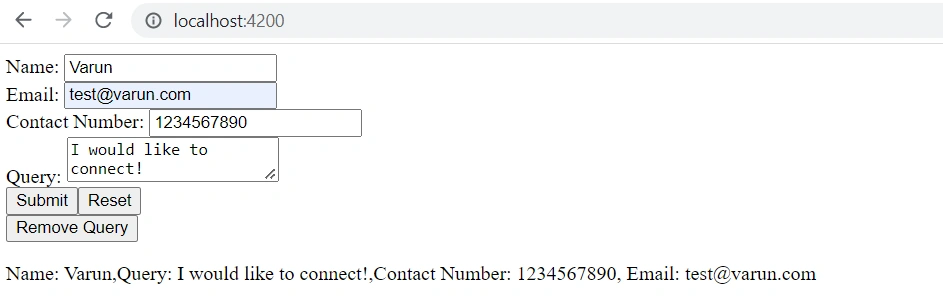
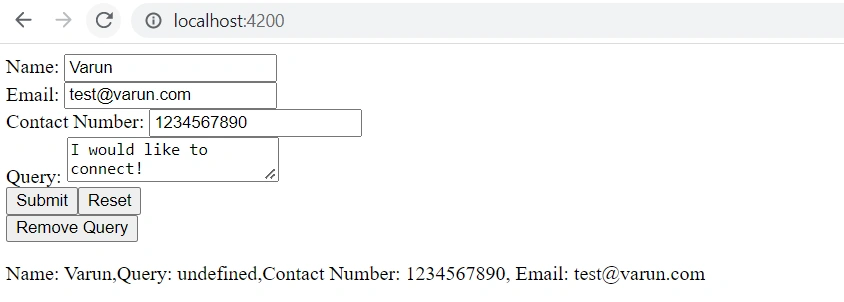
    this.dataOutput = `Name: ${this.contactForm.value.name},Query: ${this.contactForm.value.query},Contact Number: ${this.contactForm.value.contactNumber}, Email: ${this.contactForm.value.email} `;
  }
  resetSubmitContactForm(){
    this.contactForm.reset();
    this.dataOutput = '';
  }
  removeQuery(){
    this.contactForm.removeControl('query'); //This code removes the optional control from typed model
  }
}
typed-contact-form-component.html
Join the conversation! Your thoughts help the community grow.