

- Introduction
- Source Code
- Background
- Understanding Angular Application
- Conclusion
- Your turn. What do you think?
This post is a continuation of the Angular 5 series and you can find the first part of this series at What Is New and How to Set Up our First Angular 5 Application. So, if you haven’t gone through the first part yet, I strongly recommend you to do that. In our first part, we saw the Angular 5 updates and how to set up our first application in Angular 5. In this post, we are going to discuss a few files and application overview. We will also be discussing some key points like Components, Declarations, Modules, Providers etc. So, at the end of this article, you will have some basic understanding of Angular project structures and how it really matters when it comes to project. I hope you will like this article.
You can always clone or download the source code from here.
BackgroundThough Angular 5 has exactly the same project architecture as the previous version, we will be explaining some key elements so that the beginners can follow up this series. I hope you would not mind if you are an experienced professional. Thanks for understanding.
Understanding Angular ApplicationThe Angular project has a clean architecture. It contains the folder structure, as shown in the preceding image.
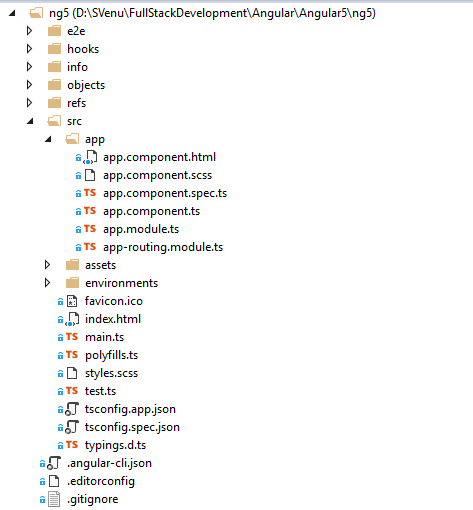
Angular_App_Folder_Structure
We are going to start developing our application in src/app folder which is our application root folder. For now, let’s go ahead and see what we have got in the existing files. Let us open the file app.component.ts.
- import {
- Component
- } from '@angular/core';
- @Component({
- selector: 'app-root',
- templateUrl: './app.component.html',
- styleUrls: ['./app.component.scss']
- })
- export class AppComponent {
- title = 'app';
- }
- Import section
- Decoration
- Export section
The Import section helps us to import some existing functionalities available in the framework like we have included the component from Angular/core in the above code snippet.
The decoration is the place where we decorate the component, giving a selector( which is unique to each component), Style the UI, giving the template URL which points to a particular HTML file where we customize the component. We can also include our template in our decoration itself as a template: "your custom HTML."
The Export section includes the custom TypeScript code which is specific to that component. Let’s say it is a class which holds its own functionalities.
Now, let us just move our pointer to app.module.ts. This is the place where we register all of our modules, components, providers, etc. We can consider this as a base class. Like components, it has a section for import and export. It also has a @NgModule section which contains our declarations (components), imports (modules), providers (services).
- import {
- BrowserModule
- } from '@angular/platform-browser';
- import {
- NgModule
- } from '@angular/core';
- import {
- AppComponent
- } from './app.component';
- @NgModule({
- declarations: [
- AppComponent
- ],
- imports: [
- BrowserModule
- ],
- providers: [],
- bootstrap: [AppComponent]
- })
- export class AppModule {}
If you see the project folder, you can see a folder named Environment. As the name implies, it helps us to set the configuration for our environments, say, for development and production etc.
Index.html is the main page from which we call the app-root. Remember, we set the app.component’s selector as app-root.
- <!doctype html>
- <html lang="en">
- <head>
- <meta charset="utf-8">
- <title>MyAngular5App</title>
- <base href="/">
- <meta name="viewport" content="width=device-width, initial-scale=1">
- <link rel="icon" type="image/x-icon" href="favicon.ico"> </head>
- <body>
- <app-root></app-root>
- </body>
- </html>
The tsconfig.app.json file is the place where we can set the configuration for our project, like setting the module versions, compiler options etc. You can see a sample file as below.
- {
- "extends": "../tsconfig.json",
- "compilerOptions": {
- "outDir": "../out-tsc/app",
- "baseUrl": "./",
- "module": "es2015",
- "types": []
- },
- "exclude": ["test.ts", "**/*.spec.ts"]
- }
- {
- "$schema": "./node_modules/@angular/cli/lib/config/schema.json",
- "project": {
- "name": "my-angular5-app"
- },
- "apps": [{
- "root": "src",
- "outDir": "dist",
- "assets": ["assets", "favicon.ico"],
- "index": "index.html",
- "main": "main.ts",
- "polyfills": "polyfills.ts",
- "test": "test.ts",
- "tsconfig": "tsconfig.app.json",
- "testTsconfig": "tsconfig.spec.json",
- "prefix": "app",
- "styles": ["styles.css"],
- "scripts": [],
- "environmentSource": "environments/environment.ts",
- "environments": {
- "dev": "environments/environment.ts",
- "prod": "environments/environment.prod.ts"
- }
- }],
- "e2e": {
- "protractor": {
- "config": "./protractor.conf.js"
- }
- },
- "lint": [{
- "project": "src/tsconfig.app.json",
- "exclude": "**/node_modules/**"
- }, {
- "project": "src/tsconfig.spec.json",
- "exclude": "**/node_modules/**"
- }, {
- "project": "e2e/tsconfig.e2e.json",
- "exclude": "**/node_modules/**"
- }],
- "test": {
- "karma": {
- "config": "./karma.conf.js"
- }
- },
- "defaults": {
- "styleExt": "css",
- "component": {}
- }
- }
Last but not least, package.json is the file where your NPM packages are mentioned, and whenever you run npm install commands, this is the file that the command looks into.
- {
- "name": "my-angular5-app",
- "version": "0.0.0",
- "license": "MIT",
- "scripts": {
- "ng": "ng",
- "start": "ng serve",
- "build": "ng build",
- "test": "ng test",
- "lint": "ng lint",
- "e2e": "ng e2e"
- },
- "private": true,
- "dependencies": {
- "@angular/animations": "^5.0.0",
- "@angular/common": "^5.0.0",
- "@angular/compiler": "^5.0.0",
- "@angular/core": "^5.0.0",
- "@angular/forms": "^5.0.0",
- "@angular/http": "^5.0.0",
- "@angular/platform-browser": "^5.0.0",
- "@angular/platform-browser-dynamic": "^5.0.0",
- "@angular/router": "^5.0.0",
- "core-js": "^2.4.1",
- "rxjs": "^5.5.2",
- "zone.js": "^0.8.14"
- },
- "devDependencies": {
- "@angular/cli": "1.5.0",
- "@angular/compiler-cli": "^5.0.0",
- "@angular/language-service": "^5.0.0",
- "@types/jasmine": "~2.5.53",
- "@types/jasminewd2": "~2.0.2",
- "@types/node": "~6.0.60",
- "codelyzer": "~3.2.0",
- "jasmine-core": "~2.6.2",
- "jasmine-spec-reporter": "~4.1.0",
- "karma": "~1.7.0",
- "karma-chrome-launcher": "~2.1.1",
- "karma-cli": "~1.0.1",
- "karma-coverage-istanbul-reporter": "^1.2.1",
- "karma-jasmine": "~1.1.0",
- "karma-jasmine-html-reporter": "^0.2.2",
- "protractor": "~5.1.2",
- "ts-node": "~3.2.0",
- "tslint": "~5.7.0",
- "typescript": "~2.4.2"
- }
- }
In our next article, we will start developing some components in our Angular app. Until then, keep reading and learning.
ConclusionDid I miss anything that you think was needed? Did you find this post useful? Please share your valuable suggestions and feedback.
Your turn. What do you think?A blog isn’t a blog without comments, but do try to stay on topic. If you have a question unrelated to this post, you’re better off posting it on C# Corner, Code Project, Stack Overflow, ASP.NET Forum instead of commenting here.
You can always see this article on my blog here.
Join the conversation! Your thoughts help the community grow.