
Every component/directive in Angular has a lifecycle; it goes through a number of different phases from its creation, to updating, to destroy. We can hook into those different phases to get some pretty fine-grained control of our application.
To do this, we add some specific methods to our component class that get called during each of these lifecycle phases. We call those methods hooks.
These hooks are executed in the following sequence.
After creating a component/directive by calling its constructor, Angular calls the lifecycle hooks in the following order at a specific time.
| S.No. | Lifecycle Hook | Description |
| 1 | ngOnChanges | Called after bound input properties changes |
| 2 | ngOnInit | Called once the component is initialized |
| 3 | ngDoCheck | Called during every change detection run |
| 4 | ngAfterContentInit | Called after a content (ng-content) has been projected into view |
| 5 | ngAfterContentCheck | Called every time the projected content has been checked |
| 6 | ngAfterViewInit | Called after the component’s view and child views has been initialized |
| 7 | ngAfterViewCheck | Called after the component’s view and child views has been checked |
| 8 | ngOnDestroy | Called once the component is about to destroy |
Lifecycle Hooks in Action
Let's take an example.
Here is the code for AppComponent.ts.
- import { Component } from '@angular/core';
- @Component({
- selector: 'app-root',
- templateUrl: './app.component.html',
- styleUrls: ['./app.component.css']
- })
- export class AppComponent {
- hooksArray = [];
- title = 'app';
- constructor(){
- this.hooksArray.push({'Name': 'TestHook'});
- }
- OnDestroy(){
- this.hooksArray.splice(0,1);
- }
- }
AppComponent.html
- <div class="container">
- <div class="row">
- <div class="col-xs-12">
- <app-life-cycle-hook *ngFor="let hook of hooksArray">
- <p>{{hook.name}}</p>
- </app-life-cycle-hook>
- <br>
- <button class='btn btn-primary' (click)="OnDestroy()">Destroy</button>
- </div>
- </div>
- </div>
LifeCycleHookComponent.ts
- import {
- Component,
- OnInit,
- OnChanges,
- DoCheck,
- AfterContentInit,
- AfterContentChecked,
- AfterViewInit,
- AfterViewChecked,
- OnDestroy }
- from '@angular/core';
- @Component({
- selector: 'app-life-cycle-hook',
- templateUrl: './life-cycle-hook.component.html',
- styleUrls: ['./life-cycle-hook.component.css']
- })
- export class LifeCycleHookComponent implements
- OnInit
- ,OnChanges
- ,DoCheck
- ,AfterContentInit
- ,AfterContentChecked
- ,AfterViewInit
- ,AfterViewChecked
- ,OnDestroy
- {
- name: string ='';
- constructor() {
- console.log('Constructor Called');
- }
- ngOnInit() {
- console.log('ngOnInit Called');
- }
- ngOnChanges(){
- console.log('ngOnChanges Called');
- }
- ngDoCheck(){
- console.log('ngOnDoCheck Called');
- }
- ngAfterContentInit(){
- console.log('ngAfterContentInit Called');
- }
- ngAfterContentChecked(){
- console.log('ngAfterContentChecked Called');
- }
- ngAfterViewInit(){
- console.log('ngAfterViewInit Called');
- }
- ngAfterViewChecked(){
- console.log('ngAfterViewChecked Called');
- }
- ngOnDestroy(){
- console.log('ngOnDestroy Called');
- }
- }
LifeCycleHookComponent.HTML
- <h1>Life Cycle Hooks Example</h1>
- <br>
- <input type="text" class="forms-contrl" [(ngModel)]="name">
- <p>{{name}}</p>
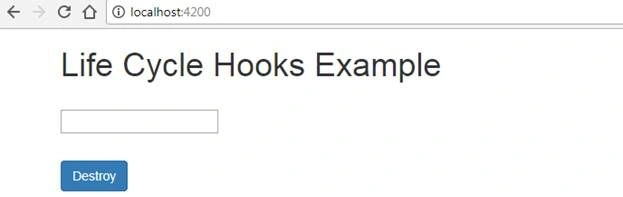
Here is the output.
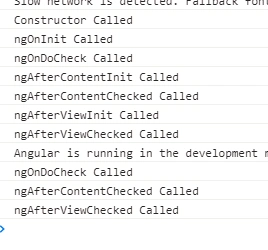
Given below is the list of different life cycle hooks in Chrome console log.
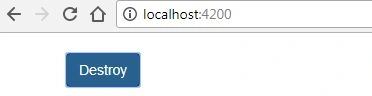
Now, click on the Destroy button. The child is destroyed as shown below.
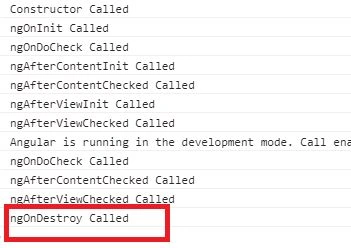
OnDestroy is captured after clicking OnDestroy button.
Siddharth GajbhiyePosted Jan 22, 2020, 9:07 PM
Nice explanation vikas
Pranay RanaPosted Apr 13, 2018, 1:21 AM
Dont call me sir , i am learner like you , i just provided my view , just dont get in wrong way
Pranay RanaPosted Apr 12, 2018, 12:17 PM
Same information on angular.io , what is difference , dont get me wrong but its subset of what is there on angular.io