

Link to Source code.

This project is a simple "rent a car" project developed in ASP.NET Core MVC and Angular with SQL Server 2008 R2 as back-end.
This application has 2 modules.
- User end
- Admin end
User Process
Renting a car is common nowadays. We have seen most people want rented cars; they do not want to purchase their own car but still they want a car for tour or visiting their native places. But for renting a car, you need to go to tours and travels consultants and ask them if there are any 6 seater or 5 seater cars available. Then, depending on the terms and conditions, we are able to rent this car.
Features
- Booking
- All Booking Details
- All Pending Booking Details
- All Payment Details
- Cancel Booking
Admin Process
In this application the admin can addnew cars, he can also view all bookings which have occurred along with that all payment transactions and also can cancel bookings.
Features
- Add Car Details and Photo
- All Pending Booking Details
- All Payment Details
- Cancel Booking
Platform Used
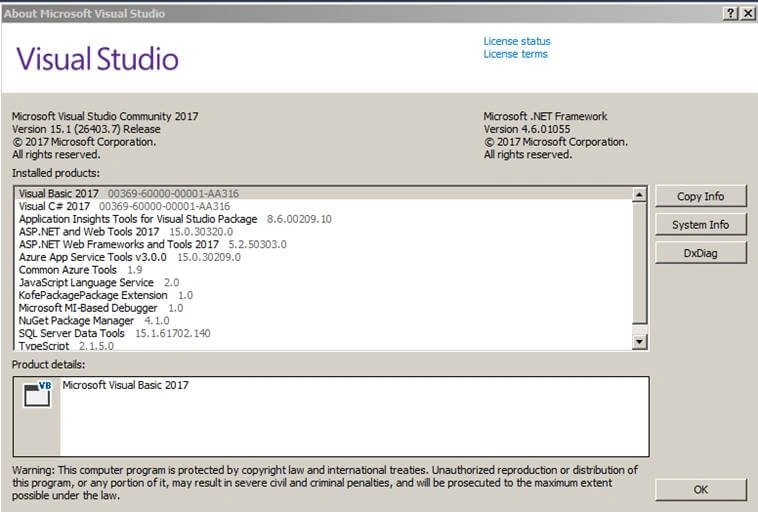
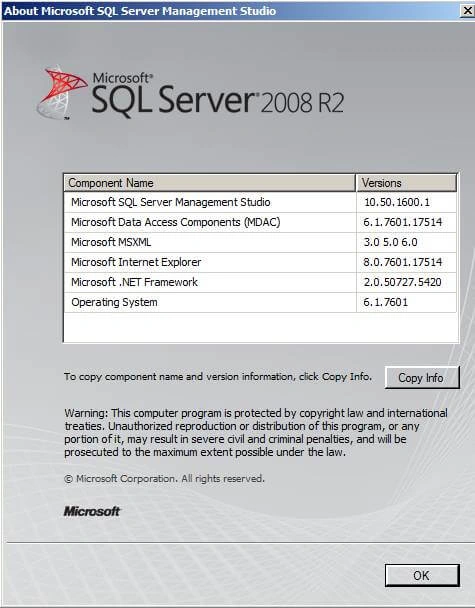
This application is developed using Angular, Microsoft Visual Studio Community 2017, and SQL Server 2008 R2 Express Edition.
Note
It’s just “Angular” As you might have already guessed, the term “Angular 2” is also kind of deprecated once we get to version 4, 5 etc. That said, we should start naming it simply “Angular” without the version suffix.
Microsoft Visual Studio Community 2017
Link to download.
Microsoft SQL Server 2008
Link to download.
Node
Link to download.
Original source of image.
Angular
Angular 2.3.1
Original source of image.
Database
- BankTB
Table contains list of bank names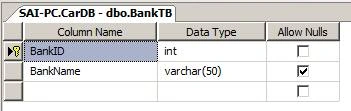
- Booking
Table contains all booking details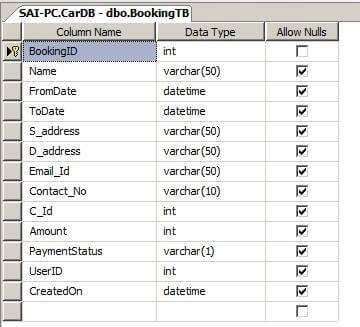
- CarTB
Table contains all car details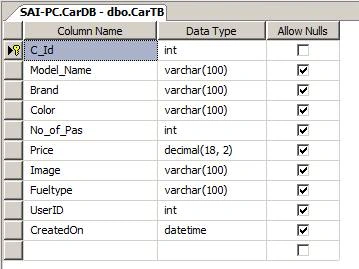
- PaymentTB
Table contains all Payment details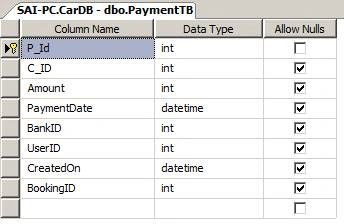
- TokenManager
Table contains all user token details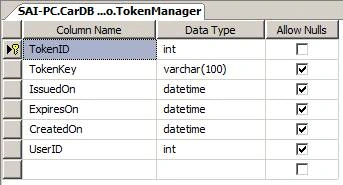
- Usermaster
Table contains all User details e.g. (Username, Password)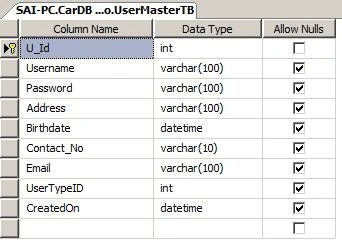
- UserType
Table contains all User type details e.g. (Admin, User)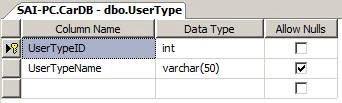
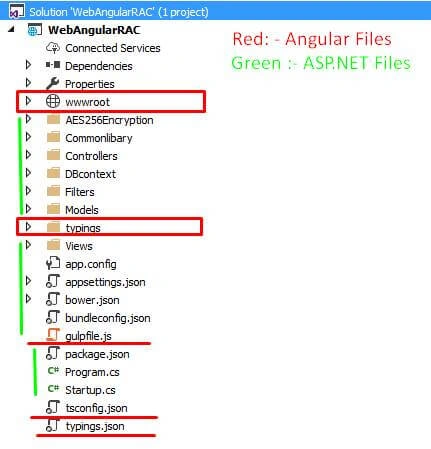
After completing with database part next we are going to have a look at project structure.
External Packages Used in Project
- Mydatepicker
It is simple date picker use for selecting date on User Registration form
- ng2-progressbar
It is simple progress bar to display in progress while posting or getting data.
- date time picker
It is simple date time picker
- dev express
It is simple date time picker
It is good to show entire package.json file
- {
- "version": "1.0.0",
- "name": "angular2_aspmvc_core1_getting_started",
- "private": true,
- "dependencies": {
- "@angular/common": "^2.3.1",
- "@angular/compiler": "^2.3.1",
- "@angular/core": "^2.3.1",
- "@angular/forms": "^2.3.1",
- "@angular/http": "^2.3.1",
- "@angular/platform-browser": "^2.3.1",
- "@angular/platform-browser-dynamic": "^2.3.1",
- "@angular/router": "^3.3.1",
- "@angular/upgrade": "^2.3.1",
- "body-parser": "1.14.1",
- "bootstrap": "3.3.5",
- "es6-shim": "^0.35.0",
- "fancybox": "3.0.0",
- "jquery": "2.1.4",
- "core-js": "^2.4.1",
- "reflect-metadata": "^0.1.3",
- "rxjs": "5.0.0-beta.12",
- "systemjs": "0.19.27",
- "zone.js": "^0.6.23",
- "angular2-in-memory-web-api": "0.0.20",
- "mydatepicker": "2.0.3",
- "ng2-progressbar": "1.3.0",
- "ng2-bootstrap": "1.6.3",
- "datetime-picker": "0.6.0",
- "ng2-datetime-picker": "0.15.1",
- "devextreme": "17.1.3",
- "devextreme-angular": "17.1.3",
- "jszip": "^3.1.2"
- },
- "devDependencies": {
- "del": "2.1.0",
- "gulp": "3.9.0",
- "gulp-typescript": "^2.13.4",
- "gulp-watch": "4.3.5",
- "merge": "1.2.0",
- "typescript": "^2.0.2",
- "typings": "^1.3.3",
- "rimraf": "^2.5.4"
- },
- "scripts": {
- "postinstall": "typings install"
- }
- }
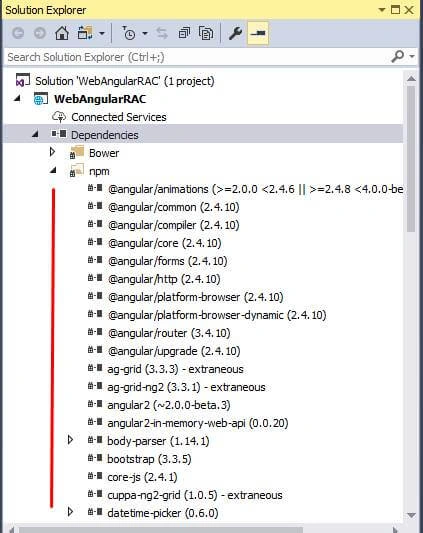
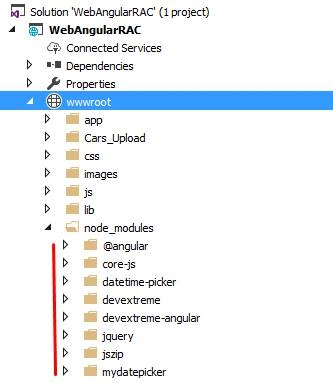
All installed npm dependencies.
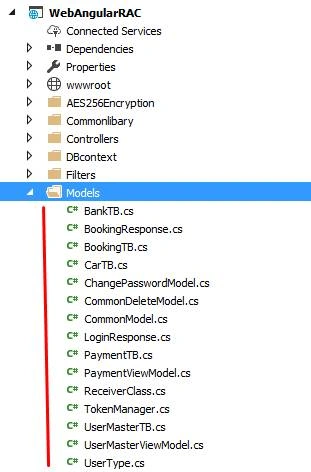
Model Folder contains all Models created in this application.
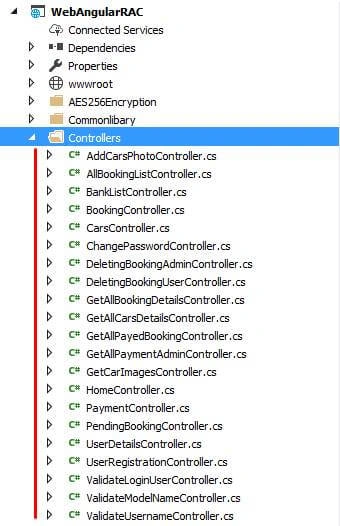
Controller Folder contains all Web API created in this application.
This folder contains all Web API controllers which are used for various purposes such as registering new User, Validating Login Credentials, Booking a car and much more.
Database first
In this project, we are going to use Database-First approach to access database using Entity Framework.
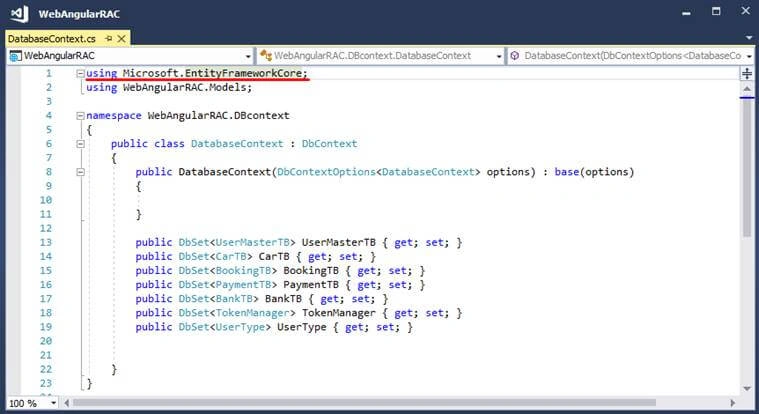
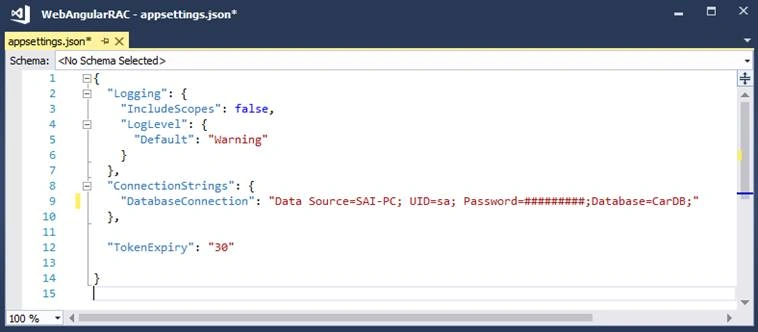
Everyone is new to .NET Core. So, here comes how to set the Connection string in .NET Core.
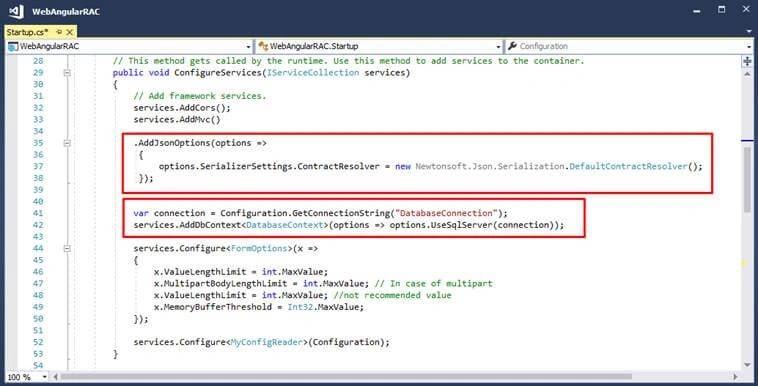
Setting dependency injection for getting instance of DatabaseContex at Controllers
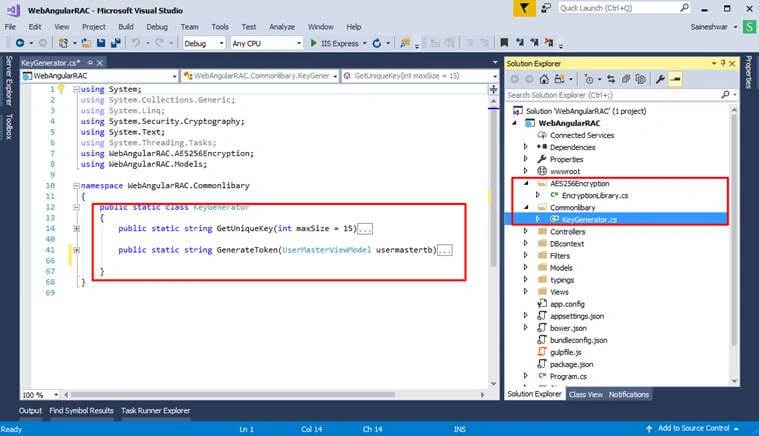
Security
For securing the application and maintaining session, we have generated Token.
Filters to Validate
- Admin Filter
Token to validate User is Admin and along with that it checks if token is expired or not.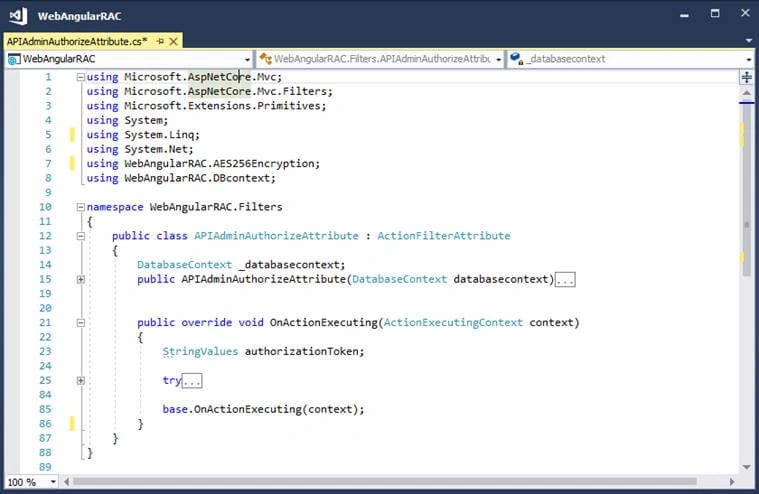
- User Filter
Token to validate User only (not admin user) and along with that it checks if token is expired or not.
Angular
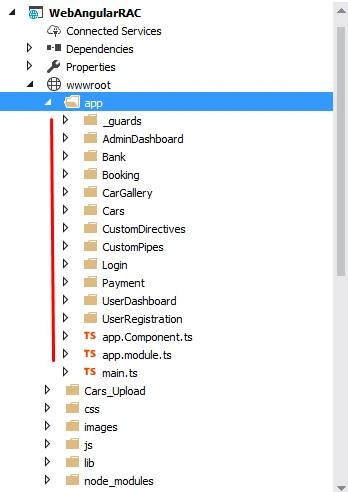
Angular app folder contains entire Angular application in it. And we are using ASP.NET CORE MVC that is why we need to keep all files in a wwwroot folder such that they are accessible to the browser.
Node_modules
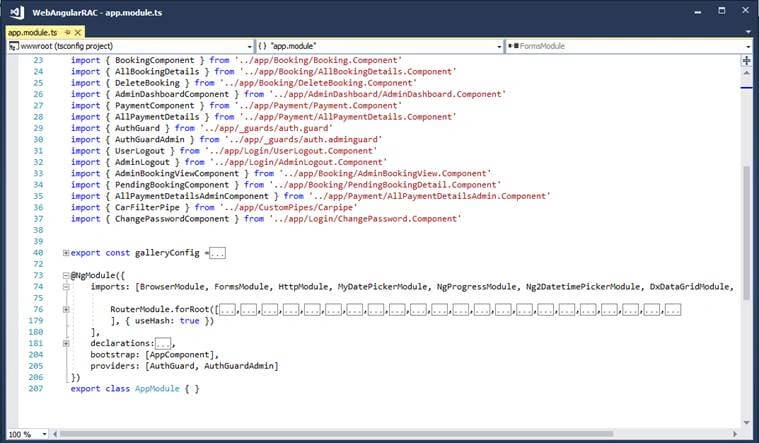
Module
This is the main file where the entire application component needs to be declared and entire Routing is defined here.
AuthGuard
In this application, I have created 2 authgaurd.
- User (auth.guard.ts)
To check user is logged in or not.
- Admin (auth.adminguard.ts)
To check Admin is logged in or not.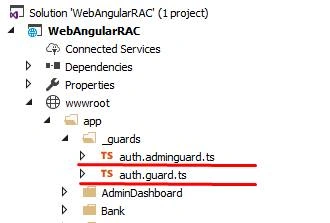
The above shows how the directory and folder structure looks, now let’s check out our screens.
Starting with Registration Screen
Registration Screen

After the user is registered then he is redirected to login page.
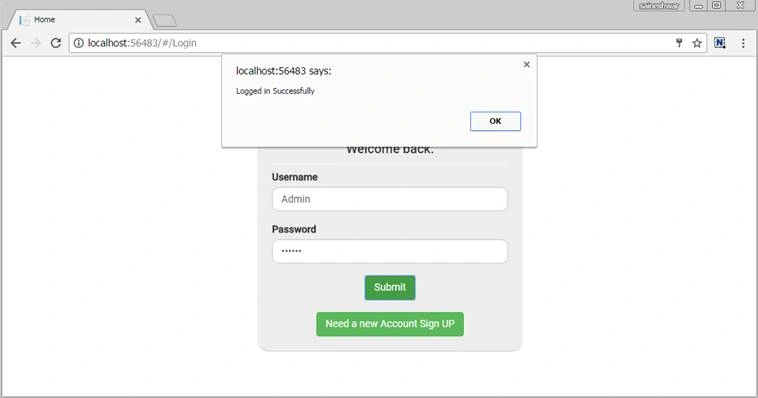
Login Screen
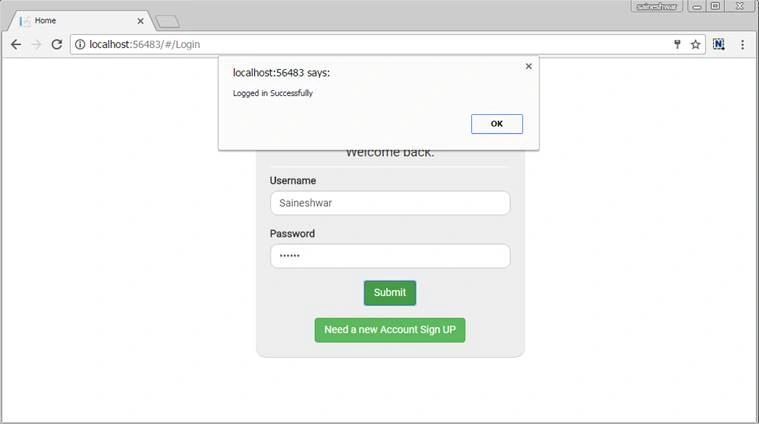
After login screen now let’s check System User Screen.
User Dashboard
After logging in application the first screen visible to the user is UserDashboard. It has all links to easy access for the user.

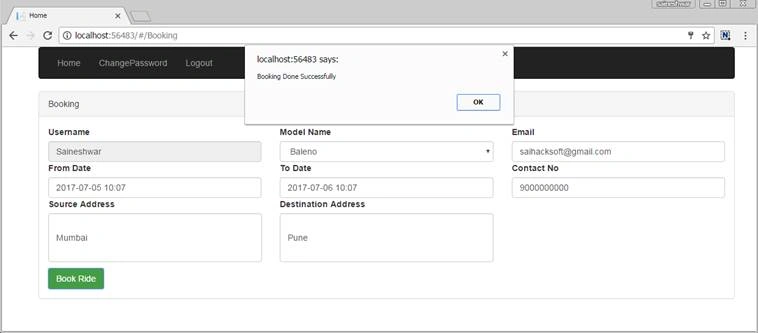
Booking
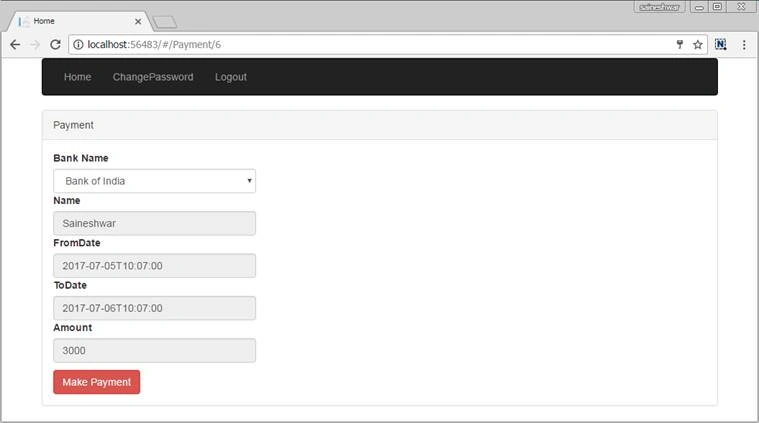
Payment
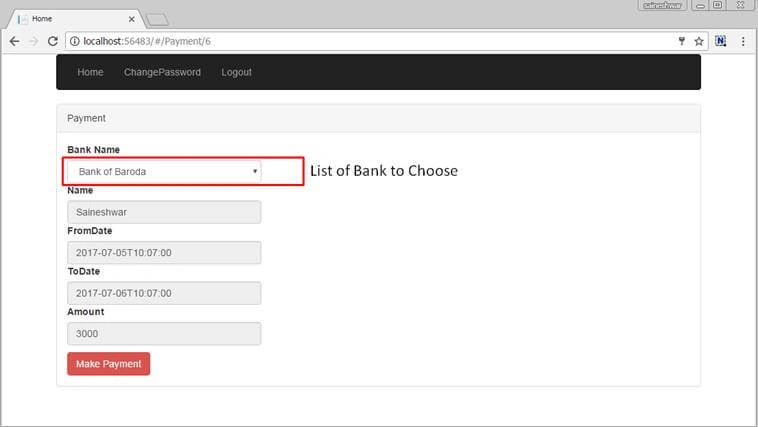
If you do not want to do payment here then you can leave here and come back after some time to do payment then you need to see all pending booking details page to repay.
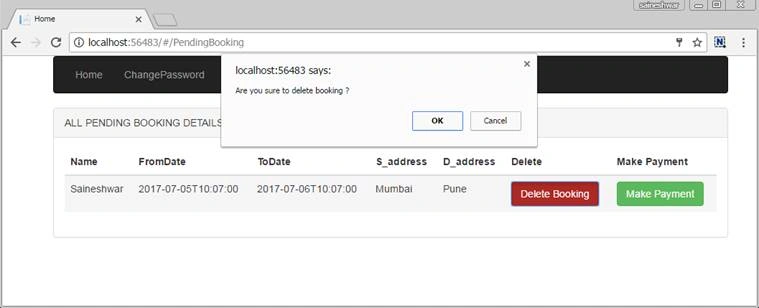
All Pending Booking Details
On this page you will see all payment pending bookings records, to make repayment you need click on Make Payment button.
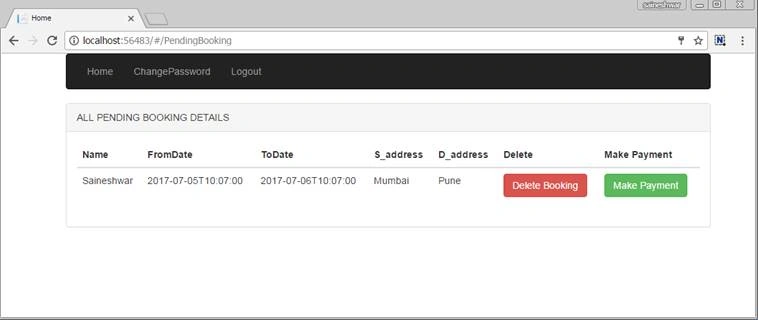
- Make payment.
- Delete Booking.
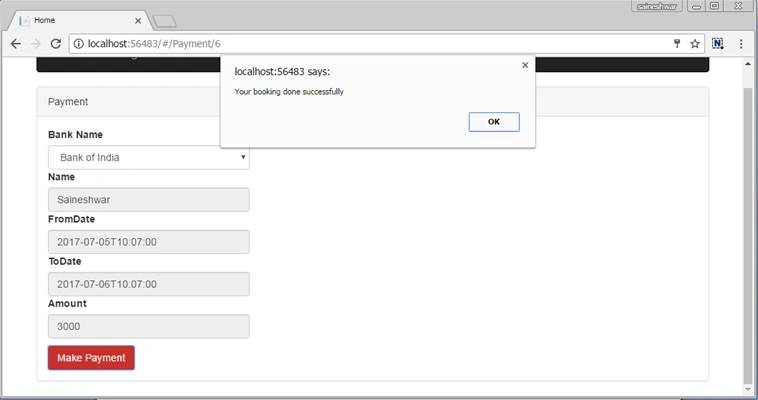
After making Payment
All Booking Details
You can see all booking details from the User dashboard by clicking on All Booking Details link.
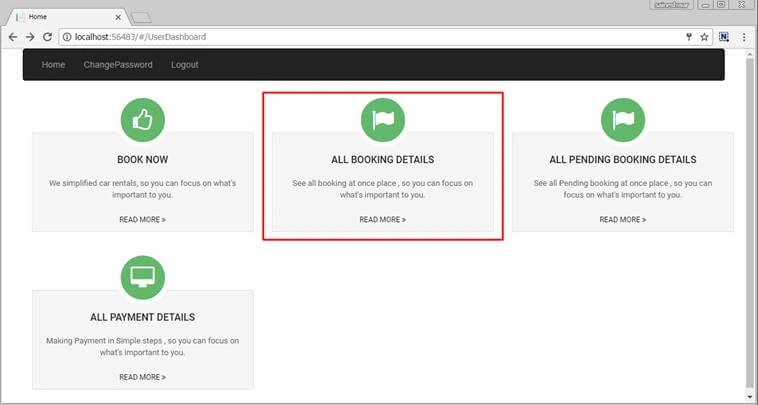
All booking records are displayed according to date.

All Payment Details
You can see all payment details from User dashboard by clicking on All payment Details link.

All payment records are displayed according to date.

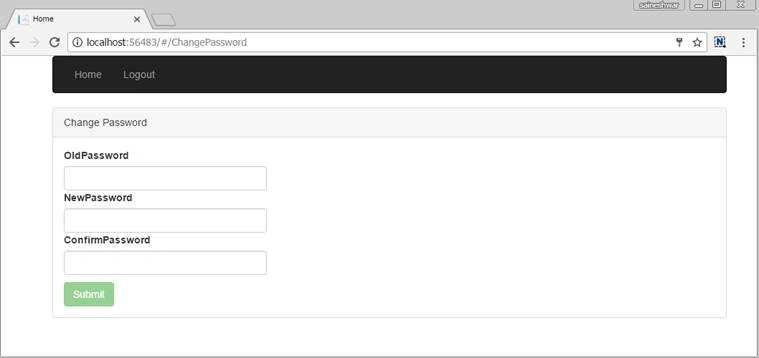
Change Password
Admin Section
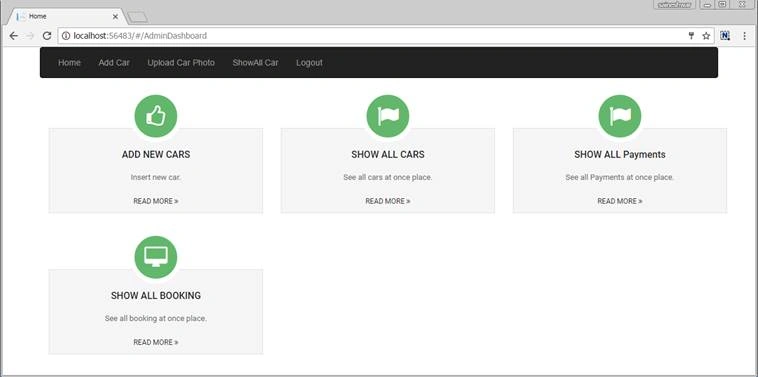
Admin Dashboard
After logging in to application the first screen visible to the user is Admin Dashboard. It has all links to easy access to the user.
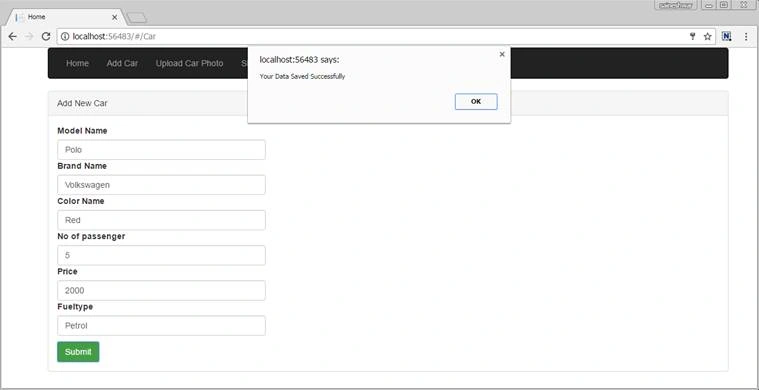
Add Car
Adding new cars
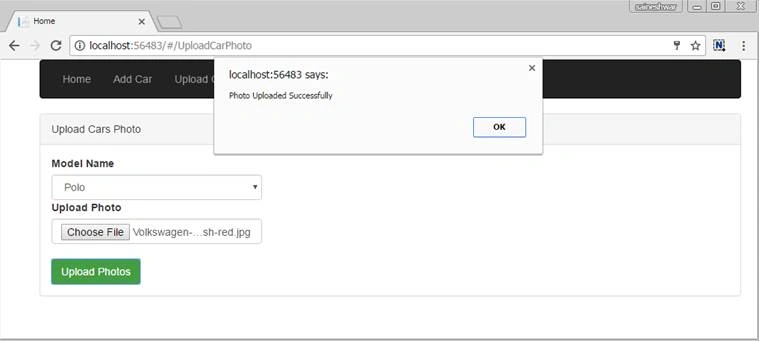
Upload photo
Uploading photo of the car which we have added
Show all Cars
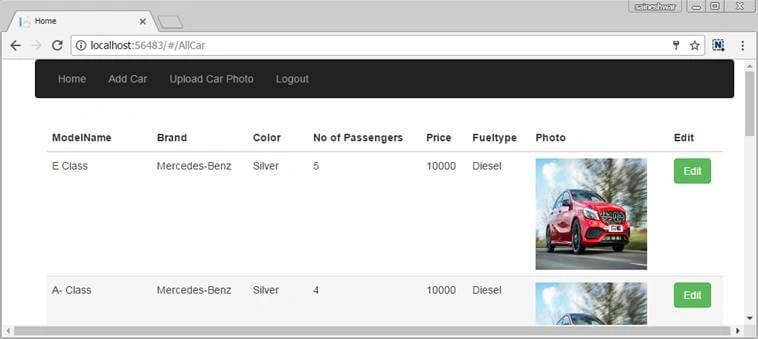
From dashboard click on show all cars to see all cars which are added by admin.
All Car Details
Display all cars.
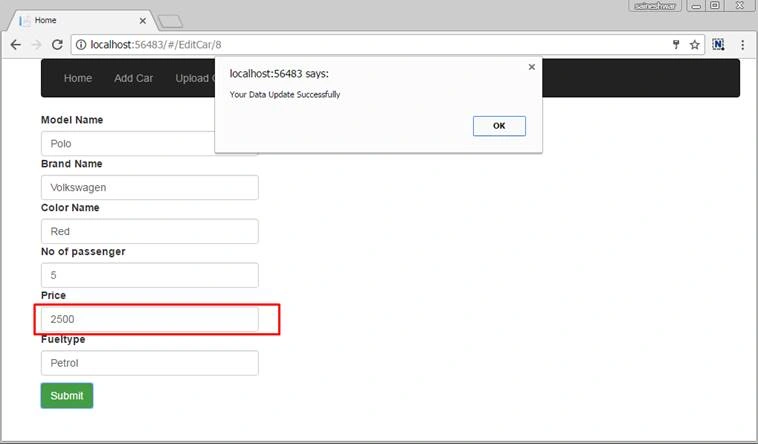
Edit Car Details
For editing car details
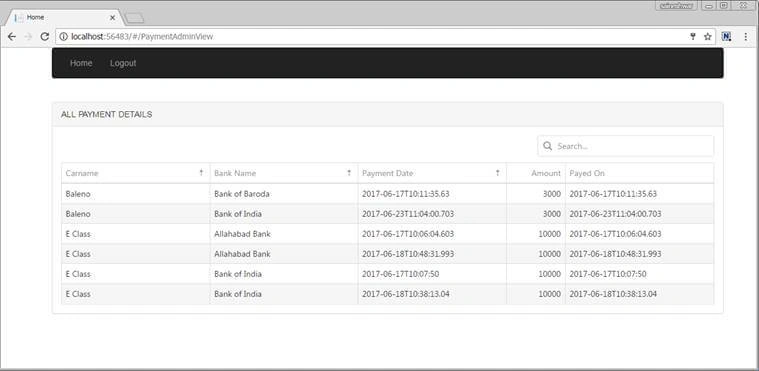
Show All Payments
From dashboard click on show all payments to see all payments done by users.
Show All Bookings
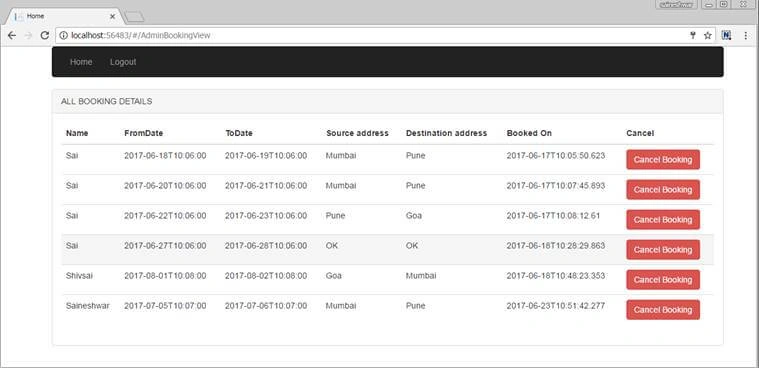
Finally, we have completed the project successfully and I believe that people who are new to Angular have learned a lot from this project.
Francis BandaPosted Jul 2, 2021, 6:17 PM
Good day teacher - so much interesting article, but when i try to run it it visual studio 2019, it gives me an error: Retrying 'FindPackagesByIdAsyncCore' for source 'https://packagesource/FindPackagesById()?id='Microsoft.VisualStudio.Web.BrowserLink'&semVerLevel=2.0.0'.An error occurred while sending the request. The remote name could not be resolved: 'packagesource' am i missing something here sir? please assist and continue a good job.
SUNNY RAJPosted Nov 3, 2019, 1:10 AM
Trying to build in VS-2019 but getting errors like Severity Code Description Project File Line Suppression State Error NETSDK1022 Duplicate 'Content' items were included. The .NET SDK includes 'Content' items from your project directory by default. You can either remove these items from your project file, or set the 'EnableDefaultContentItems' property to 'false' if you want to explicitly include them in your project file. For more information, see https://aka.ms/sdkimplicititems. The duplicate items were: 'wwwroot\app\AdminDashboard\AdminDashboard.Component.ts'; 'wwwroot\app\AdminDashboard\AdminDashboard.html'; 'wwwroot\app\app.Component.ts'; 'wwwroot\app\app.module.ts'; 'wwwroot\app\Bank\BankTB.Model.ts'; 'wwwroot\app\Bank\Services\Bank.Service.ts'; 'wwwroot\app\Booking\AdminBookingView.Component.ts'; 'wwwroot\app\Booking\AllAdminBookingDetails.html'; 'wwwroot\app\Booking\AllBookingDetails.Component.ts'; 'wwwroot\app\Booking\AllBookingDetails.html'; 'wwwroot\app\Booking\Booking.Common.Model.ts'; 'wwwroot\app\Booking\Booking.Component.ts'; 'wwwroot\app\Booking\Booking.html'; 'wwwroot\app\Booking\BookingModel.ts'; 'wwwroot\app\Booking\DeleteBooking.Component.ts'; 'wwwroot\app\Booking\DeleteBooking.html'; 'wwwroot\app\Booking\PendingBookingDetail.Component.ts'; 'wwwroot\app\Booking\PendingBookingDetails.html'; 'wwwroot\app\Booking\Services\AdminBookingView.Service.ts'; 'wwwroot\app\Booking\Services\Booking.Service.ts'; 'wwwroot\app\CarGallery\CarImage.Model.ts'; 'wwwroot\app\CarGallery\carousel.component.ts'; 'wwwroot\app\CarGallery\image.interface.ts'; 'wwwroot\app\CarGallery\index.png'; 'wwwroot\app\CarGallery\Services\CarImages.Service.ts'; 'wwwroot\app\Cars\AddCarsPhoto.Component.ts'; 'wwwroot\app\Cars\AddCarsPhoto.html'; 'wwwroot\app\Cars\AllCars.Component.ts'; 'wwwroot\app\Cars\AllCars.html'; 'wwwroot\app\Cars\Car.Component.ts'; 'wwwroot\app\Cars\Car.html'; 'wwwroot\app\Cars\Car.Model.ts'; 'wwwroot\app\Cars\EditCar.Component.ts'; 'wwwroot\app\Cars\EditCar.html'; 'wwwroot\app\Cars\Services\Car.Service.ts'; 'wwwroot\app\CustomDirectives\equal-validator.directive.ts'; 'wwwroot\app\CustomPipes\Carpipe.ts'; 'wwwroot\app\Login\AdminLogout.Component.ts'; 'wwwroot\app\Login\ChangePassword.Component.ts'; 'wwwroot\app\Login\ChangePassword.html'; 'wwwroot\app\Login\ChangePassword.Model.ts'; 'wwwroot\app\Login\Login.Component.ts'; 'wwwroot\app\Login\Login.html'; 'wwwroot\app\Login\Login.Model.ts'; 'wwwroot\app\Login\Services\Changepassword.Service.ts'; 'wwwroot\app\Login\Services\Login.Service.ts'; 'wwwroot\app\Login\UserLogout.Component.ts'; 'wwwroot\app\main.ts'; 'wwwroot\app\Payment\AllPaymentDetails.Component.ts'; 'wwwroot\app\Payment\AllPaymentDetails.html'; 'wwwroot\app\Payment\AllPaymentDetailsAdmin.Component.ts'; 'wwwroot\app\Payment\AllPaymentDetailsAdmin.html'; 'wwwroot\app\Payment\Payment.Component.ts'; 'wwwroot\app\Payment\Payment.html'; 'wwwroot\app\Payment\Payment.Model.ts'; 'wwwroot\app\Payment\PaymentViewModel.ts'; 'wwwroot\app\Payment\Service\Payment.Service.ts'; 'wwwroot\app\Payment\Service\PaymentAdmin.Service.ts'; 'wwwroot\app\UserDashboard\UserDashboard.Component.ts'; 'wwwroot\app\UserDashboard\UserDashboard.html'; 'wwwroot\app\UserRegistration\Services\UserRegistration.Service.ts'; 'wwwroot\app\UserRegistration\UserMaster.Component.ts'; 'wwwroot\app\UserRegistration\UserMaster.Model.ts'; 'wwwroot\app\UserRegistration\UserRegistration.html'; 'wwwroot\app\_guards\auth.adminguard.js'; 'wwwroot\app\_guards\auth.adminguard.js.map'; 'wwwroot\app\_guards\auth.adminguard.ts'; 'wwwroot\app\_guards\auth.guard.ts'; 'wwwroot\css\Dashboard.css'; 'wwwroot\css\Login.css'; 'wwwroot\Index.html'; 'wwwroot\lib\moment\moment-with-locales.js' WebAngularRAC C:\Program Files\dotnet\sdk\2.1.509\Sdks\Microsoft.NET.Sdk\targets\Microsoft.NET.Sdk.DefaultItems.targets 269 Please let me know the solution
Prashant RewatkarPosted Dec 23, 2018, 3:17 AM
Sir Very nice an article @
Ajay GuptaPosted Dec 7, 2018, 9:51 PM
Not working . Project not loading project in visual studio 2015 community.
James FredricPosted Nov 28, 2018, 1:49 PM
Thank you, downloaded the code and it is working !! Keep up your good work !
mekh eddinePosted Jun 26, 2018, 1:18 PM
Hello, nothing happens when a i run the application, l've Loading without any errors
Saurabh JajuPosted Dec 15, 2017, 10:21 AM
I have download your code and ran it, I get an error as "An Error has occured please try again after some time !"
Naresh SinghalPosted Dec 15, 2017, 4:18 AM
Nice and well explained Sir, Thanks for sharing it.....
Abhishek KumarPosted Nov 30, 2017, 5:46 AM
Awesome work..thanks for sharing..
Ankit ShuklaPosted Nov 8, 2017, 12:07 AM
Hello Sir, I create a global file like: import { Injectable } from '@angular/core';@Injectable() export class Globals { sourc1: string = ''; desti1: string = ''; } Save source and destination in these variables like this: this._bookingservice.GetDistance() .subscribe(data => { if (data != null) { this.bookingmodel = <BookingModel>data; this.globals.sourc1 = this.bookingmodel.S_address; this.globals.desti1 = this.bookingmodel.D_address; }} create another service to get distance between them like: this._routeservice.GetDistancebyRoute(this.globals.sourc1, this.globals.desti1) .subscribe(data => { if (data != null) { this.routemodel = <RouteM>data; alert('success'); alert(this.routemodel.Distance); } alert('success'); }, but problem is this: "this.globals.sourc1" and "this.globals.desti1" gets empty value. Please help.
Mohammad Shahid SolankiPosted Nov 3, 2017, 8:18 AM
Superb...Keep going man
Aniket NarvankarPosted Nov 2, 2017, 9:07 AM
Nice article...keep sharing and helping us..
Saumya RoutPosted Nov 2, 2017, 4:42 AM
Nice article..Keep sharing
Bablu KasotePosted Sep 13, 2017, 5:23 AM
Nice article sir....it's very helpfull me
Anil JhaPosted Aug 18, 2017, 4:16 PM
Great article.. thanks for sharing
Shridhar SharmaPosted Aug 14, 2017, 2:42 AM
Worthy content to go through. thanks for sharing
Shakti Singh DulawatPosted Aug 6, 2017, 12:25 PM
Great work and Congratulations
mahesh ramgariPosted Jul 21, 2017, 4:10 PM
In a component; the data getting in "bookingmodel" but not display in a page...plz help ... i have run same what ever you given code..like not display in all grids
mahesh ramgariPosted Jul 21, 2017, 1:47 AM
I am getting this error "Cannot find a differ supporting object '[object Object]' of type 'object'. NgFor only supports binding to Iterables such as Arrays. " Plz help
mahesh ramgariPosted Jul 18, 2017, 5:50 AM
I am getting is error "Failed to load resource: the server responded with a status of 500 (Internal Server Error) ----api/ValidateLoginUser )..Plz help
Upendra Pratap ShahiPosted Jul 17, 2017, 10:42 AM
Nice one sir...............................
Former memberPosted Jul 15, 2017, 2:54 AM
---------------------------Microsoft Visual Studio --------------------------- The attribute "Version" in element <DotNetCliToolReference> is unrecognized. F:\Angular-Demo-Application-master\WebAngularRAC\WebAngularRAC.csproj --------------------------- OK ---------------------------
Nithish ReddyPosted Jul 11, 2017, 8:44 AM
Sir please explain the diff b/w Asp.net and Asp.net Core ?
Nithish ReddyPosted Jul 11, 2017, 8:42 AM
Nice article Sir ! it will helpful to me as a beginner !
Navneet KumarPosted Jul 1, 2017, 6:51 AM
Nuget Reference showing waring sign... If i am installing using nuget console command completed successfully. But showing warning sign please help me solve this problem...
Dinesh Kumar SharmaPosted Jun 30, 2017, 8:28 AM
Thank You sir for sharing
Madhanmohan DevarajanPosted Jun 28, 2017, 1:19 PM
Nice article with easily understandable screenshots. Keep it up.
naveen kumarPosted Jun 28, 2017, 12:12 PM
Very Good Article...
Sagar PardeshiPosted Jun 28, 2017, 10:03 AM
Great article ,Nice Explore scenario
Vignesh ManiPosted Jun 27, 2017, 3:33 PM
Very Good article. Thanks for sharing.
Rohanjoy BhattacharyaPosted Jun 27, 2017, 9:23 AM
I am getting is error "An Error has occured please try again after some time !" while logging in. Cannot login. Can you please tell me the fix?
Rupesh KahanePosted Jun 27, 2017, 8:07 AM
Great work Sai... It is helpful for beginners
Rupali ShindePosted Jun 27, 2017, 4:55 AM
Can you please explain in short , how to debug source code. Like which method gets called first.. as when iam trying to run source code ' loading ' displayed on page... Nothing else happing.. it good if you explain how to debug code
Manav PandyaPosted Jun 27, 2017, 12:10 AM
Nice article sir ..............
shanmuga kumarPosted Jun 26, 2017, 11:12 PM
great sir congratulations.
Prashanta GangulyPosted Jun 26, 2017, 2:37 PM
Great article sir, nice work
Sundaram SubramanianPosted Jun 26, 2017, 1:12 PM
It's a great work man. Thanks for your great effort !!. Cheers. Will Try this !!!!