

Introduction
This article discusses how to create a reusable component in Angular js. This tutorial is for beginners/freshers or students. I have created the functionality of component and used in our program. It is a good idea to create a component and reduce the code of a program in angular js. I hope this will be helpful for you for creating a component in Angular js.
Angular Js Code Point
- ng-app - This directive is used to bootstrap the application. Normally, it is put in a top-level element like HTML or body tag.
- ng-controller - It is the main component of AngularJS which contains the state and logic both. It acts as a bridge between services and views.
- $scope - It provides and the link between the data and views. It holds all the required data for the views and used within the HTML template.
- {{expression}} - It is called expressions and JavaScript-like code can be written inside. It should be used for mainly small operations in the HTML page.
- ng-repeat - It actually repeats the element on which it is used based on the provided list of data. In our example card view component using JSON object which contains a list of software, hotel, or product sample data.
- $ctrl - By default, the components use $ctrl as the controller alias.
Angular Js Component
We know that the template acts as a blueprint for how our data should be organized and presented to the user. So the combination (template + controller) is such a common and recurring pattern. AngularJS provides an easy and concise way to combine them together into reusable and isolated entities, known as components. To create a component, we use the .component() method of an AngularJS module. We must provide the name of the component. The name of the component is in camelCase (e.g. myDataComponent), but we will use kebab-case (e.g. my-data-component) when referring to it in our HTML. By default, components use $ctrl as the controller alias, but we can override it, should the need arise.
Example:
Section 1
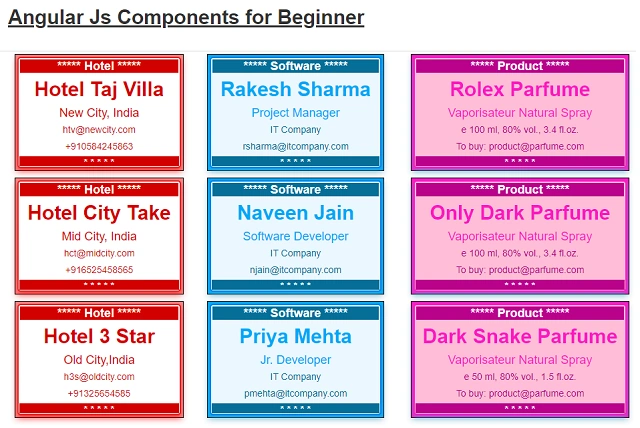
Section 1 shows a short view of the code part. We create ng-app myApp and in the body part we create three ng-controller myCardHotel,myCardCompany and myCardProduct. Both ng-app and ng-controller as the two main parts of angular js. Another in header tag we include angular.min.js and link bootstrap.min.css to run angular js functionality and design css. Also, we added a link of card view style, mycomponent.css. In this style, sheet has created a component theme in which the class name is company_card,hotel_card and product_card. These names are used dynamically to show stylish output of card by using json data, and the key name is card_theme. In HTML we add code to get angular app by using angular.module() function so we can access controller by using "appName".controller() function. To create a component, use the function "appName".component(). Function .component() takes the name of component, template and controller.
<html ng-app="myApp">
<head>
    <link href="bootstrap.min.css" rel="stylesheet" />
    <!--link style for card view template-->
    <link href="mycomponent.css" rel="stylesheet" />
    <script src="angular.min.js"></script>
    <title>My Data Table</title>
    <script></script> <!-- program script bellow -->
<head>
var dinfoType=0;// global variable to update data info type.
     var myApp = angular.module('myApp', []);
     myApp.component('dinfoList', {  // element name will be '<dinfo-list>'.
        template:'<ul>'+
                '<li ng-repeat="dinfo in $ctrl.datainfos">' +
                '<div class="{{dinfo.card_theme}}">'+
                '<div class="card">'+
                '<div class="cardin">'+
                '<h4>***** {{dinfo.mtitle}} *****</h4>'+
                '<h2>{{dinfo.title}}</h2>'+
                '<p class="title">{{dinfo.info1}}</p>'+
                '<p>{{dinfo.info2}}</p>'+
                '<p>{{dinfo.info3}}</p>'+
                '<h5>* * * * *</h5>'+
                '</div>'+
                '</div></div></li></ul>',
        controller: function DataInfoController() {
            // calling outer function not related to controller.
           this.datainfos =MyDataInfo();
        }
    });
    // function not related to controller.
    MyDataInfo = function () {
           return datainfos;
        }
     // update data info type in controller one
     myApp.controller('myCardCompany',function($scope){
        dinfoType=1;
     });
     // update info type in controller one
     myApp.controller('myCardHotel',function($scope){
        dinfoType=2;
    });
    // update info type in controller one
    myApp.controller('myCardProduct',function($scope){
        dinfoType=3;
    });
Section 2
In our code create one variable, named datainfoType and a function MyDataInfo(). Both are not related to the controller because this is common for an Angular app. In MyDataInfo() function, we load the default JSON data list. Also, it views change by updating the datainfoType variable. In JSON data one key field card_theme is important because of the runtime decision to select a theme for the card.
// function not related to controller.
MyDataInfo = function () {
    if (dinfoType == 1) {
        this.datainfos = [{
                mtitle: 'Software', title: 'Rakesh Sharma', info1: 'Project Manager', info2: 'IT Company', info3: '[email protected]', card_theme:'company_card'
            }, {
                mtitle: 'Software', title: 'Naveen Jain', info1: 'Software Developer', info2: 'IT Company', info3: '[email protected]', card_theme:'company_card'
            }, {
                mtitle: 'Software', title: 'Priya Mehta', info1: 'Jr. Developer', info2: 'IT Company', info3: '[email protected]', card_theme:'company_card'
            } ]
        return datainfos;
    } else
        if (dinfoType == 2) {
            this.datainfos = [
                {
                    mtitle: 'Hotel', title: 'Hotel Taj Villa', info1: 'New City, India', info2: '[email protected]', info3: '+910584245863', card_theme:'hotel_card'
                }, {
                    mtitle: 'Hotel', title: 'Hotel City Take', info1: 'Mid City, India', info2: '[email protected]', info3: '+916525458565', card_theme:'hotel_card'
                }, {
                    mtitle: 'Hotel', title: 'Hotel 3 Star', info1: 'Old City,India', info2: '[email protected]', info3: '+91325654585', card_theme:'hotel_card'
                }
            ]
            return datainfos;
        } else
            if (dinfoType == 3) {
                this.datainfos = [
                    {
                        mtitle: 'Product', title: 'Rolex Parfume', info1: 'Vaporisateur Natural Spray', info2: 'e 100 ml, 80% vol., 3.4 fl.oz.', info3: 'To buy: [email protected]', card_theme:'product_card'
                    }, {
                        mtitle: 'Product', title: 'Only Dark Parfume', info1: 'Vaporisateur Natural Spray', info2: 'e 100 ml, 80% vol., 3.4 fl.oz.', info3: 'To buy: [email protected]', card_theme:'product_card'
                    }, {
                        mtitle: 'Product', title: 'Dark Snake Parfume', info1: 'Vaporisateur Natural Spray', info2: 'e 50 ml, 80% vol., 1.5 fl.oz.', info3: 'To buy: [email protected]', card_theme:'product_card'
                    }
                ]
                return datainfos;
            } else
                this.datainfos = [{ mtitle: '', title: '', info1: '', info2: '', info3: '' }]
    return datainfos;
    }
Section 3
Section 3 is the HTML code part. Two div are available in this section. First div tag to show page header title, second div tag shows tag shows table part. In second div tag we using component dinfo-list in three column with three different ng-controller which name is myCardHotel, myCardCompany and myCardProduct, shows in code below. So we have seen no need to repeat same code again and again to show data. Only just we write one component and we can use in our program. It depends on program requirements and how many component we need to create for our application.
<body>
 <div class="container"><h2><u>Angular Js Components for Beginner</u></h2></div>
    <br/>
        <div class="container">
                <div class="row">
                    <table class="table table-condensed">
                        <tr>
                            <!--Three controller added in table column to call component <dinfo list> -->
                            <td ng-controller="myCardHotel"><dinfo-list></dinfo-list></td>
                            <td ng-controller="myCardCompany"><dinfo-list></dinfo-list></td>
                            <td ng-controller="myCardProduct"><dinfo-list></dinfo-list></th>
                        </tr>
                    </table>
                </div>
        </div>

</body>
Conclusion
This article shows and explains to a beginner how to create a reusable component by using angular js. Also, it tries to explain component binding dynamically. Finally, it also explains how to use dynamic theme logic in the component.
Join the conversation! Your thoughts help the community grow.