

Introduction
This article explains how to get the data from a SharePoint List using Angular JavaScript and the REST API. I used the REST API to talk to SharePoint and get the data from the list. I am not going to discuss much about the REST services since many folks have already done great work on explaining REST API services.
In this script we just see that we have first created an Angular Controller with the name "spCustomerController". We have also injected $scope and $http service. The $http service will fetch the list data from the specific columns of the SharePoint list. $scope is a glue between a Controller and a View. It acts as execution context for Expressions. Angular expressions are code snippets that are usually placed in bindings such as {{ expression }}.
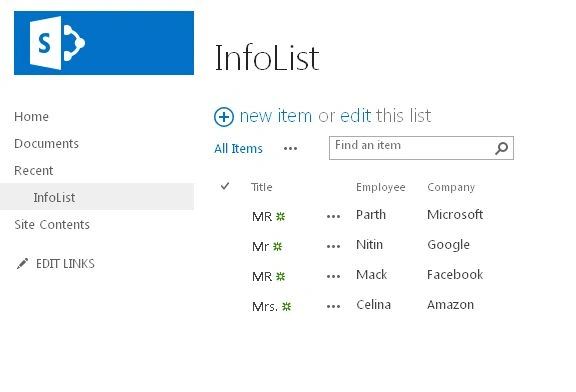
Use the following procedure to create a sample.
- <h1>WelCome To Angular JS Sharepoint 2013 REST API !!</h1>
- <div ng-app="SharePointAngApp" class="row">
- <div ng-controller="spCustomerController" class="span10">
- <table class="table table-condensed table-hover">
- <tr>
- <th>Title</th>
- <th>Employee</th>
- <th>Company</th>
- </tr>
- <tr ng-repeat="customer in customers">
- <td>{{customer.Title}}</td>
- <td>{{customer.Employee}}</td>
- <td>{{customer.Company}}</td>
- </tr>
- </table>
- </div>
- </div>
Step 2: From this page select the Site Actions | Edit Page.
Edit the page, go to the "Insert" tab in the Ribbon and click the "Web Part" option. In the "Web Parts" picker area, go to the "Media and Content" category, select the "Script Editor" Web Part and press the "Add button".
Step 3: Once the Web Part is inserted into the page, you will see an "EDIT SNIPPET" link; click it. You can insert the HTML and/or JavaScript as in the following
- <style>
- table, td, th {
- border: 1px solid green;
- }
- th {
- background-color: green;
- color: white;
- }
- </style>
- <script src="https://ajax.googleapis.com/ajax/libs/angularjs/1.0.1/angular.min.js"></script>
- <script src="http://code.jquery.com/ui/1.10.3/jquery-ui.min.js"></script>
- <script>
- var myAngApp = angular.module('SharePointAngApp', []);
- myAngApp.controller('spCustomerController', function ($scope, $http) {
- $http({
- method: 'GET',
- url: _spPageContextInfo.webAbsoluteUrl + "/_api/web/lists/getByTitle('InfoList')/items?$select=Title,Employee,Company",
- headers: { "Accept": "application/json;odata=verbose" }
- }).success(function (data, status, headers, config) {
- $scope.customers = data.d.results;
- }).error(function (data, status, headers, config) {
- });
- });
- </script>
- <h1> Angular JS SharePoint 2013 REST API !!</h1>
- <div ng-app="SharePointAngApp" class="row">
- <div ng-controller="spCustomerController" class="span10">
- <table class="table table-condensed table-hover">
- <tr>
- <th>Title</th>
- <th>Employee</th>
- <th>Company</th>
- </tr>
- <tr ng-repeat="customer in customers">
- <td>{{customer.Title}}</td>
- <td>{{customer.Employee}}</td>
- <td>{{customer.Company}}</td>
- </tr>
- </table>
- </div>
- </div>
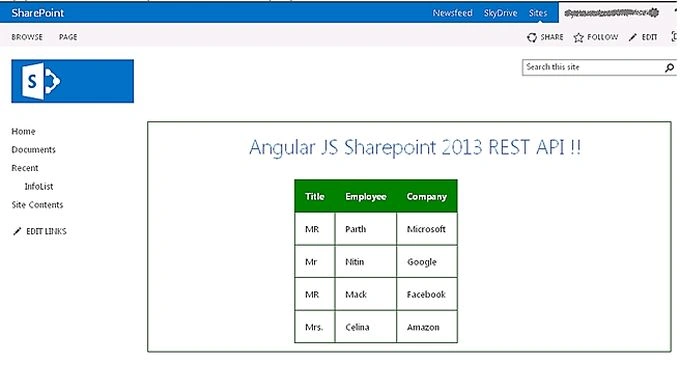
shima sbtPosted Jan 22, 2018, 3:49 AM
When I change the 'InfoList' to any other lists, it doesnt work. could you help me?
WNC RunnersPosted Oct 6, 2017, 3:04 PM
I cannot get this to bind any custom columns. It will bind the out of the box columns (Title, Created, Modified, etc..) but will not bind Employee or Company.
Mahesh BabuPosted Apr 7, 2017, 5:15 AM
I have tried and it got worked for me...Thank you very much..
Jean BarrosPosted Sep 27, 2016, 4:26 PM
Just added: "text / javascript" in the <script> and is running now.
Jean BarrosPosted Sep 27, 2016, 2:25 PM
Hi Sagar Pardeshi. Thank you for this post. It saved my time, but i have a trouble. Just works on edit mode. After save the page changes, the data go away and i get that screen, like did say ASWIN KUMAR. Could you help me please?
Prashant VermaPosted Mar 9, 2016, 10:08 AM
great
ASWIN KUMARPosted Dec 11, 2015, 12:02 AM
Also i have deactivated the MDS Feature as well
ASWIN KUMARPosted Dec 11, 2015, 12:02 AM
I am also getting the same screen as described by Pallavi Sharma. only the Green table header with one row displaying {{customer.Title}} {{customer.Employee}} {{customer.Company}}.
phanikumar peramPosted Nov 17, 2015, 12:35 AM
appWebUrl is not defined
phanikumar peramPosted Nov 17, 2015, 12:34 AM
Mixed Content: The page at 'https://xtz-cbfd9be9b97d93.sharepoint.com/sites/Develo…orporated%2Dcbfd9be9b97d93%2Esharepoint%2Ecom%2Fsites%2FDeveloper%2FTest22' was loaded over HTTPS, but requested an insecure script 'http://code.jquery.com/ui/1.10.3/jquery-ui.min.js'. This request has been blocked; the content must be served over HTTPS.
Sagar PardeshiPosted Nov 10, 2015, 7:10 AM
check ur message box
phanikumar peramPosted Nov 10, 2015, 6:24 AM
Hii sagar,thank you for ur post but i am not able to bind the list data in sp i found that ng-controller cannot call the script controller so please clarify my doubt
phanikumar peramPosted Nov 10, 2015, 6:23 AM
hii
gopal yadavPosted Nov 10, 2015, 4:35 AM
<script type="text/javascript"> var myAngApp=angular.module('SharePointAngApp',[]); myAngApp.controller('spCustomerController', function ($scope, $http) { alert("shadfshkdg"); $http({ method: 'GET', url: appWebUrl + "/_api/SP.AppContextSite(@TargetSite)/web/lists/getByTitle('angularsp_P')/items?$select=Title,Id,Employee Name,Year Of Experiance,Salary,variable,Pay Percentage,Monthly Gross Pay&@TargetSite='" + targetSiteUrl + "'", headers: { "Accept": "application/json;odata=verbose" } }).success(function (data, status, headers, config) { alert("s"); $scope.customers = data.d.results; }).error(function (data, status, headers, config) { alert('f'); }); }); var appWebUrl = ""; var targetSiteUrl = ""; var ready = false; $(document).ready(function () { var params = document.URL.split("?")[1].split("&"); for (var i = 0; i < params.length; i = i + 1) { var param = params[i].split("="); switch (param[0]) { case "SPAppWebUrl": appWebUrl = decodeURIComponent(param[1]); break; case "SPHostUrl": targetSiteUrl = decodeURIComponent(param[1]); break; } } // load the request executor script, once ready set a flag that can be used to check against later $.getScript(appWebUrl + "/_layouts/15/SP.RequestExecutor.js", function () { ready = true; }); }); </script>
gopal yadavPosted Nov 10, 2015, 4:21 AM
Controller not able to call
mesut demirPosted Dec 28, 2014, 1:48 PM
change the compatible mode to IE version 9 or higher ( F12, then Emulation , then change to 9 or 10 --> you find the emulation on the left side, scrolling to last tab).
Pallavi SharmaPosted Nov 18, 2014, 12:08 AM
I get only the Green table header with one row displaying {{customer.Title}} {{customer.Employee}} {{customer.Company}}