

Introduction
In this article, we will discuss the Angular Material Stepper. Stepper is an Angular Material component that is used to create a wizard-like workflow by separating content into different steps.
In the previous part of the series, we discussed the basics of Angular Material. You can check the previous article from the below-mentioned link.
Angular provides two types of Stepper.
- mat-horizontal-stepper
- mat-vertical-stepper
The mat-horizontal-stepper selector is used to create a horizontal stepper and the mat-vertical-stepper is used to create a vertical stepper.
Step 1
Let's create a new component by using the following command.
ng g c AngularMatstepper

Step 2
Now, open the app.module.ts file and import the required module for Stepper.
import {MatStepperModule} from '@angular/material/stepper';
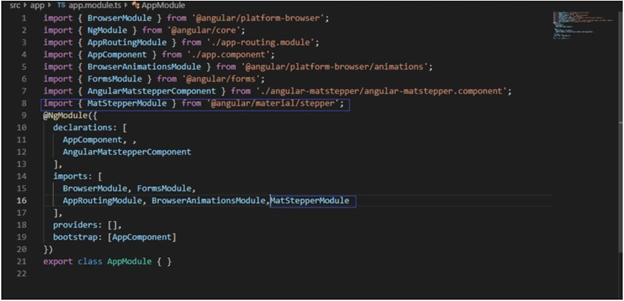
- import { BrowserModule } from '@angular/platform-browser';
- import { NgModule } from '@angular/core';
- import { AppRoutingModule } from './app-routing.module';
- import { AppComponent } from './app.component';
- import { BrowserAnimationsModule } from '@angular/platform-browser/animations';
- import { FormsModule,ReactiveFormsModule} from '@angular/forms';
- import { AngularMatstepperComponent } from './angular-matstepper/angular-matstepper.component';
- import { MatStepperModule } from '@angular/material/stepper';
-
import { MatButtonModule } from "@angular/material";import 'hammerjs';
- @NgModule({
- declarations: [
- AppComponent, ,
- AngularMatstepperComponent
- ],
- imports: [
- BrowserModule, FormsModule, ReactiveFormsModule,
- AppRoutingModule, BrowserAnimationsModule,MatStepperModule ,MatButtonModule
- ],
- providers: [],
- bootstrap: [AppComponent]
- })
- export class AppModule { }
Step 3
Now, open angular-matstepper.component.html and add the following HTML to create a horizontal stepper.
- <mat-horizontal-stepper>
- <mat-step label="Personal Detail">
- <p> Step 1</p>
- <button mat-raised-button color="primary" matStepperNext>Next</button>
- </mat-step>
- <mat-step label="Address">
- <p> Step 2</p>
- <div>
- <button mat-raised-button color="primary" style="margin-right:6px;" matStepperNext>Next</button>
- <button mat-raised-button color="primary" matStepperPrevious>Previous</button>
- </div>
- </mat-step>
- <mat-step label="Reviews Details">
- <p>Step 3</p>
- <button mat-raised-button color="primary" style="margin-right:6px;" matStepperPrevious>Previous</button>
- <button mat-raised-button color="primary" (click)="add()" >Save</button>
- </mat-step>
- </mat-horizontal-stepper>
- <form>
- </form>
Step 4
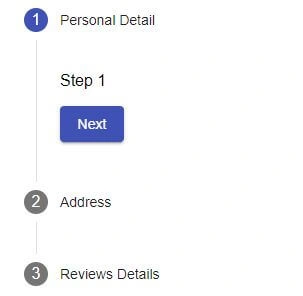
Run the project and check the result.

We can create a vertical stepper by using < mat-vertical-stepper> in place of <mat-horizontal-stepper>.
- <mat-vertical-stepper>
- <mat-step label="Personal Detail">
- <p> Step 1</p>
- <button mat-raised-button color="primary" matStepperNext>Next</button>
- </mat-step>
- <mat-step label="Address">
- <p> Step 2</p>
- <div>
- <button mat-raised-button color="primary" style="margin-right:6px;" matStepperNext>Next</button>
- <button mat-raised-button color="primary" matStepperPrevious>Previous</button>
- </div>
- </mat-step>
- <mat-step label="Reviews Details">
- <p>Step 3</p>
- <button mat-raised-button color="primary" style="margin-right:6px;" matStepperPrevious>Previous</button>
- <button mat-raised-button color="primary" (click)="add()" >Save</button>
- </mat-step>
- </mat-vertical-stepper>
- <form>
- </form>

Faisal PathanPosted Nov 27, 2019, 12:41 AM
How to add dynamic steps on selection? for example on secons step I have dropdown and on change I want modify next steps how can I?
Amit MohantyPosted Jul 1, 2019, 5:25 AM
Nice article..