

I hope you have read all my previous tutorials. My previous article was about Sharing Data Between Component Using Angular V4 And Above, in which I explained the methods by which we can share data between the components parent-child. Today, I am here with one more article that is very important for Angular developers.
As I already told you, it’s a basic need for any application to send and play with data. It should be able to perform operations that are necessary according to our requirements as we have used @Input and @Output. Here, we need to understand why we are using services for sharing the data while we have @Input and @Output. Well, the answer is we are using the @Input and @output for sharing the data between parent and child. Suppose we have the requirement to share the data between components where each component is separate. This time, the Angular service comes into the picture.
One thing that's very necessary to know is that we are not using Angular Services only for sharing the data between components. The basic need of Angular service is to communicate to the API with the help of HTTP verbs and perform the required operations such as GET, POST the data, etc.
Now, the first thing that comes to your mind is what Angular service is and why we use it.
What is Angular Service?
An Angular service is simply a function that allows you to access its properties and methods. For example, if we have any code which gets the data we will use it in one component and now if you want to use the same code in another component to get the same data, we will not add the same code again and again. We will simply create a service and it will be used by the component where we want the data.
Why do we use Angular Services?
Services are commonly used for storing data and making HTTP calls for retrieving, posting, updating, and deleting the data we need in our application.
Now I am going to explain how we will share the data by service from one component to another while these are not in a parent-child relationship.
First, I have created one service, either command as ng service <srvicename>, or created a file option within the Angular application where we are creating the application. In my application, I have created the service data.service.ts as,
import { Injectable } from '@angular/core';

@Injectable()
export class DataService {

  private data = {};

  setOption(option, value) {
    this.data[option] = value;
  }

  getOption() {
    return this.data;
  }
}
As you can see above, I have created two methods, setOption, and getOption, in the service for getting and setting the required value from our component.
Now, I have created two components,
app.first.component.ts
For setting the value using the setOption method by service within the first component,
export class FirstComponent {
    public size: number;
    public square: number;

    constructor(_dataService: DataService) {
        this.size = 16;
        this.square = Math.sqrt(this.size);

        _dataService.setOption('size', this.size);
        _dataService.setOption('square', this.square);
    }
}
app.second.component.ts
For getting the added value using the getOption method by service within the second component,
import { DataService } from './DataService';

export class SecondComponent {
    public data;

    constructor(private _dataService: DataService) {
        debugger;
        this.data = this._dataService.getOption();
    }
}
As you know we are reading about sharing data between two components while each component is separate using service, so the important thing is, how we will show the value has changed? For this purpose, I have added an anchor within the first component, and with the help of [routerLink], we will show the other components using routing. Now one thing you may be wondering: What is routing?
What is Routing?
Angular provides a Router to make it easier to define routes for the web applications and to navigate from one view to another view so we are using routing only for moving one page or view to another view. I have added routing in this application so that we can move the first component to the second component and get the added value using the setOption method from the first component.
app.routing.ts
import { ModuleWithProviders } from '@angular/core';
import { Routes, RouterModule } from '@angular/router';
import { FirstComponent } from './app.first.component';
import { SecondComponent } from './app.second.component';

const appRoutes: Routes = [
    { path: '', component: FirstComponent },
    { path: 'second', component: SecondComponent },
];

export const routing: ModuleWithProviders =
    RouterModule.forRoot(appRoutes);
As you can see above we have added Routes and RouterModule which is mainly for routing.
Also, I have added a Routes array with path and component. The path denotes the URL and the component denotes the component name which means the corresponding component html page will run and show the view that we have added within a template or template URL of @component decorator.
One thing that is very important that we have to add is <router-outlet></router-outlet> within the main component file as I have added with the app.component.html page which is my main component, like this:
app.component.html
<router-outlet></router-outlet>
The router is mainly showing the view, which means the component html page which we have added in the routing.
Now, the most important thing we have to do is we have to register all the above components, service, and routing files in the app.module.ts file as I have explained in my previous tutorial:
app.module.ts
import { NgModule } from '@angular/core';
import { BrowserModule } from '@angular/platform-browser';
import { AppComponent } from './app.component';
import { FirstComponent } from './app.first.component';
import { SecondComponent } from './app.second.component';
import { DataService } from './data.service';
import { routing } from './app.routing';

@NgModule({
  declarations: [
    AppComponent,
    FirstComponent,
    SecondComponent,
  ],
  imports: [
    BrowserModule,
    routing
  ],
  providers: [DataService],
  bootstrap: [AppComponent]
})
export class AppModule { }
As you can see above, I have added both the components in the declaration section and routing within the imports section where all the modules will be registered.
The service that we have created we will add within the providers:[] section as I have added DataService in the above example.
Now, if everything is completed above, you can run the application using two steps.
Step 1. Open the node js command window and move to the location where you have added the application.
Step 2. Execute the command ng serve
When the application runs successfully you should see the below output.
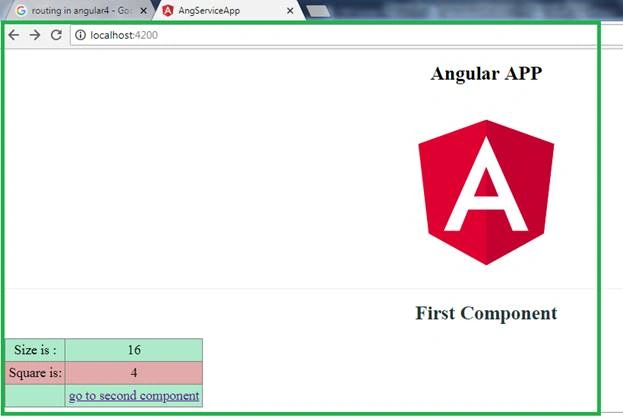
You can see above, the data shows what we have added with the first component and assigns the value within the constructor as,
public size: number;
public square: number;

constructor(private _dataService: DataService) {
    this.size = 16;
    this.square = Math.sqrt(this.size);

    this._dataService.setOption('size', this.size);
    this._dataService.setOption('square', this.square);
}
Service Method
private data = {};

setOption(option, value) {
  debugger;
  this.data[option] = value;
}
Now, I am using the setOption method within the constructor which is the service method. Here setOption method sets the above size and square value in the service data object.
I have added an anchor also for navigating from the first component to the second component so when we click on the above and go to the second component link it will navigate to the second component and in the second component I am using the getOption service method for getting the data value in the second component within the constructor as,
public data;

constructor(_dataService: DataService) {
  debugger;
  this.data = _dataService.getOption();
}
Service Method
getOption() {
  return this.data;
}
Now when we click on the anchor link and go to the second component it should show the below output,
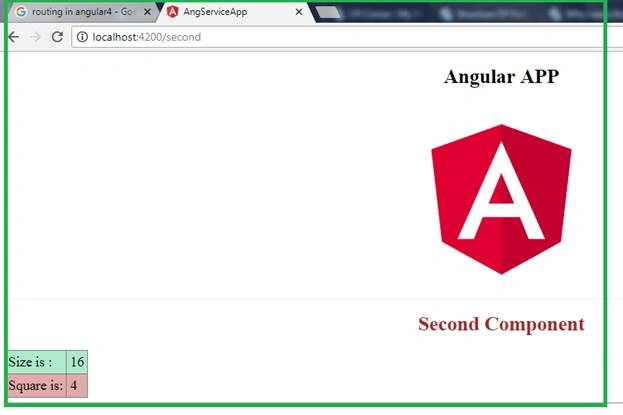
So you can see the first component values are shared with the second component using the service.
The entire application code is.
- data.service.ts
import { Injectable } from '@angular/core';

@Injectable()
export class DataService {

  private data = {};

  setOption(option, value) {
    debugger;
    this.data[option] = value;
  }

  getOption() {
    return this.data;
  }
}
- app.component.ts
import { Component, OnInit } from '@angular/core';
import { DataService } from "./data.service";

@Component({
  selector: 'app-root',
  templateUrl: 'app.component.html',
})
export class AppComponent implements OnInit {
  public title: string = 'Sharing data using service';

  constructor() {

  }

  ngOnInit() {

  }
}
- app.component.html
<div style="text-align:center">
  <h1>
    {{title}}
  </h1>
  <img width="300" alt="Angular Logo" src="data:image/svg+xml;base64,PHN2ZyB4bWxucz0iaHR0cDovL3d3dy53My5vcmcvMjAwMC9zdmciIHZpZXdCb3g9IjAgMCAyNTAgMjUwIj4KICAgIDxwYXRoIGZpbGw9IiNERDAwMzEiIGQ9Ik0xMjUgMzBMMzEuOSA2My4ybDE0LjIgMTIzLjFMMTI1IDIzMGw3OC45LTQzLjcgMTQuMi0xMjMuMXoiIC8+CiAgICA8cGF0aCBmaWxsPSIjQzMwMDJGIiBkPSJNMTI1IDMwdjIyLjItLjFWMjMwbDc4LjktNDMuNyAxNC4yLTEyMy4xTDEyNSAzMHoiIC8+CiAgICA8cGF0aCAgZmlsbD0iI0ZGRkZGRiIgZD0iTTEyNSA1Mi4xTDY2LjggMTgyLjZoMjEuN2wxMS43LTI5LjJoNDkuNGwxMS43IDI5LjJIMTgzTDEyNSA1Mi4xem0xNyA4My4zaC0zNGwxNy00MC45IDE3IDQwLjl6IiAvPgogIDwvc3ZnPg==">

  <router-outlet></router-outlet>
</div>
- app.first.component.ts
import { Component, OnInit } from '@angular/core';
import { DataService } from "./data.service";

@Component({
  selector: 'app-root',
  templateUrl: 'app.first.component.html',
})
export class FirstComponent implements OnInit {
  public size: number;
  public square: number;

  constructor(private _dataService: DataService) {
    this.size = 16;
    this.square = Math.sqrt(this.size);
    this._dataService.setOption('size', this.size);
    this._dataService.setOption('square', this.square);
  }

  ngOnInit() {

  }
}
- app.first.component.html
<hr>
<h1 style="color:#253535">First Component</h1>
<div style="text-align:center">
    <div>
        <table>
            <tr>
                <td>
                    Size is :
                </td>
                <td>
                    {{ size }}
                </td>
            </tr>
            <tr>
                <td>
                    Square is:
                </td>
                <td>
                    {{ square }}
                </td>
            </tr>
            <tr>
                <td>
                </td>
                <td>
                    <a [routerLink]="['second']">go to second component</a>
                </td>
            </tr>
        </table>
    </div>
    <hr>
- app.second.component.ts
import { Component, OnInit } from '@angular/core';
import { DataService } from "./data.service";

@Component({
  selector: 'grid',
  templateUrl: 'app.second.component.html',
})

export class SecondComponent {
  public data;

  constructor(_dataService: DataService) {
    debugger;
    this.data = _dataService.getOption();
  }
}
- app.second.component.html
<hr> <h1 style="color:brown">Second Component</h1> <div style="text-align: left"> <table> <tr> <td> Size is: </td> <td> {{ data.size }} </td> </tr> <tr> <td> Square is: </td> <td> {{ data.square }} </td> </tr> </table> </div> <hr> - app.routing.ts
import { ModuleWithProviders } from '@angular/core';
import { Routes, RouterModule } from '@angular/router';
import { FirstComponent } from './app.first.component';
import { SecondComponent } from './app.second.component';

const appRoutes: Routes = [
    { path: '', component: FirstComponent },
    { path: 'second', component: SecondComponent },
];

export const routing: ModuleWithProviders = RouterModule.forRoot(appRoutes);
- app.module.ts
import { BrowserModule } from '@angular/platform-browser';
import { NgModule } from '@angular/core';
import { AppComponent } from './app.component';
import { FirstComponent } from './app.first.component';
import { SecondComponent } from './app.second.component';
import { DataService } from './data.service';
import { routing } from './app.routing';

@NgModule({
  declarations: [
    AppComponent, FirstComponent, SecondComponent,
  ],
  imports: [
    BrowserModule, routing
  ],
  providers: [DataService],
  bootstrap: [AppComponent]
})
export class AppModule { }
- style.css
/* You can add global styles to this file, and also import other style files */

table, th, td {
  border: 1px solid grey;
  border-collapse: collapse;
  padding: 5px;
  font-size: 22px;
}

table tr:nth-child(odd) {
  background-color: #ADE9CB;
}

table tr:nth-child(even) {
  background-color: #E2AAAA;
}
So, these are the above files that I am using with the application. You can also download the application by zip file which I have shared with this article.
Conclusion
As we know, sharing data within the component while components are separate is a very important concept in Angular and most of the time we need it as per our requirement. I hope you liked this -- please share it if you did.
Mukta GadgilPosted Oct 8, 2021, 10:57 AM
Thank you for this, it worked for me, now I am just looking for the data to be dynamic (entered by the user) and then passed to the component
tiep nguyenPosted Nov 16, 2019, 4:40 AM
It's useful. Thanks for your effort.
Shashikant DevaniPosted Aug 30, 2018, 2:19 AM
That's not a good practice to shared data between components. If you are using angular 4+ then why you not shared data using behaviorSubject of rxJs.
akhilesh singhPosted Aug 28, 2018, 4:42 AM
Very good article sir.
Khumana RamPosted Jul 4, 2018, 5:09 AM
Very nice and informative article .... keep it up
Komal SharmaPosted Jun 29, 2018, 3:29 AM
Very informative sir, you can explain the concept of services with very simple example, anyone can easily understand.
L APosted Jun 25, 2018, 5:16 PM
Great article Bhairab, thanks for sharing. I think in 'data.service.ts' line #3 - @Injectable() isn't required because '@Injectable()' decorator is only used when you're injecting a service into other service.
Deepak VermaPosted Jun 25, 2018, 12:43 AM
Nice article sir.... good job keep it up :)
Mahesh VermaPosted Jun 24, 2018, 9:18 AM
Very nice and informative article Sir :-)