

I hope you have had a chance to look into my last tutorial. Here, I will talk about the technology stack and create a UI HTML page with the module and controller.
Kindly find links here as shown below:
- AngularJS And ASP.NET MVC Movie Library Application - Part One
- AngularJS And ASP.NET MVC Movie Library Application - Part Two
Moving ahead in this article, we’ll focus on how to bind UI controls events and link with the defined controller.
$scope plays a vital role whenever you bind the controller value with the specific view. Here, we are going to learn it. After using this, I believe that it would be a kind of ice-breaker and will ease all the further learnings. Let's get our hands dirty with AngularJS & ASP.NET MVC Movie Library Application Tutorials part three.
So far, we’ve designed the screen shot, given below:
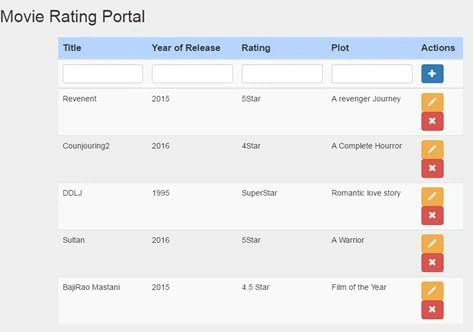
Hope, you will have also reached up to this level. Moving ahead, let's bind the fancy bootstrap glyphicon icon into an action.
Add the ng-click event, one by one, on each respective control.There are thee HTML button controls that exist.
First – Add button with + symol
Second – Edit button with pencil symbol
Third - Cross with * Symbol.
Kindly paste the code segment, given below, into the movie.html page.
Code segment Movie.html
- <!DOCTYPE html>
- <html xmlns="http://www.w3.org/1999/xhtml">
- <head>
- <h2>Movie Rating Portal</h2>
- <link rel="stylesheet" href="http://maxcdn.bootstrapcdn.com/bootstrap/3.3.6/css/bootstrap.min.css">
- <style>
- .selected
- {
- background-color: lightyellow;
- color: red;
- font-weight: bold;
- }
- </style>
- </head>
- <body ng-app="routingApp" class="jumbotron">
- <div ng-controller="MovieController" class="container">
- <div ng-show="success" class="alert-success">Record has been upddated for movie : {{updatedMovie.title}}</div>
- <div ng-show="clear" class="alert-success">Record has been deleted for movie : {{updatedMovie.title}}</div>
- <div class="row col-md-8">
- <table class="table table-striped ">
- <thead class="thead-inverse">
- <th style="background-color: Highlight">Title</th>
- <th style="background-color: Highlight">Year of Release</th>
- <th style="background-color: Highlight">Rating</th>
- <th style="background-color: Highlight">Plot</th>
- <th style="background-color: Highlight">Actions</th>
- </thead>
- <tr>
- <!-- <td>EmployeeID:</td>-->
- <td>
- <input type="text" ng-model="movie.title" class="form-control" />
- </td>
- <td>
- <input type="text" ng-model="movie.year" class="form-control" />
- </td>
- <td>
- <input type="text" ng-model="movie.rating" class="form-control" />
- </td>
- <td>
- <input type="text" ng-model="movie.plot" class="form-control" />
- </td>
- <td>
- <button type="button" ng-click="AddMovie(movie)" class="btn btn-primary">
- <span class="glyphicon glyphicon-plus"></span>
- </button>
- </td>
- </tr>
- <tbody>
- <tr ng-repeat="movie in movies" ng-class="{'selected':$index == selectedRow}">
- <td>{{movie.title}}
- </td>
- <td>{{movie.year}}
- </td>
- <td>{{movie.rating}}
- </td>
- <td>{{movie.plot }}
- </td>
- <td>
- <button type="button" ng-click="EditMovie(movie,$index)" class="btn btn-warning">
- <span class="glyphicon glyphicon-pencil"></span>
- </button>
- <button type="button" ng-click="DeleteMovie(movie,$index)" class="btn btn-danger">
- <span class="glyphicon glyphicon-remove"></span>
- </button>
- </td>
- </tr>
- </tbody>
- </table>
- </div>
- </div>
- </body>
- </html>
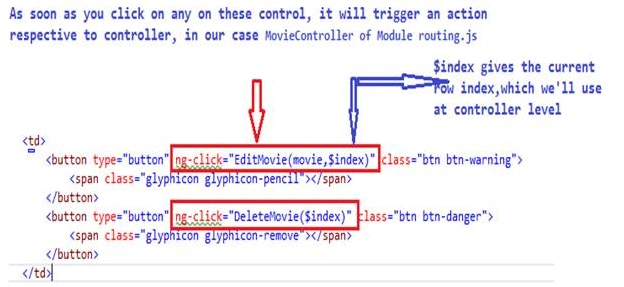
Now, we are almost done with the UI part and have created the required ng-click events on all the buttons existing on the page.
Now, it'stime to design the controller and write the code so that every button should work very effectively. Thus, please copy and paste the code, given below and replace it within routing.js file.
- /// <reference path="../Scripts/angular.js" />
- var routingApp = angular.module('routingApp', []);
- routingApp.controller("MovieController", ['$scope', function ($scope) {
- $scope.edit = false;
- $scope.message = "Welcome to DotnetPiper.com to learn Angular";
- $scope.error = false;
- $scope.clear = false;
- $scope.success = false;
- // alert("Servcie Called");
- var movies = [
- { title: "Revenent", year: "2015", rating: "5Star", plot: " A revenger Journey" },
- { title: "Counjouring2", year: "2016", rating: "4Star", plot: " A Complete Hourror" },
- { title: "DDLJ", year: "1995", rating: "SuperStar", plot: "Romantic love story" },
- { title: "Sultan", year: "2016", rating: "5Star", plot: "A Warrior" },
- { title: "BajiRao Mastani", year: "2015", rating: "4.5 Star", plot: "Film of the Year" }
- ];
- $scope.movies = movies;
- $scope.AddMovie = function (movie) {
- if ($scope.edit == true) {
- var index = $scope.movies.indexOf(movie);
- // alert("edit Called");
- $scope.movies[index] = movie;
- //alert(movie.rating);
- $scope.updatedMovie = movie;
- $scope.success = true;
- $scope.movie = {};
- }
- else {
- var newMovie = {
- title: $scope.movie.title,
- year: $scope.movie.year,
- rating: $scope.movie.rating,
- plot: $scope.movie.plot
- };
- movies.push(newMovie);
- // alert("Add Called");
- }
- }
- $scope.DeleteMovie = function (movie,index) {
- movies.splice(index, 1);
- // $scope.movie = movie;
- $scope.updatedMovie = movie;
- $scope.success = false;
- $scope.clear = true;
- $scope.movie = {};
- console.log(index);
- }
- $scope.EditMovie = function (movie, index) {
- $scope.selectedRow = null; // initialize our variable to null
- $scope.selectedRow = index;
- $scope.movie = movie;
- $scope.edit = true;
- }
- }]);
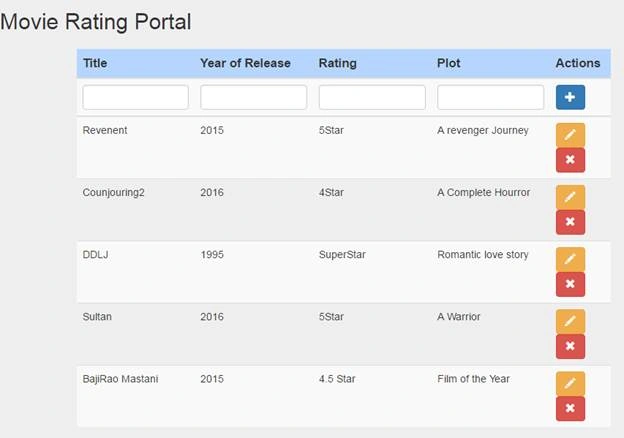
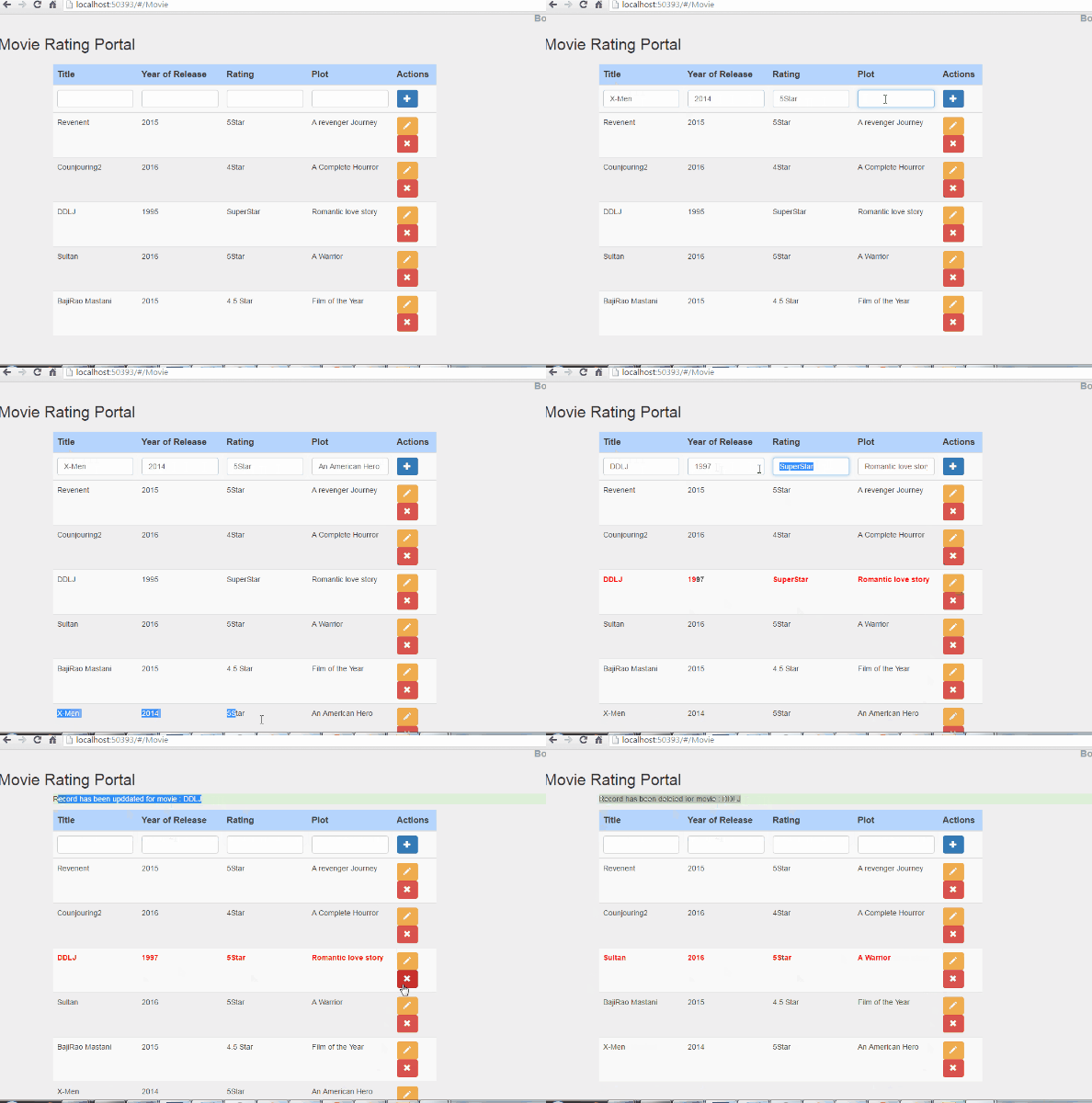
Kindly open Movie.html page and find the given below line and understand its actual fact. Please refer below the screen, given below:
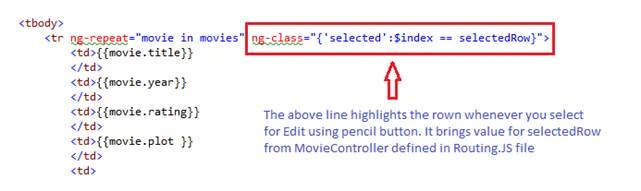
There are three major cases here as shown below:
First – Add button with + symbol
Second – Edit button with pencil symbol
Third - Cross with * Symbol.
Hope this will help you some day. Enjoy coding.
Shaili DashoraPosted Jul 29, 2016, 4:37 AM
Nice one
Suraj SahooPosted Jul 25, 2016, 6:51 AM
Beautiful!! :)
Humayun Kabir MamunPosted Jul 24, 2016, 12:42 AM
Nice...
Sachin KaliaPosted Jul 20, 2016, 10:08 PM
It means a lot when reader says this. Thanks :)
VenkatPosted Jul 20, 2016, 9:27 PM
Great article very informative..thanks a lot.
farooq smdPosted Jul 20, 2016, 9:35 AM
Nice
kalu singh raoPosted Jul 20, 2016, 3:00 AM
Interesting !