

About
This article provides an idea of some more directives like ng-include, ng-click and ng-repeat in AngularJs.
This article is just a continuation of my previous article about Quick Start On AngularJS. So, please read that to get the initial/basic idea of AngularJS.
ng-include
This is an AngularJS directive, it is very helpful to include the various files in a main page using the ng-include attribute.
Sample Application
The header.html file contains the following.
- <div style='Width:100%;border:5px solid gray;text-align:center;'>
- Header of the site
- </div>
The footer HTML file contains the following.
- <div style='Width:100%;border:5px solid gray;text-align:center;'>
- Copyright Ramchand @2014
- </div>
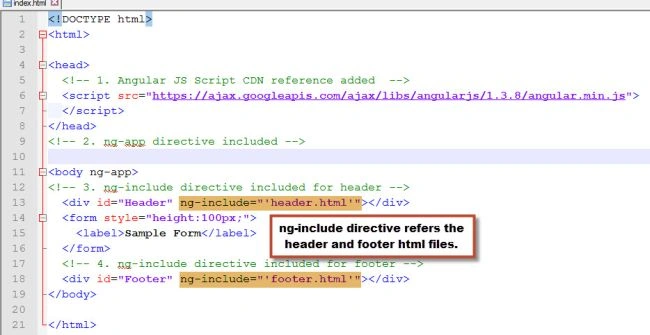
The main index.html file contains the following.
Now, when you run the index.html file, the output looks as in the following.

ng-click
This is also one of the directives, you can use this in one of the scenarios like when you click on a button if you do any operation then this would be useful.
Scenario: The form contains an input text box and Search button, whenever the user enters a value into a text box and clicks on the search button you need to display the user-entered value, if the user clicks on the search button without entering anything then we need to display a message.
The index.html file looks as in the following.

- (function() {
- var app = angular.module("DemoClickApp", []);
- var DemoController = function($scope) {
- $scope.Search = function(empname) {
- if (empname)
- $scope.result = "You have searched for " + empname;
- else
- $scope.result = "Please enter employee name";
- };
- };
- app.controller("DemoController", DemoController);
- })();
Now, when you run the index.html file by default it looks as in the following.

If you click on the Search button without entering any value in the text box then the output screen displays an alert kind of message as "Please enter employee name" that looks as in the following.

Now, you can enter some value into a text box and click on the search box and then the displayed screen is as follows.

ng-repeat
This directive is like a foreach loop in C#. By using this directive you can display a collection of items in a view (HTML page).
- <!DOCTYPE html>
- <html>
- <head>
- <!-- 1. Angular JS Script CDN reference added -->
- <script src="https://ajax.googleapis.com/ajax/libs/angularjs/1.3.8/angular.min.js">
- </script>
- <!-- 2. Script JS Reference -->
- <script src="Employee.js"></script>
- </head>
- <!-- 3. ng-app directive included -->
- <body ng-app="DemoRepeatApp">
- <h1>List of Emplooyees</h1>
- <!-- 4. ng-controller directive included -->
- <form ng-controller="DemoController">
- <table>
- <thead>
- <tr>
- <th>Name</th>
- <th>Designation</th>
- <th>Location</th>
- </tr>
- </thead>
- <tbody>
- <!-- 5. ng-repeat directive included -->
- <tr ng-repeat="emp in employees">
- <td>{{emp.Name}}</td>
- <td>{{emp.Designation}}</td>
- <td>{{emp.Location}}</td>
- </tr>
- </tbody>
- </table>
- </form>
- </body>
- </html>
- (function() {
- var app = angular.module("DemoRepeatApp", []);
- var DemoController = function($scope) {
- var sampleEmployees = '[' +
- '{ "Name":"Ramchand" , "Designation":"SSE" , "Location":"Bhubhaneswar" },' +
- '{ "Name":"Lakshman" , "Designation":"DBA" , "Location":"Noida" },' +
- '{ "Name":"ABC" , "Designation":"Team Lead" , "Location":"Banglore" } ]';
- $scope.employees = JSON.parse(sampleEmployees);
- };
- app.controller("DemoController", DemoController);
- })();
The following describes the Employee.js file:
- Angular module created with the name DemoRepeatApp.
- The variable DemoController is assigned for the Controller action.
- The Controller contains a variable named "sampleEmployees" that contains a list of sample employess in JSON format.
- Assign the JSON converted sample employees list to the $scope.employees object.

Conclusion
This article provided an idea of core directives of ng-include, ng-click and ng-repeat in AngularJS.
Ramchand RepallePosted Jan 8, 2015, 12:32 AM
Thanks Vithal Wadje :)
Vithal WadjePosted Jan 7, 2015, 10:36 PM
another nice contribution ,keep it up
Ramchand RepallePosted Jan 7, 2015, 4:26 AM
Hello Sumit Jolly, I have just started exploring on AngularJS. I will definitely come up with an article about filters and services. As a initial note, Filters are used to format the data in a presentation, While services in AngularJS performs specific job like providing a timer ($interval) , ability to communicate to http ($http), log, browser, animation etc. Thanks :)
Guest UserPosted Jan 7, 2015, 3:23 AM
Hi Ramchand Repalle, I'm using AngularJS for long time now. But, I'm not clear on clear distinction between filter & services. If you know about it, can you please explain or write article on it? Thanks