

Overview
In this article we will cover the following
- AngularJS "Nested Scopes" and "Controllers as Syntax"
- Controller vs Scope
For more articles on AngularJS, please refer these links.
- Overview Of AngularJS
- Modules And Controller In AngularJS
- Controllers in AngularJS
- AngularJS ng src Directive
- AngularJS ng-Repeat Directive
- Handling Events In AngularJS
- How To Use Two-Way Data Binding In AngularJS
- Filters In AngularJS
- Sorting Data In AngularJS
- Sorting Rows By Table Header In AngularJS
- Creating Custom Filters In AngularJS
- ng-Hide And ng-Show In AngularJS
- ng-init Directive In AngularJS
- Search And MultiSearch In AngularJS
- ngInclude Directive In AngularJS
- $http Service In AngularJS
- Consuming ASP.NET WebService In AngularJS
- AnchorScroll Service In AngularJS
- AngularJS Page Refresh Problems
First, let's look into "Nested Scopes" and "Controllers as Syntax".
Introduction
"Controllers as Syntax" can make our code more readable while working with "Nested Scopes". For this, we need to have an idea of Controllers as Syntax, given ahead in this article.
Here, we will make a Country Controller, State Controller, and City Controller respectively in our script file. I have created an empty website and in that, I created a Scripts folder and added the AngularJS script files.
Now, add a JavaScript file and name it as script.js. Reference the angular.min.js as shown below.
- /// <reference path="angular.min.js" />
- var app = angular.module("Demo", [])
- .controller("CountryController", function ($scope) {
- $scope.name = "India";
- })
- .controller("StateController", function ($scope) {
- $scope.name = "Maharashtra";
- })
- .controller("CityController", function ($scope) {
- $scope.name = "Mumbai";
- })
Now, we will create a simple HTML page and in that, we will reference AngularJS script file along with our script file. Then, we will include three div elements to display those details .
- <html>
- <head>
- <title></title>
- <meta charset="utf-8" />
- <script src="scripts/angular.min.js"></script>
- <script src="scripts/script.js"></script>
- </head>
- <body>
- <div>
- <div>
- </div>
- <div>
- </div>
- </div>
- </body>
- </html>
- <!DOCTYPE html>
- <html ng-app="Demo">
- <head>
- <title></title>
- <meta charset="utf-8" />
- <script src="scripts/angular.min.js"></script>
- <script src="scripts/script.js"></script>
- </head>
- <body>
- <div ng-controller="CountryController">
- {{name}}
- <div ng-controller="StateController">
- {{name}}
- <div ng-controller="CityController">
- {{name}}
- </div>
- </div>
- </div>
- </body>
- </html>
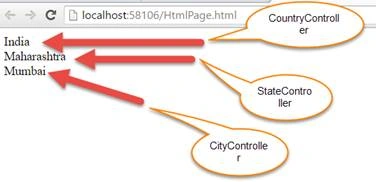
We have got various respective Controllers but when we see our View Code, its quite confusing because these three Controllers are nested inside each other and we have a common name property.
Since we have developed this View, we are aware of the common name property but for others, it is more confusing.
Now, we will be seeing how to display $parent Controller inside the State Controller. We will pass this $controller to the State Controller and see how much more confusing the code can be. So, let's go back to our HTML page. Locate the following code.
- <div ng-controller="StateController">
- {{$parent.name}} - {{name}}
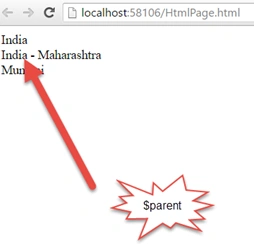
Now, suppose I want a grand parent name in our City Controller, then we will write the following code.
- <div ng-controller="CountryController">
- {{name}}
- <div ng-controller="StateController">
- {{$parent.name}} - {{name}}
- <div ng-controller="CityController">
- {{$parent.$parent.name}} - {{$parent.name}} - {{name}}
- </div>
- </div>
- </div>
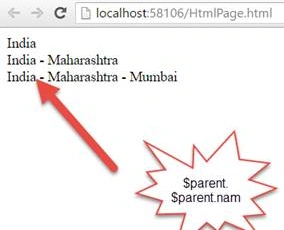
Now, we have only three levels of Controller here. Imagine, if there are 20 levels of Controller Nest, how deep will it be. This will add more confusion. To avoid these and as a good programming practice, we will use "Controller as Syntax". To use "Controller as Syntax" in your script file, get rid of the $scope object and use this keyword. So, let's implement that first.
- /// <reference path="angular.min.js" />
- var app = angular.module("Demo", [])
- .controller("CountryController", function () {
- this.name = "India";
- })
- .controller("StateController", function () {
- this.name = "Maharashtra";
- })
- .controller("CityController", function () {
- this.name = "Mumbai";
- })
- <div ng-controller="CountryController as CountryCtrl">
- {{name}}
- <div ng-controller="StateController as StateCtrl">
- {{$parent.name}} - {{name}}
- <div ng-controller="CityController as CityCtrl ">
- {{$parent.$parent.name}} - {{$parent.name}} - {{name}}
- </div>
- </div>
- </div>
- <div ng-controller="CountryController as CountryCtrl">
- {{CountryCtrl.name}}
- <div ng-controller="StateController as StateCtrl">
- {{CountryCtrl.name}} - {{StateCtrl.name}}
- <div ng-controller="CityController as CityCtrl ">
- {{CountryCtrl.name}} - {{StateCtrl.name}} - {{CityCtrl.name}}
- </div>
- </div>
- </div>
Now, let's save the changes and reload the page. We get the following output.
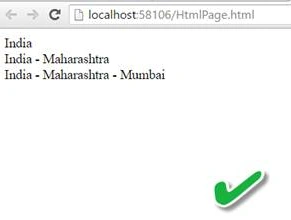
Now, let's see the difference in $scope and "Controller as Syntax".
"Controller as Syntax" is new and it's officially released in 1.2 and above versions. $scope is an old technique that is available since initial versions of AngularJS. You can use either of the two. But, Controller as Syntax makes your code more readable as we have seen earlier in Nested Scopes.
If you want to use $scope, it has to be injected into Controller function. Whereas, for Controller as Syntax, you don’t have a need to inject into Controller function.
NOTE: When you are using Controller as Syntax, don’t be under impression that Angular is not using $scope. Actually, behind Controller as Syntax, it is using $scope. It's just hiding that .
Let's see an example of this.
- <div ng-controller="CountryController as CountryCtrl">
- {{CountryCtrl.name}}
- <div ng-controller="StateController as StateCtrl">
- {{CountryCtrl.name}} - {{StateCtrl.name}}
- <div ng-controller="CityController as CityCtrl ">
- {{CountryCtrl.name}} - {{StateCtrl.name}} - {{CityCtrl.name}}
- </div>
- </div>
- </div>
Conclusion
So, this was all about AngularJS Nested Scopes and Controllers, and difference between $scope and Controller as Syntax . Hope this article was helpful.
riks mohantyPosted Jan 10, 2018, 6:20 AM
Controller as not working as expected
riks mohantyPosted Jan 10, 2018, 6:20 AM
Controller as not working